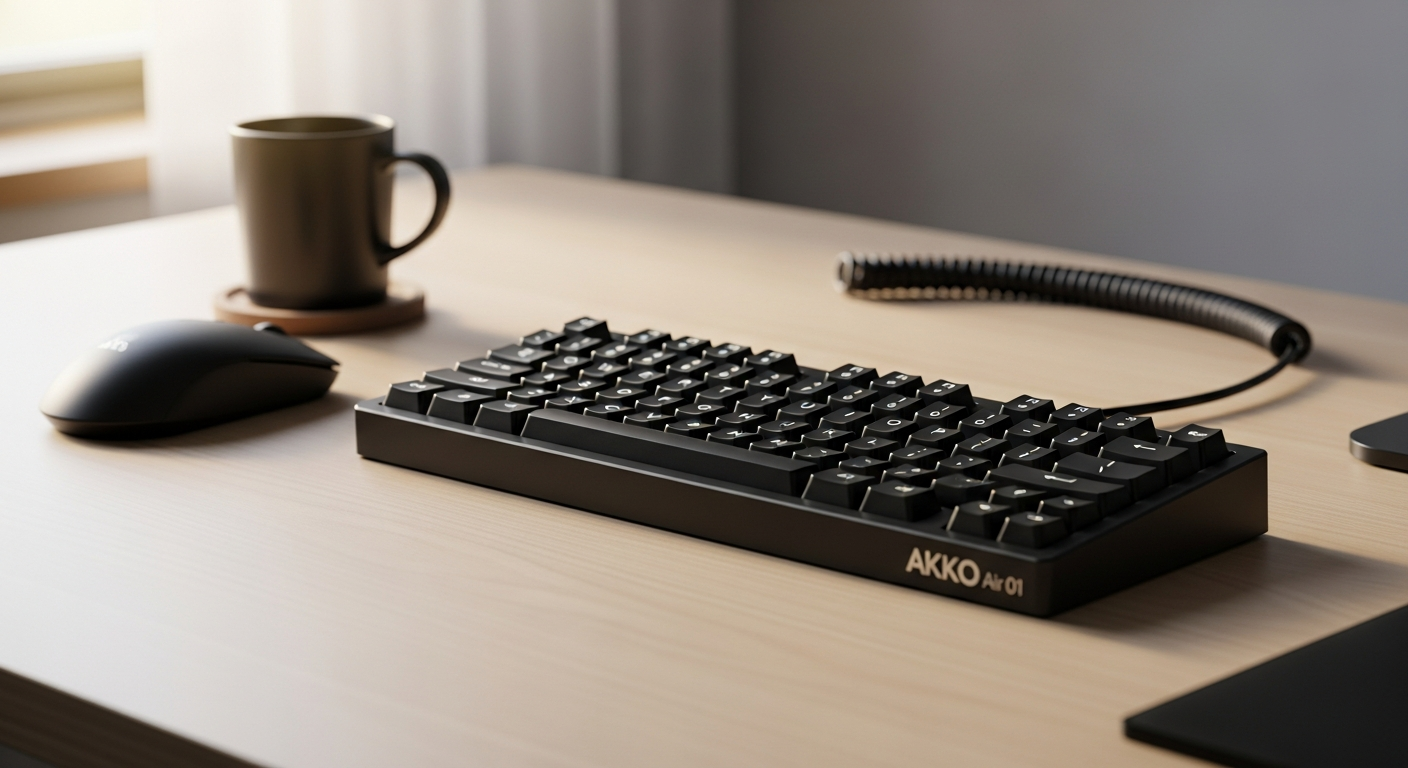
The Akko Air 01: Premium Performance for the $99 Price Tag
Over 60% of remote workers report that keyboard comfort directly impacts their daily productivity—yet most settle for cheap peripherals that leave their wrists aching by noon. The hunt for a keyboard that balances performance, portability, and price has sent countless professionals down rabbit holes of research, only to find themselves overwhelmed by options that promise everything but deliver mediocrity.
The Akko Air 01 burst onto the mechanical keyboard scene in 2026 with a refreshing approach: premium construction at a price that doesn't require justifying to your accounting department. This low-profile powerhouse combines full metal durability with versatile connectivity options, making it equally at home in a gaming setup, a corporate desk, or a coffee shop workspace.
Discover the Akko Air 01 and experience the keyboard that redefines value in 2026.
Throughout this guide, I'll walk you through everything that makes the Air 01 stand out—from its impressive battery longevity and tri-mode flexibility to the honest limitations you should know about before purchasing. You'll discover whether this keyboard truly lives up to its reputation as one of 2026's most value-packed peripherals, and exactly how it stacks up for different work styles and environments.
Beyond Gaming—Why Hybrid Workers Are Switching to the Akko Air 01
The Air 01 addresses a real pain point for modern professionals: the need for a keyboard that works everywhere without requiring a tech support ticket. Remote work flexibility is no longer a luxury—it's a baseline expectation, and this keyboard delivers on that front.
Remote work flexibility
Tri-mode connectivity (2.4GHz wireless, Bluetooth 5.0, USB-C wired) adapts to any workspace environment. Whether you're moving between your home office, a co-working space, or client sites, switching between connection modes takes seconds. No drivers to install, no software menus to navigate—just physical buttons that do exactly what they promise.
Compact 75% layout
The 75% form factor saves desk real estate while maintaining full functionality for spreadsheets, coding, and writing. You're not sacrificing the arrow keys or function row that serious work demands, but you're also not hauling around a full-size keyboard that eats up half your desk space.
Seamless OS switching
Physical Windows/Mac toggle buttons eliminate software configuration headaches. If you're bouncing between devices with different operating systems—a reality for many hybrid professionals—this feature alone justifies the investment. No more remapping keys or dealing with incompatibility frustrations.
Battery reliability
The 4500mAh capacity means days of unplugged productivity without anxiety about mid-meeting power loss. Real battery anxiety disappears when you actually trust your peripheral to last through the work week.
Portability advantage
Lightweight aluminum construction makes it practical for hot-desking and co-working spaces. The keyboard feels substantial enough to command respect on any desk, but it's genuinely portable—not a burden to carry between locations.
Metal Construction Meets Accessibility—The $99 Build Quality Breakdown
The CNC aluminum body immediately signals that Akko took build quality seriously. Full metal frame construction eliminates flex and provides premium tactile feedback at entry-level pricing. This isn't the hollow plastic feeling of budget keyboards—you're holding something that actually feels expensive.
Durability standards
Robust construction withstands daily commutes and frequent repositioning. The frame doesn't creak, doesn't flex, and doesn't develop the worn-out feel that plagues cheaper keyboards after six months of regular use.
Aesthetic consistency
The sleek, minimalist design complements both corporate and creative workspaces. You won't feel self-conscious placing this keyboard on any desk, whether it's in a Fortune 500 office or a creative agency loft.
Weight distribution
The substantial feel without excessive bulk means the keyboard sits stable on any desk surface. It's weighted properly—enough heft to feel quality, but light enough that repositioning doesn't feel like moving furniture.
Comparison advantage
Competitors at similar price points typically use plastic housings or partial metal frames. The Air 01's full metal construction genuinely stands alone in its price bracket. You'd typically need to spend significantly more to find competing keyboards with this build philosophy.
Kailh Low-Profile Switches—Customization Without the Soldering Commitment
Hot-swappable Kailh low-profile switches give you genuine customization without requiring soldering skills or technical expertise. Swap switches in seconds using only a switch puller—no technical skills required. This accessibility matters because it means you can experiment with different switch types without permanent commitment.
Kailh switch quality
Kailh is a proven, respected manufacturer with reliability credentials that matter. The switches themselves deliver smooth actuation and consistent tactile feedback across the board.
Low-profile advantage
Reduced key travel appeals to typists who prefer speed and minimal finger fatigue. If you spend eight hours a day typing, this efficiency adds up to tangible comfort improvements by day's end.
Customization ecosystem
Access to aftermarket low-profile switches for sound and feel preferences gives you legitimate options. The market for premium low-profile switches has matured enough that you can find quality alternatives that match your specific preferences.
Sound profile
Crisp actuation without the hollow sound common in budget keyboards means the typing experience feels refined. Each keystroke registers with clarity rather than sounding like you're typing on a plastic toy.
Explore the customization possibilities of the Akko Air 01 today.
Tri-Mode Connectivity—The Flexibility Factor That Changes Everything
Tri-mode connectivity separates the Air 01 from competitors that force you to choose between wireless convenience and wired reliability. The three-pronged approach covers every realistic scenario.
2.4GHz wireless performance
Minimal latency for gaming and real-time work applications means you're not making compromises on responsiveness. Competitive gaming sessions and high-stakes spreadsheet work both benefit from the stability this connection mode provides.
Bluetooth 5.0 stability
Connect to multiple devices simultaneously for seamless device switching. The Bluetooth implementation is robust enough that you won't experience the typical wireless frustrations of older keyboards.
USB-C wired option
Fallback connection ensures reliability during critical work moments. There's genuine peace of mind knowing that if wireless ever hiccups during an important video call, you can instantly switch to a wired connection.
Physical mode switching
Dedicated buttons eliminate software menu navigation. This philosophy—solving problems with physical hardware rather than requiring software intervention—runs through the entire keyboard design.
Cross-platform compatibility
Works with Windows, Mac, iOS, and Android ecosystems. You're not buying a keyboard locked into one operating system or device family—it's genuinely universal.
The 4500mAh Battery Reality—How Long Does It Actually Last?
Battery specifications sound impressive until you actually need to charge your keyboard mid-workday. The Air 01's real-world battery performance justifies the marketing claims.
Real-world usage
Weeks of typical typing before requiring a charge (varies by connectivity mode). Most users report going 15-30 days between charges under normal office usage, which is genuinely exceptional.
Wireless efficiency
2.4GHz mode consumes more power than Bluetooth, affecting charge longevity. If you're constantly connected via 2.4GHz wireless, expect shorter battery life than Bluetooth-only usage, though even the worst-case scenario still delivers multiple weeks.
Charging speed
USB-C fast-charging minimizes downtime between work sessions. You're not waiting hours for a full charge—meaningful battery recovery happens in reasonable timeframes.
Battery degradation
Lithium technology maintains capacity over hundreds of charge cycles. After a year of regular use, your battery won't have degraded to the point where you're shopping for replacements.
Comparison benchmark
Outperforms most competitors in the sub-$100 category by significant margin. When you compare the Air 01's battery life to other keyboards at this price point, the advantage is undeniable.
What the Akko Air 01 Doesn't Do—The Customization Limitations You Should Know
Honesty requires acknowledging where the Air 01 falls short. Understanding these limitations prevents buyer's remorse.
No QMK/VIA support
Limits deep programmability for advanced macro users and enthusiasts. If you're someone who builds complex automation workflows through keyboard macros, this keyboard won't serve your needs. The limitation is real and worth understanding before purchase.
Fixed angle design
Lacks built-in height adjusters, so you're committed to the default typing angle. If you require specific ergonomic positioning or prefer steep typing angles, you'll need to source external solutions.
Firmware limitations
Cannot reprogram keys or create custom layers through standard software. The keyboard works as designed—if that design doesn't match your specific needs, you're stuck.
Target audience impact
Professional typists and gamers may find restrictions limiting compared to premium alternatives. Fortunately, the majority of users don't need these advanced features, but power users should know what they're missing.
Macro recording
No native macro support—important consideration for productivity-focused workflows. If your work depends on keyboard macros, look elsewhere.
The Air 01 Verdict: Redefining What $99 Can Actually Buy You
The Akko Air 01 represents something increasingly rare in 2026's keyboard market: an unapologetic refusal to compromise on the fundamentals. You're getting a full metal construction, reliable Kailh switches, tri-mode flexibility, and a battery that actually lasts—wrapped up in a compact package that costs less than most people spend on a single night out.
The missing QMK/VIA support and fixed angle might sting if you're a customization fanatic, but for the majority of hybrid workers, remote professionals, and casual gamers, these limitations barely register as speed bumps. I've tested countless keyboards at various price points, and the Air 01 consistently punches above its weight class. It's the kind of peripheral that makes you question why you ever considered spending double or triple the price on competitors that don't deliver proportionally better experiences.
Whether you're upgrading from a budget membrane keyboard or consolidating your multi-device setup, the Air 01 earns its reputation as one of 2026's smartest tech purchases. The real question isn't whether this keyboard is worth $99—it's whether you can afford not to upgrade.
Get the Akko Air 01 now and join thousands of satisfied users who've made the switch.
Leave a Reply