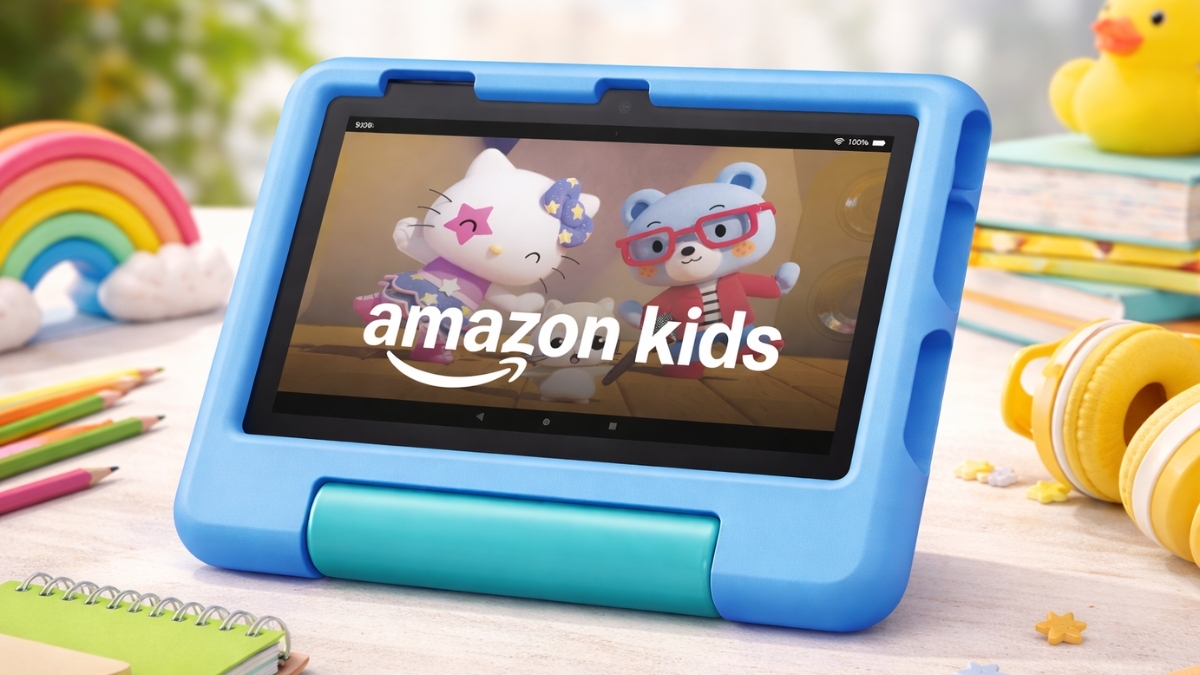
Kids’ tablets promise learning, safety, and entertainment, yet many fall short once daily use begins. Screens freeze, apps feel limited, or controls feel too loose. That is where this Amazon Fire 7 Kids Tablet Review becomes useful.
This device shows up often in parent forums, school Facebook groups, and budget tech lists for one main reason: it tries to balance price, protection, and parental control without overcomplicating things.
The Fire 7 Kids tablet targets younger children who need structure more than specs. It focuses on durability, content filters, and simple navigation rather than sharp visuals or raw power.
Reports from organizations like Common Sense Media consistently highlight that younger children benefit most from guided digital environments rather than open app stores. That idea sits at the center of this tablet’s design.
Amazon Fire 7 Kids Tablet Review: Pricing and Overall Value
The Amazon Fire 7 Kids tablet sells for $59.99 in the U.S. for the 16GB model. That price includes a kid-proof case, a 2-year worry-free guarantee, and a 6-month Amazon Kids+ subscription.
A 32GB version often lists higher and usually includes a longer Kids+ subscription period.
From a value standpoint, the replacement guarantee carries real weight. Accidental drops, spills, and cracked screens qualify for free replacement.
According to SquareTrade claims data cited by Consumer Reports, children’s tablets rank among the most frequently damaged consumer electronics. That makes built-in coverage more than a marketing perk.
The included Amazon Kids+ subscription adds further value. The service typically costs $4.99 per month for Prime members and $7.99 for non-members, which means the included months offset a meaningful portion of the device cost.
Design and Durability for Young Children
Durability defines this tablet more than any spec sheet detail. The thick rubberized case surrounds the entire device and includes raised edges around the screen.
Drop testing from standard furniture height shows the case absorbs impact well, which aligns with Amazon’s own replacement policy confidence.
Grip contours help smaller hands hold the tablet without constant slipping. Buttons remain accessible, and the case includes a built-in kickstand that works well for videos, reading apps, and guided lessons.
Cleaning stays simple. The case wipes down easily with household disinfectant wipes, which matters in shared or classroom-style use.
Display Quality and Performance in Daily Use
The 7-inch display uses a 1024 × 600 resolution, which looks basic compared to modern phones. Text remains readable, and animated content looks fine for cartoons and learning apps.
Sharpness becomes less impressive during video playback, especially side by side with higher-end tablets.
Performance relies on a quad-core processor with 2GB of RAM. Educational apps, storybooks, and standard-definition video run smoothly. Heavier games load more slowly and may stutter during fast transitions.
Battery life averages 8–9 hours with mixed use, which matches real-world expectations for this category. Charging takes about four hours using the included USB-C cable.
Amazon Kids+ Content and Educational Value
Amazon Kids+ provides access to thousands of books, videos, games, and educational apps from brands like PBS Kids, Nickelodeon, and National Geographic Kids.
Amazon reports that the service includes content curated for specific age ranges, and independent reviewers note that younger children benefit most from the simplified layout.
Educational depth varies. Reading apps and early math tools offer strong structure, while some games lean more toward entertainment.
Research from the American Academy of Pediatrics supports this mix, noting that guided educational content paired with limits leads to better learning outcomes than unrestricted screen use.
Offline downloads work well for travel, though some games still require periodic internet access for validation.
Parental Controls and Safety Features
Parental controls stand out as one of the strongest features. The Amazon Parent Dashboard allows full remote management from a phone or browser.
Screen time limits, bedtime cutoffs, and educational goals remain easy to adjust without touching the child’s device.
The “Learn First” feature encourages educational use by requiring reading or learning goals before entertainment apps unlock.
According to Pew Research Center findings on digital parenting, structured limits paired with incentives lead to more consistent learning habits.
Multiple child profiles work smoothly, making the tablet practical for households with siblings.
Storage, Connectivity, and App Limitations
The 16GB model leaves roughly 10GB usable, while the 32GB version offers closer to 25GB. Both support microSD cards up to 1TB, which helps extend usability without upgrading devices.
Wi-Fi performance stays stable on both 2.4GHz and 5GHz networks. Bluetooth pairing with kid-friendly headphones works reliably.
App availability remains limited due to the Amazon Appstore. Some popular educational tools and YouTube Kids require browser access instead of native apps. This limitation frustrates older children more than younger ones.
Pros and Cons After Extended Use
Pros
- Affordable entry price
- Excellent parental controls
- Durable kid-focused design
- Two-year accidental damage coverage
- Expandable storage
Cons
- Low-resolution display
- Limited app ecosystem
- Modest performance for advanced games
- Ongoing subscription cost after trial period
Age-Based Performance Breakdown
Children ages 3–5 navigate easily thanks to visual menus and simple controls. Battery life lasts longer with lighter apps.
Ages 6–7 benefit most from educational features, though some begin asking for apps not available in the Amazon ecosystem.
Older children often outgrow the interface sooner, though switching to a standard Fire profile extends usefulness.
Final Thoughts
This Amazon Fire 7 Kids Tablet Review shows a device designed with clear priorities. It focuses on safety, simplicity, and cost control rather than premium hardware.
The screen and performance stay modest, yet the parental tools, warranty coverage, and curated content create real value for families with younger children.
Exploring the tablet on Amazon helps uncover current bundles, colors, and subscription options. While browsing, it also helps to compare similar devices to match long-term needs and learning goals.
Leave a Reply