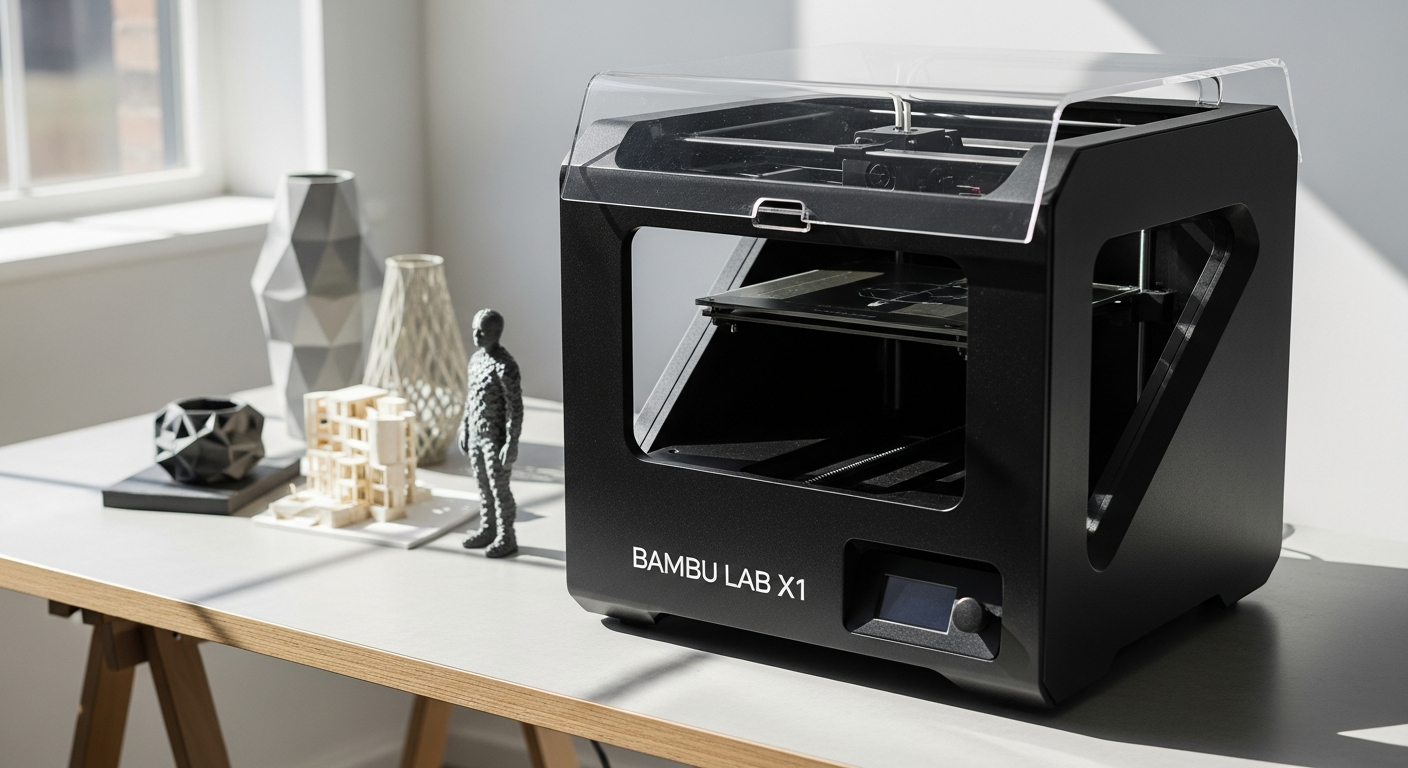
What Makes the Bambu Lab X1 Carbon Stand Out in the 3D Printing Market
Industry Recognition and Market Position
The Bambu Lab X1 Carbon has earned its reputation as the “Apple of 3D printing” through a fundamental commitment to seamless integration and user-centric design. T
his positioning reflects more than marketing savvy—it represents a genuine philosophical approach where complexity disappears behind an intuitive interface.
The printer accomplishes what seemed impossible just years ago: delivering professional-grade results to users without extensive technical backgrounds.
Speed and precision form the foundation of its market disruption. The CoreXY motion system achieves print speeds of up to 500 mm/s with acceleration capabilities reaching 20,000 mm/s².
These numbers translate to tangible benefits: a project that once took 12 hours now completes in 2-3 hours, fundamentally changing how creators approach production timelines.
The “it just works” philosophy resonates across both hobbyist and professional segments. Users consistently report minimal troubleshooting, reliable performance, and predictable results.
This reliability advantage distinguishes the X1 Carbon from traditional desktop printers that often demand calibration adjustments, nozzle cleaning, and careful material handling before yielding acceptable prints.
Advanced Features and Technical Specifications Explained
The CoreXY Motion System
At the heart of the X1 Carbon’s performance lies the CoreXY motion architecture. Unlike traditional Cartesian systems where stepper motors directly drive axes, CoreXY distributes motion across two motors controlling X and Y movement simultaneously.
This design enables the rapid acceleration and smooth, precise movement that characterizes the printer’s operation. The result: print heads that respond instantly to direction changes without overshooting or vibration artifacts.
AI-Powered Intelligence and Lidar Technology
The integrated Lidar system represents a significant leap in automation. Rather than manual first-layer calibration—a notoriously finicky process—the printer’s AI conducts precise height mapping across the entire build plate.
Perfect first-layer adhesion becomes automatic, eliminating one of 3D printing’s most persistent frustrations. Spaghetti detection technology offers another layer of intelligent protection.
This feature monitors print geometry in real-time, identifying when filament fails to extrude properly or when the print separates from the bed. Upon detection, the printer pauses and alerts the user, preventing the creation of tangled filament masses that damage nozzles and waste material.
Build Volume and Specifications
The Bambu Lab X1 Carbon provides a 256x256x256 mm³ build volume—sufficient for most consumer and professional applications.
While this space won’t accommodate massive engineering models, it handles the vast majority of practical projects from functional prototypes to complex artistic pieces.
The 5-inch touchscreen display (720×1280 resolution) provides intuitive access to printer functions. An integrated 1920×1080 camera enables live monitoring and time-lapse recording, allowing users to supervise prints remotely or document creation progress for portfolios.
Connectivity and Integration
The printer supports dual-band Wi-Fi (5G and 2.4G) alongside the proprietary Bambu-Bus system, ensuring stable connections in various environments.
Mobile app integration means users can monitor, adjust, and control prints from anywhere, receiving notifications about print completion, errors, or material changes.
Multi-Material and Multi-Color Printing with the Automatic Material System
Revolutionizing Material Switching
The Automatic Material System (AMS) transforms multi-color and multi-material printing from a technical challenge into a straightforward workflow.
The AMS holds up to four spools simultaneously, with expansion modules enabling support for up to 16 colors in a single print job. Automatic loading and unloading eliminates manual filament swapping between color changes.
Engineering-Grade Material Support
The enclosed build chamber maintains consistent thermal conditions essential for demanding materials. The X1 Carbon successfully prints with:
- Standard filaments (PLA, PETG)
- Engineering polymers (ABS, ASA, PA, PC, PET)
- Reinforced materials (carbon fiber and glass fiber variants)
This material versatility means creators aren’t limited to basic plastics—they can print functional parts with real mechanical properties, suitable for prototyping products that will eventually be injection molded.
Workflow Efficiency and Material Management
Automatic filament tracking prevents color mismatches and material waste. The AMS records remaining spool amounts, predicting when new material is needed.
During color transitions, the printer purges old filament systematically, minimizing waste compared to manual color-change procedures that often squander several meters of material per transition.
Bambu Lab X1 Carbon Pricing and Package Options
Investment Levels
The base X1 Carbon unit starts at $1,199, representing the printer-only configuration. The AMS combo package ranges from $1,449 to $1,749.99, including the Automatic Material System and expanding the printer’s capabilities considerably.
Recent market observations indicate prices fluctuating based on regional availability and promotional periods, with some configurations reaching $1,499 for the printer alone and $1,749.99 for complete AMS bundles.
Value Proposition Analysis
Comparing the X1 Carbon to competing premium 3D printers reveals compelling economics. Machines offering comparable speed and feature sets typically cost $2,000-$3,000+.
The X1 Carbon delivers professional-grade performance at a price point that attracts both individual creators and small businesses scaling operations.
Long-Term Cost Considerations
Initial purchase represents only part of ownership costs. Budget planning should account for filament expenses (varying by material type and quality), occasional replacement parts, and electricity consumption.
AMS ownership increases material expenses slightly but typically recoups costs through reduced filament waste and improved project success rates.
Comprehensive Pros: Why the X1 Carbon Dominates the Market
Speed and Quality Balance
The X1 Carbon maintains exceptional print quality while operating at velocities that would typically compromise surface finish on competing printers.
This speed-quality balance emerges from precise motion control, optimal acceleration profiles, and validated material temperature settings. Users consistently report dimensional accuracy and surface finishes rivaling much slower machines.
User Experience Excellence
The onboarding process feels deliberately simplified. New users receive clear guidance through initial setup, and the software presents only essential controls initially, with advanced parameters available for those seeking deeper optimization.
This tiered complexity approach serves everyone from complete novices to experienced engineers.
Reliability Metrics
Failed prints represent one of 3D printing’s greatest frustrations. The X1 Carbon’s combination of Lidar calibration, spaghetti detection, and firmware stability translates to substantially higher success rates than typical desktop printers. Users report that many prints complete unattended without intervention.
Robust Software Ecosystem
Bambu Studio, the integrated slicer, handles the critical translation from 3D models to printer instructions. The software includes validated profiles for hundreds of material and printer combinations, reducing the experimentation cycles required on other platforms.
The mobile app extends functionality beyond the printer itself, enabling monitoring and basic adjustments from phones or tablets.
Material Versatility
The thermal stability provided by the enclosed chamber means users can tackle advanced materials without external heating chambers or tent enclosures.
This accessibility to engineering-grade plastics appeals to professionals prototyping products that will eventually transition to injection molding.
Community and Documentation
The active user community provides extensive resources, troubleshooting guides, and optimized material profiles.
Official documentation covers both basic and advanced topics, and community forums offer responsive support from experienced users who’ve encountered and solved similar problems.
Important Limitations: Understanding the X1 Carbon’s Drawbacks
Proprietary Ecosystem Constraints
The X1 Carbon utilizes proprietary parts and closed-source firmware, limiting customization options that appeal to enthusiasts and makers accustomed to open-source platforms.
Replacement components must come from Bambu Lab or authorized suppliers, reducing repair flexibility compared to printers using standardized components.
Filament Waste During Color Changes
While the AMS system elegantly handles color switching, the process necessarily purges remaining filament from the nozzle before loading new material.
This purge waste accumulates across large multi-color print jobs, representing a cost consideration for high-volume production.
Premium Pricing Entry Point
The X1 Carbon demands significant investment compared to entry-level models priced at $300-$600. For hobbyists testing whether 3D printing fits their workflow, this cost barrier may prove prohibitive despite the superior performance and reliability.
Build Volume Limitations
The 256x256x256 mm³ space handles most projects but cannot accommodate larger engineering models or architectural pieces requiring bigger dimensions. Users needing larger build volumes must look at professional industrial systems commanding substantially higher prices.
Ecosystem Dependency
Optimization assumes users leverage Bambu Lab’s software, mobile app, and accessory ecosystem. Those preferring third-party slicers or alternatives workflows may lose some functionality or convenience.
Bambu Lab Studio Software and Ecosystem Integration
Slicer Capabilities and Optimization
Bambu Studio translates 3D models into machine instructions through an interface balancing simplicity with advanced control.
The software includes pre-validated profiles for different materials and quality targets, allowing users to make informed decisions without memorizing complex parameter relationships. Advanced users access detailed temperature, speed, and extrusion controls for custom optimization.
Mobile App and Remote Monitoring
The companion mobile application extends the printer’s functionality beyond the build chamber. Real-time camera feeds allow monitoring from any location, while push notifications alert users to print completion, errors, or material changes.
Users can pause, resume, or stop prints remotely, providing practical safety and peace-of-mind capabilities.
Cloud Connectivity and File Management
Cloud-connected workflows enable uploading models from design software directly to printing queues.
Print history synchronizes across devices, and users can maintain organized project libraries accessible from any interface.
Community Resources and Profiles
Bambu Lab maintains a repository of community-contributed material profiles and print settings. These profiles represent collective experience with specific filament brands and models, often revealing optimizations that individual users might take months to discover independently.
Real-World Performance: Speed, Quality, and Reliability
Translating Specifications to Practical Output
The 500 mm/s specification translates to tangible timeline reductions. A complex miniature terrain model requiring 12 hours on comparable equipment completes in 2-3 hours on the X1 Carbon.
For professionals billing time-based services or hobbyists juggling multiple projects, this speed advantage compounds significantly.
Dimensional Accuracy and Surface Finish
Users report consistent dimensional tolerance within ±0.2-0.3 mm across print volumes, suitable for functional prototypes and mechanical components. Surface finish quality rivals machines requiring post-processing smoothing, particularly when printing with optimized profiles for specific materials.
Spaghetti Detection Effectiveness
The intelligent failure detection prevents catastrophic print failures that would otherwise consume hours and significant filament quantities. Real-world testing shows the system reliably identifies nozzle clogs, bed adhesion loss, and geometric printing failures within minutes of occurrence.
Material Performance Across Ranges
Performance testing across ABS, ASA, PA, PC, PET, and reinforced polymers confirms consistent quality. The enclosed chamber maintains stable thermal conditions that these advanced materials require, enabling successful prints that would fail on open-frame printers.
Long-Term Reliability and Durability
Extended user reports spanning over a year of continuous operation demonstrate sustained reliability. Mechanical components show minimal wear, and firmware updates continuously enhance functionality without introducing stability regressions.
Who Should Choose the Bambu Lab X1 Carbon?
Professional Applications
Product designers and engineers benefit immediately from rapid iteration cycles. Prototyping complex mechanical components becomes faster and more frequent, accelerating development timelines.
The ability to test multiple design iterations before expensive manufacturing represents significant value.
Creative Makers and Hobbyists
Creators seeking professional results without intensive technical learning find the X1 Carbon removes barriers to advanced output. Artists, costume makers, and DIY enthusiasts can focus on creative vision rather than troubleshooting printer behavior.
Small Business Scaling
Entrepreneurs producing physical goods discover the X1 Carbon’s reliability enables small-scale manufacturing without the capital investment required for injection molding. Multi-color capability supports branded products and custom variations without extensive retooling.
Educational Institutions
Schools and university programs benefit from a printer that doesn’t consume classroom time with troubleshooting and recalibration. The intuitive interface accommodates students with varying technical backgrounds, while the performance supports curriculum projects at professional levels.
Multi-Material Project Creators
The AMS system particularly appeals to creators working with complex color and material combinations. Jewelry designers, miniature creators, and artistic technologists find unprecedented material versatility.
Time-Sensitive Applications
When project deadlines matter, the X1 Carbon’s speed directly translates to competitive advantage. Designers producing pitch models for clients, or creators working on time-limited collaborations, benefit from compressed production timelines.
Bambu Lab X1 Carbon vs. Competing Premium 3D Printers
Speed Advantages in Practice
Traditional FDM competitors typically max out at 150-250 mm/s, making the X1 Carbon’s 500 mm/s capability genuinely differentiated. This isn’t marginal improvement—it represents a fundamental speed advantage that rivals some commercial industrial systems.
Feature Comparison Framework
Multi-color capability appears on few competing consumer machines. Most competitors require either manual filament changing or proprietary multi-head systems costing thousands more. The AMS approach balances functionality with reasonable cost.
Price-to-Performance Economics
Competing machines offering comparable speed and features (Ultimaker S5, Formlabs Form 3, Raise3D Pro2) cost $3,000-$5,000+. The X1 Carbon delivers comparable performance at 40-50% of these price points.
Software Ecosystem Strength
Bambu Studio rivals or exceeds dedicated slicing software from competitors in user experience while integrating seamlessly with the printer. Competitor machines often require third-party slicer software, fragmenting workflows.
Reliability Metrics and Support
User satisfaction surveys consistently rank the X1 Carbon at or above competing premium machines. The combination of intelligent failure detection and thermal stability contributes to reliability metrics matching much more expensive industrial systems.
Customization and Open-Source Considerations
Open-source printer platforms offer flexibility that appeals to technical enthusiasts. The X1 Carbon’s proprietary approach sacrifices this customization capability but gains streamlined optimization and integrated support.
Getting Started: Setup, Calibration, and First Prints
Initial Setup Process
Unboxing the Bambu Lab X1 Carbon reveals a well-organized component layout with clear assembly instructions. Assembly takes 30-45 minutes for someone with basic mechanical ability.
Most mechanical connections use standardized fasteners, and the documentation guides users through each step logically.
Lidar-Assisted First-Layer Calibration
Rather than manual nozzle height adjustment, the Lidar system automatically maps the build plate surface and compensates for minor irregularities.
Users initiate calibration through the touchscreen interface, and the process completes in minutes. This automation eliminates the most frustrating aspect of traditional printer setup.
Software Installation and Configuration
Bambu Studio installation follows standard software processes across Windows, macOS, and Linux.
The setup wizard guides network configuration and printer registration, establishing the connection between slicer and hardware. Mobile app installation similarly handles Wi-Fi connection setup through straightforward dialogs.
AMS System Initialization
For users including the AMS, filament loading follows visual guides on the touchscreen. The system detects material type when possible and configures settings accordingly. The learning curve for AMS operation extends only a few minutes beyond basic printer familiarization.
Recommended Initial Projects
First prints should be simple test models rather than ambitious creations. Basic calibration cubes, simple organizational boxes, or uncomplicated figurines serve as excellent learning projects. These tests reveal print quality without investing significant time or material in complex models.
Common Troubleshooting Approaches
Print adhesion issues typically resolve through Lidar recalibration. Extrusion inconsistencies often respond to nozzle temperature adjustments within Bambu Studio’s interface.
Most problems users encounter have straightforward solutions documented in official resources or community forums.
Maintenance, Upgrades, and Long-Term Ownership
Regular Maintenance Schedule
Monthly maintenance includes nozzle cleaning using the printer’s built-in cleaning cycle and visual inspection of mechanical components for accumulated dust.
Quarterly routines involve more thorough cleaning of cooling fans and thermal sensors. Annual maintenance includes replacing nozzle wear components and inspecting mechanical bearings.
Replacement Parts Availability
Bambu Lab supplies official replacement components including nozzles, build plate surfaces, thermal blocks, and motion system components. Prices remain reasonable, typically $10-$50 per component.
Third-party suppliers increasingly offer compatible parts, though official components ensure guaranteed compatibility.
Firmware Update Process
Automatic firmware updates deliver incremental improvements and new features. Users can enable automatic updates or manually trigger them through the touchscreen interface. Updates typically complete in 5-10 minutes without disrupting existing printer functionality.
The Bottom Line: Is the Bambu Lab X1 Carbon Worth Your Investment?
The Bambu Lab X1 Carbon represents a genuine leap forward in consumer 3D printing technology. Its combination of exceptional speed, intelligent features, and user-friendly design creates a machine that simply works—without requiring you to become an expert to achieve professional results.
If you’re serious about 3D printing and value reliability, speed, and quality, the X1 Carbon delivers on all fronts. Yes, it commands a premium price, and yes, its proprietary design limits some customization options.
These trade-offs, however, are offset by consistent performance, multi-color capability, and an ecosystem that genuinely enhances your creative workflow.
For hobbyists exploring advanced printing, professionals managing production timelines, or businesses scaling operations, the X1 Carbon stands as the benchmark machine that others aspire to match.
The investment pays dividends through reduced failed prints, faster project completion, and the confidence that your ideas will translate accurately from screen to physical reality.
Ready to experience next-generation 3D printing? The Bambu Lab X1 Carbon awaits—and it might just transform how you approach making.
Leave a Reply