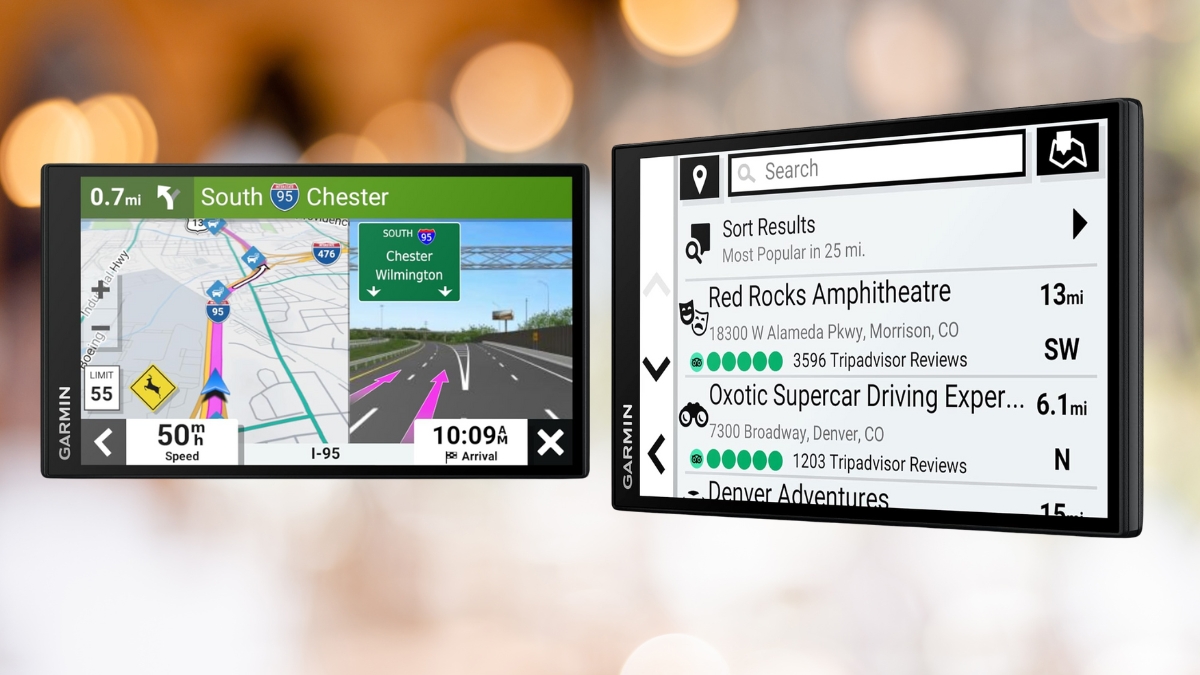
Getting lost is frustrating. Having spotty cell service while relying on phone navigation can turn any drive into a headache. That’s where a reliable GPS device comes in—and the Garmin DriveSmart 71 proves why dedicated GPS units are still worth it in 2025.
This 7-inch GPS offers a sharp display, real-time traffic updates, and smooth voice controls. It performs consistently, even in areas where mobile data fails. Plus, it comes loaded with features that actually make driving easier.
Let’s take a closer look at what makes this dashboard GPS one of the better tools to have in your car.
Garmin DriveSmart 71: Smart Navigation with a Clean Display
The Garmin DriveSmart 71 has a large 7-inch touchscreen with a resolution of 1024 x 600 pixels. That means high-resolution maps appear crisp and easy to read.
Even in bright sunlight, the screen stays clear. The touch response is quick and accurate too, so you won’t need to tap around multiple times.
It measures 6.8 inches wide, 3.9 inches tall, and less than an inch thick. At just under 8.5 ounces, it doesn’t weigh down your dashboard. The included mount holds it securely, even on rougher roads.
This car GPS navigator was designed with a simple, distraction-free interface. It loads fast and responds well when entering addresses or changing routes on the fly.
GPS Navigation System That Keeps You Moving
Coverage includes the US, Canada, Mexico, and Puerto Rico. The GPS navigation system comes with free lifetime map updates. No cables needed—just connect to Wi-Fi and download the newest maps straight to the device.
Live traffic updates help avoid delays. If there’s a slowdown ahead, the system recommends other routes automatically. These changes usually happen fast and help avoid sitting in traffic unnecessarily.
The built-in Garmin voice assist lets you speak commands like “OK Garmin” and follow with your destination. This keeps your hands on the wheel and your focus on the road.
More Than Directions: Features That Support Safer Driving
Bluetooth lets you pair your phone for hands-free calls. You can also use the Garmin Drive app to see texts and notifications on the GPS screen.
Helpful driver alerts pop up when needed. It warns about school zones, sharp curves, speed changes, and cameras. These reminders help keep you aware, especially in new places.
It also supports Garmin’s BC 30 and BC 40 backup cameras. That means the screen can double as a rearview display. It adds another layer of safety without needing more hardware.
You’ll get about an hour of battery use without plugging in. It’s mainly made for car use, but can come in handy when walking from the parking spot to a final location.
Fast, Reliable, and Works Without Cell Signal
Startup is quick. GPS locks onto your location in seconds. Routes calculate fast too, giving multiple options like avoiding tolls or highways.
If you make a wrong turn, rerouting happens with minimal delay. That speed is especially helpful when driving in cities.
One major benefit of using this over your phone is that maps are stored on the device. So even if you lose mobile signal, you still get full directions with no issues.
Voice directions are clear, with helpful timing before turns and exits. Street names are usually pronounced well, though rare street names may come out a bit strange.
Why the Garmin DriveSmart 71 Is Still Worth It
At $268.99, the Garmin DriveSmart 71 sits in the middle of the price range for GPS units. But it includes everything you need to start using it right away: the GPS device, a mount, USB cable, power adapter, and setup guide.
With a 4.4-star rating and hundreds of units sold recently, users clearly find it dependable.
Here’s why drivers are picking this up:
- Free lifetime traffic and map updates
- Large, easy-to-read screen
- No phone battery drain on long trips
- Still works without mobile signal
- No interruptions from texts or calls
Some users have pointed out that voice commands can lag in noisy environments. And while most areas are well-covered, very rural spots may lack some point-of-interest data.
Still, these issues are minor compared to the consistent performance.
A GPS That Does the Job Right
If staying on track without distractions matters, the Garmin DriveSmart 71 is worth checking out. It doesn’t need a phone connection, it responds quickly, and it makes every route clearer with smart features.
You can find it on Amazon for around $268.99. That might seem like a chunk up front, but it pays off in saved time, less stress, and reliable help on every drive.
So if driving directions tend to lead you in circles, this GPS could be the one that finally points you in the right direction.
Leave a Reply