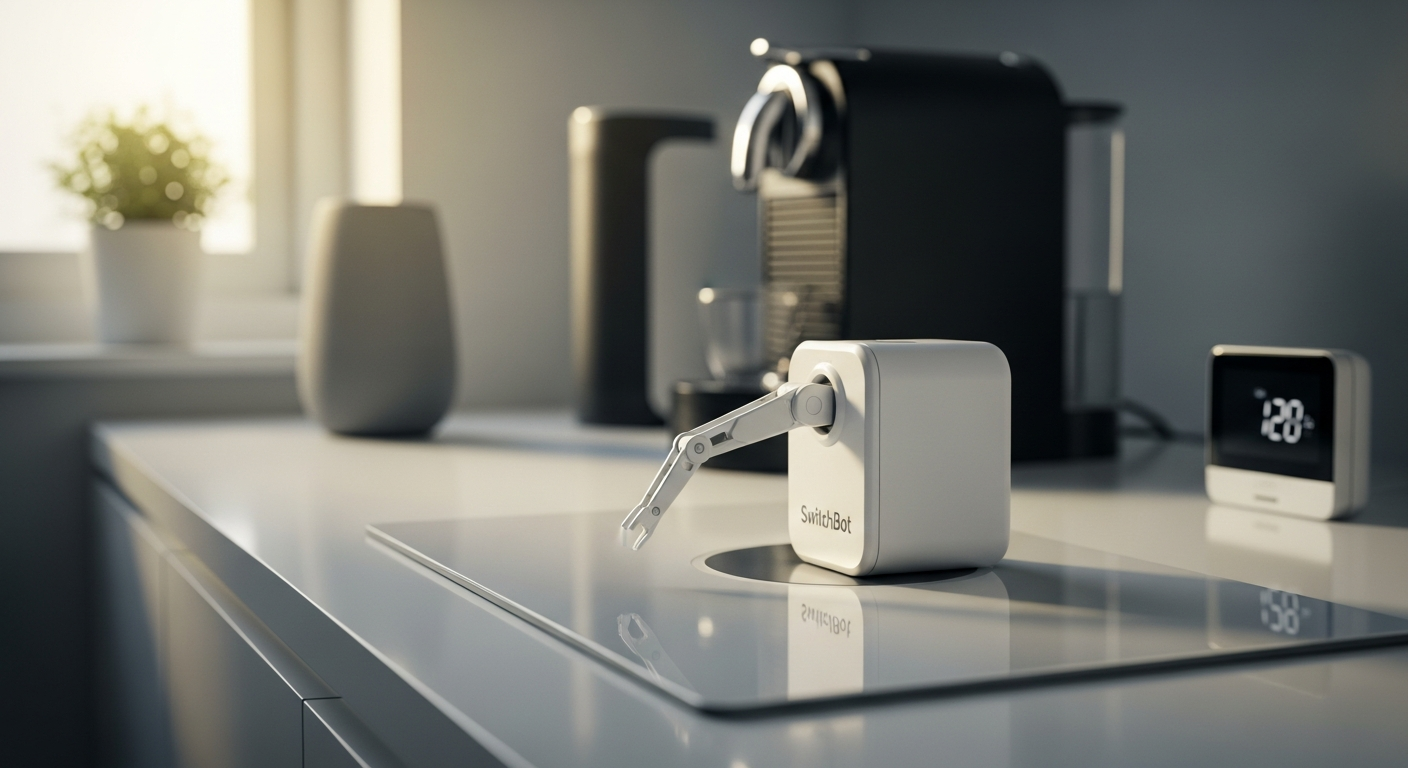
Over 60% of households own at least one dumb appliance they wish was smart—yet the thought of replacing it entirely feels wasteful and expensive. What if there's a matchbox-sized robot that can press buttons for you, turning your coffee maker, fan, or light switches into voice-controlled devices? The SwitchBot Bot challenges everything we assumed about smart home upgrades.
The SwitchBot Bot represents a paradigm shift in home automation philosophy. Rather than forcing you to replace perfectly functional appliances with expensive smart alternatives, this innovative device physically actuates existing buttons and switches. It's the embodiment of the upgrade-not-replace movement—a philosophy that makes smart home technology accessible to renters, budget-conscious homeowners, and anyone skeptical of throwing away working equipment.
Explore the SwitchBot Bot today and transform your dumb appliances into smart ones.
Real-World Applications Beyond Basic Light Switches
The SwitchBot Bot's versatility extends far beyond the obvious. Coffee makers and espresso machines become programmable—imagine waking to freshly brewed coffee without lifting a finger. Bathroom exhaust fans and ventilation systems can run on schedules, improving air quality automatically. Garage door openers and gate controls gain remote accessibility, while printer power buttons and office equipment transform into smart-managed devices.
Humidifiers and dehumidifiers respond to schedules you set. Washing machines and dryers get rudimentary automation (though you'll still need to transfer clothes manually). Computer power buttons become schedulable, letting you turn workstations on or off remotely. Air purifiers, space heaters, televisions, and entertainment systems all become controllable through a single app.
Even niche applications work: refrigerator ice dispenser buttons, outdoor water fountains, pool pump switches, microwave buttons, and oven controls all respond to the Bot's mechanical actuation. The device excels wherever a physical button or rocker switch exists.
Installation and Placement Strategy for Maximum Reliability
Success with the SwitchBot Bot hinges on proper placement. The adhesive strip attachment requires clean, flat surfaces—glass, plastic, and metal work best. Surface preparation is critical: wipe the area with a dry cloth to remove dust and oils that could compromise adhesion.
Positioning determines functionality. The Bot's arm must align precisely with your target button or switch. For rocker switches, the angle matters significantly. Test different positions before committing the adhesive strip permanently. The distance between the Bot's arm and the target button affects both reach and pressure application.
Curved or textured surfaces spell trouble—the adhesive won't hold reliably, and arm positioning becomes unpredictable. Outdoor placement requires weatherproofing consideration; while the device functions outside, direct rain exposure shortens its lifespan.
Arm angle adjustment handles different button depths and resistance levels. Some buttons sit flush; others protrude. The Bot accommodates this variation through mechanical adjustment. Before permanent installation, test the pressure settings. Gentle button presses require minimal force adjustment, while stiffer switches demand more aggressive positioning.
Removing and repositioning the Bot without damaging the device or surface is straightforward—simply peel away the adhesive strip. This reversibility appeals especially to renters who can't modify their spaces permanently. The Bot's compatibility with various button sizes and switch configurations makes it adaptable to almost any household device.
Connectivity Options: Bluetooth vs. Hub-Enabled Control
Direct Bluetooth control through the SwitchBot app offers the simplest setup. Typical Bluetooth range spans 30-50 feet, sufficient for most homes when you're present. Smartphone notifications and scheduling features work seamlessly via Bluetooth alone, letting you automate devices on time-based routines without additional hardware.
However, remote access—controlling your devices from outside the home—requires the SwitchBot Hub. This separate purchase ($49.99-$59.99) bridges the gap between local Bluetooth control and cloud-based remote access. With the Hub, Wi-Fi connectivity becomes available, enabling control from anywhere globally.
Voice assistant integration depends on the Hub. Amazon Alexa, Google Assistant, and Apple HomeKit all connect through the Hub, not directly through the Bot. IFTTT automation for cross-platform workflows also necessitates Hub integration. This architecture means budget-conscious users can start with just the Bot and Bluetooth, upgrading to the Hub later if voice control becomes important.
The Bot operates on Bluetooth 4.2 or higher and maintains compatibility with Android 4.3+, iOS 10.0+, and watchOS 1.0+. Latency and response times vary by control method. Direct Bluetooth offers nearly instantaneous response, while remote Hub-based control introduces slight delays as commands travel through the cloud.
Multi-device control scenarios work smoothly. The SwitchBot app interface handles multiple Bots intuitively, grouping them by room or function. Creating scenes that activate multiple devices simultaneously becomes practical for complex automation routines.
Battery Life and Long-Term Maintenance Expectations
The SwitchBot Bot runs on a single CR2 3V battery—a readily available, inexpensive power source. Battery life reaches approximately 600 days or up to two years under typical usage, an impressive specification that minimizes ongoing maintenance.
Actual battery drain depends on frequency of use, operating mode (pushing versus pulling), and ambient temperature. Heavy users might see battery exhaustion sooner, while those using the Bot sparingly could approach the two-year mark. The SwitchBot app monitors battery status, sending alerts before depletion occurs.
Replacement is trivial. When the battery dies, simply open the device's battery compartment and swap in a fresh CR2. Sourcing replacement batteries costs just a few dollars, making maintenance remarkably affordable. Seasonal usage patterns affect battery performance—cold climates may see slightly faster drain, though temperature effects remain minimal.
No wiring, electrical work, or professional installation means the Bot generates zero ongoing maintenance costs beyond occasional battery replacement. Durability remains solid for both indoor and outdoor placements, though outdoor exposure to elements does gradually affect longevity.
Start your smart home journey with the SwitchBot Bot at an unbeatable price point.
Cost Breakdown: Is the SwitchBot Bot Actually Affordable?
At $29.99-$30 per device, the Bot undercuts virtually every smart appliance alternative. Replacing a "dumb" coffee maker with a smart model costs $100-300+. A smart fan or light switch runs $50-150. The Bot handles multiple devices for a fraction of that investment.
Multi-pack pricing improves value further. Purchasing three or four Bots simultaneously yields modest per-unit discounts, making ecosystem building more economical. Color options (white versus black) typically maintain consistent pricing.
The SwitchBot Hub ($49.99-$59.99) represents the significant secondary cost. For households wanting remote and voice control, this becomes essential. The Hub handles Wi-Fi connectivity and voice assistant integration, justifying its expense for most users.
Calculate total investment scenarios realistically. A basic setup—one Bot for a coffee maker—costs $30. A comprehensive smart home scenario—four Bots for various devices plus one Hub—totals around $180-190. Compare this to replacing four appliances with smart alternatives (which would cost $400-600+), and the value proposition becomes strikingly clear.
Hidden costs remain minimal. Adhesive strips occasionally require replacement if repositioning happens frequently, costing pennies. Battery replacement occurs only every 1-2 years at minimal expense. The Bot doesn't demand proprietary accessories or subscription services.
Smart plug alternatives—another budget option—cannot press physical buttons, limiting their usefulness. They only cut power to devices, lacking the Bot's nuanced control. For appliances without separate power switches (coffee makers, for instance), smart plugs fail entirely.
Renters gain particular value. Unable to modify electrical systems or install permanent smart devices, renters can automate multiple appliances without landlord approval. The non-invasive, removable nature eliminates lease-violation concerns while delivering genuine smart home functionality.
Limitations and Honest Drawbacks to Consider Before Buying
The Bot cannot control dimmer switches, touchscreen panels, or digital displays. These require sophisticated control beyond mechanical button pressing. If your appliances rely on touchscreen interfaces, the Bot won't help.
Physical bulkiness presents aesthetic considerations. The matchbox-sized device, while compact, becomes visible on whatever surface it occupies. Attaching it to a premium kitchen appliance or bedside table might clash with your décor. Some users accept this trade-off; others find it visually jarring.
The two-pound force limitation excludes very stiff or heavy switches. Commercial-grade buttons or switches designed for industrial use may resist the Bot's actuating arm. Testing on your specific devices before purchase prevents disappointment.
Trial-and-error setup plagues rocker switch positioning. Unlike simple push-buttons, rocker switches demand precise angle alignment for reliable operation. Expect to adjust and test multiple times before achieving consistent results.
Bluetooth range restrictions frustrate users without the Hub. The 30-50 foot range covers most homes, but thick walls or long distances eliminate signal. Hub purchase becomes mandatory for remote control, adding $50+ to your investment.
Buttons requiring precise pressure present reliability challenges. Some devices need light, controlled presses that the Bot's mechanical arm struggles to deliver consistently. Buttons with springs that require specific deactivation pressure sometimes resist the Bot's fixed-force approach.
Recessed or protected buttons defeat the Bot—the arm cannot reach into protected button wells or access buttons behind protective covers. Non-standard button designs occasionally confuse the device, requiring creative repositioning or workarounds.
Response time lags compared to native smart devices become apparent in comparative use. A smart light responds instantly to voice commands; a Bot-controlled light via Alexa introduces slight delays. For most purposes this matters little, but automation purists notice.
Dependency on smartphone battery and app functionality creates single-point-failure scenarios. If your phone dies or the app crashes, manual control becomes necessary. The Bot lacks a physical backup interface.
Setting Schedules and Automation Workflows That Actually Work
The SwitchBot app excels at creating automation routines. Recurring daily, weekly, and monthly patterns establish through an intuitive interface. Setting your coffee maker to activate at 6:30 AM every weekday takes minutes.
Fan operation can follow temperature or time-based patterns. Schedule maximum fan speed during afternoon hours when temperatures peak, or coordinate activation with your home's occupancy patterns. Automating fans reduces energy waste while maintaining comfort.
Combining multiple Bots enables coordinated multi-device automation. Morning scenes might activate your coffee maker, turn on bedroom lights, and start your shower's exhaust fan simultaneously. Evening scenes could power down entertainment systems and activate security devices.
Scene creation—bundling multiple device actions—simplifies complex workflows. Rather than executing individual commands, one scene tap handles everything needed for a scenario. "Leaving Home" might shut down coffee makers, turn off fans, and disable certain devices simultaneously.
Conditional triggers through IFTTT add sophistication. Trigger your humidifier based on weather forecasts—if humidity drops below 40%, activate the device. Connect outdoor temperature sensors to adjust heating or cooling equipment. These conditional workflows eliminate manual oversight.
Delay and timing adjustments between sequential button presses handle devices requiring setup sequences. Some appliances demand pressing buttons in specific orders with pauses between presses. The Bot accommodates these multi-step workflows through scheduled delays.
Backup manual controls remain essential. Automation occasionally fails—apps crash, connectivity drops, or unexpected situations arise. The ability to manually press buttons directly on appliances provides reliable fallback control.
Testing automation sequences before full deployment prevents frustration. Run your morning routine script once manually, observing each action's execution. Adjust timing if devices operate out of sequence or experience delays.
Troubleshooting missed or delayed scheduled actions requires checking several factors: Hub connectivity, smartphone battery percentage, app notification permissions, and device proximity. Most issues trace to connectivity problems rather than Bot malfunction.
Comparing SwitchBot Bot to Alternative Automation Solutions
Smart plugs represent the most common alternative, but they possess fundamental limitations. They can only disconnect power, not control functions within appliances. A smart plug cannot brew coffee or adjust fan speed—it can only prevent the appliance from receiving power entirely.
Full smart appliance replacement offers native control but demands significant investment. Replacing five non-smart devices with smart alternatives costs $400-800+. The Bot accomplishes similar automation for $150-180 total.
Relay switches and professional automation solutions deliver superior control but require electrician installation, running $500-2000+ depending on complexity. They're overkill for most households and impossible for renters.
DIY Arduino and Raspberry Pi solutions appeal to tech enthusiasts with time and skills. These approaches offer maximum customization but demand programming knowledge and ongoing maintenance. The SwitchBot Bot prioritizes plug-and-play convenience over technical flexibility.
Other smart home hubs—Samsung SmartThings, Hubitat, Apple Home—offer broader ecosystem integration but don't address the core problem: controlling non-smart devices. The Bot specifically solves this gap, making it complementary rather than competitive.
Integration capabilities matter significantly. The SwitchBot Bot works across multiple ecosystems: Alexa, Google Assistant, Apple HomeKit, and IFTTT. This flexibility prevents vendor lock-in and accommodates households using multiple platforms.
User experience and learning curve differ substantially. The Bot requires zero technical knowledge—literally anyone can attach it and schedule basic automation. Other solutions demand more technical sophistication, deterring casual users.
Scalability and expandability work smoothly with the Bot. Adding a sixth or tenth device costs just $30 per unit and requires no additional wiring, configuration, or professional help. The system scales elegantly with your needs.
Long-term support matters. SwitchBot maintains active development and firmware updates. As your smart home ecosystem evolves, the Bot adapts through software improvements rather than obsolescence.
The Verdict: Who Should Buy the SwitchBot Bot in 2026
Renters represent the ideal audience. Lease restrictions prevent permanent modifications, making the Bot's non-invasive approach invaluable. Create sophisticated automation without landlord concerns or security deposit losses.
Budget-conscious homeowners maximize existing appliance lifespan rather than surrendering to constant replacement cycles. The Bot economically extends the useful life of devices that function perfectly but lack smart features.
Tech enthusiasts building comprehensive automation ecosystems find the Bot an affordable, versatile component. It fills gaps that existing smart devices cannot address, enhancing overall system capabilities.
Elderly or mobility-limited users benefit tremendously from remote device control. Activating fans, lights, or other appliances without physical exertion improves quality of life and promotes independence.
Apartment dwellers with strict lease restrictions face the same constraints as renters. The Bot delivers smart home benefits within lease-compliant boundaries.
Sustainability-focused individuals resist the disposable consumer electronics culture. Rather than replacing working appliances, the Bot extends their useful life, reducing electronic waste and resource consumption.
Small business owners automating office equipment discover practical applications. Schedule printers to power down after hours or automate ventilation systems based on occupancy patterns.
Users with specific appliances lacking native smart capabilities find targeted solutions. That vintage but reliable coffee maker finally enters the smart home era without replacement.
Anyone hesitant about complex electrical work or professional installation discovers a zero-barrier automation option. No tools, no permits, no contractors—just attach and schedule.
Households seeking gradual smart home adoption without major investment adopt the Bot as an entry point. Experience home automation benefits at minimal risk, then expand gradually as comfort increases.
The Smart Home Revolution Starts Small
The SwitchBot Bot proves that upgrading your home doesn't mean replacing it. This tiny device transforms how people interact with their spaces—from the busy parent scheduling coffee before sunrise to the apartment dweller finally automating their exhaust fan without landlord drama. It's affordable, it's genuinely useful, and it respects your existing investments in appliances and fixtures.
That said, approach with realistic expectations. This isn't a magic wand for every device, and you'll likely need the Hub if remote control and voice integration matter to you. But for roughly the price of a decent dinner, the SwitchBot Bot delivers remarkable convenience and flexibility.
Whether you're a smart home novice or a seasoned automation enthusiast, this device deserves serious consideration. The future of home automation isn't about throwing everything out and starting over. Sometimes, it's simply about adding a tiny robot to press the buttons you can't reach.
Get your SwitchBot Bot now and experience the upgrade-not-replace revolution.
Leave a Reply