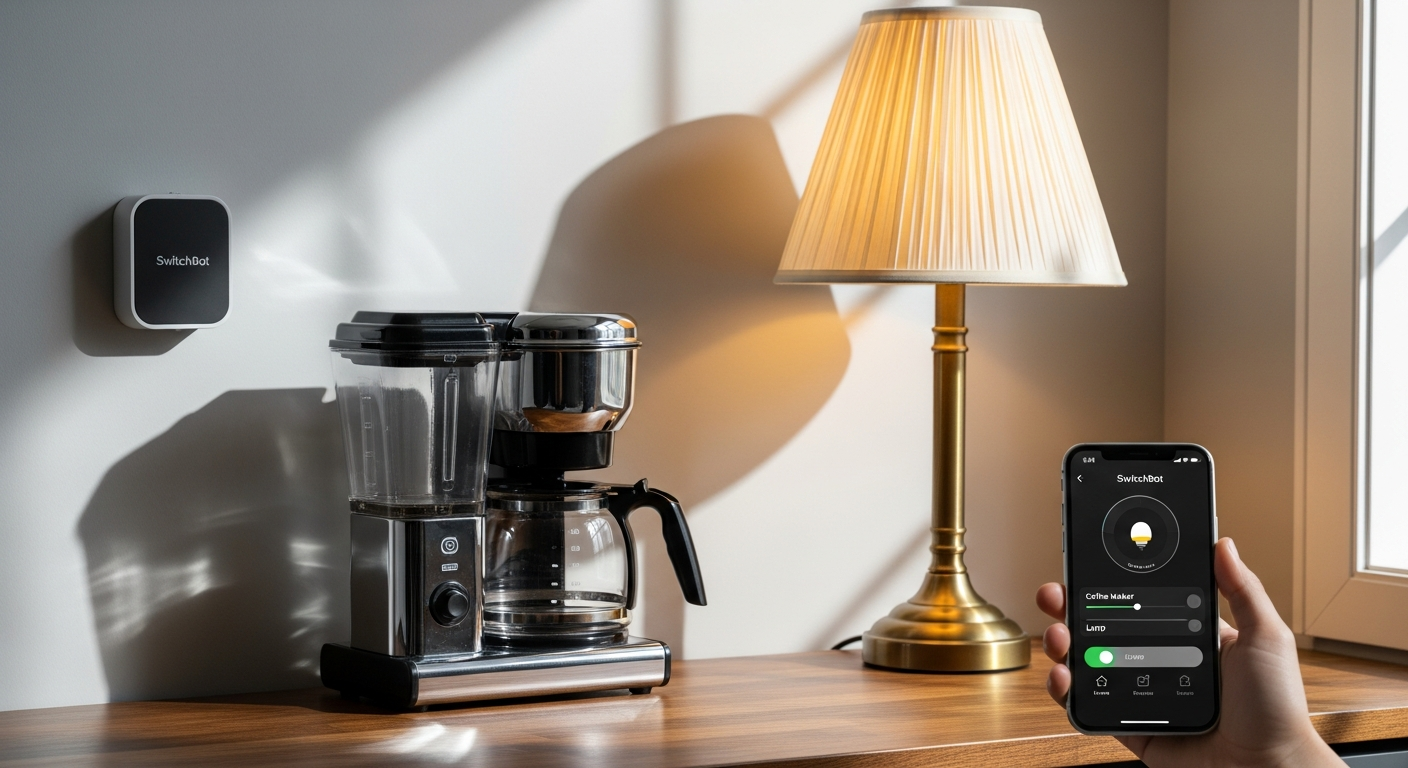
Roughly 40% of households still operate on “dumb” appliances that lack any smart capabilities—and replacing them entirely would drain thousands from your budget. I’ve watched countless people accept the reality of manually flipping switches, adjusting thermostats, and pressing buttons on devices that simply weren’t built for the smart home era. But what if there’s a $30 solution that eliminates the entire replacement problem?
The SwitchBot Bot represents a fundamental shift in home automation philosophy. Instead of forcing you to swap out perfectly functional devices, this compact robotic device physically interacts with existing buttons and switches—becoming a mechanical finger that operates entirely on your command. It’s especially valuable for renters, apartment dwellers, and anyone hesitant about a full smart home investment.
Explore the SwitchBot Bot and transform your dumb appliances into smart ones today.
Beyond Light Switches: Unexpected Appliances You Can Automate With a Smart Button Pusher
The SwitchBot Bot’s versatility extends far beyond standard light switches. Your coffee maker, espresso machine, and electric kettle all become candidates for automation—eliminating the morning scramble to brew your first cup.
Garage door openers, gate controls, and motorized blinds respond to the Bot’s mechanical press just as well as they do to human fingers. Washing machines, dryers, and dishwashers with physical start buttons all work reliably once you position the Bot correctly.
Space heaters, humidifiers, and air purifiers sit idle in your home waiting for automation. Older entertainment systems, projectors, and AV receivers with non-smart remotes suddenly gain modern control capabilities. Your aquarium pump, pet feeder, and plant watering system become schedulable through simple on/off switches.
Window AC units and portable air conditioners operate via mechanical controls that the Bot handles with ease. Desk lamps, ceiling fans, and exhaust fans with pull-chain or rocker switches all transition into smart devices. Refrigerator ice makers and water dispensers respond to button controls, while microwave ovens and toaster ovens gain scheduling and remote activation.
The range of compatible devices demonstrates why this approach resonates with so many users—nearly any device with a physical button or switch becomes a candidate for automation.
The Renter’s Dream: Why the SwitchBot Bot Wins for Apartment Dwellers & Temporary Spaces
Renters face unique constraints that eliminate most smart home solutions. You can’t rewire your apartment, drill into walls, or permanently alter existing infrastructure without risking your security deposit. The SwitchBot Bot solves this dilemma entirely.
Installation requires only an adhesive strip—nothing permanent, nothing destructive. Your landlord never needs approval because you’re not modifying the building itself. When you move to your next apartment or home, your automation moves with you. This portability transforms how renters approach smart home technology.
The Bot also serves as a testing ground for smart home automation before committing serious money to expensive wired solutions. You discover whether voice control and scheduling actually improve your daily life or represent features you’ll never use. This experimental approach prevents costly mistakes.
HOA restrictions that prohibit electrical modifications or smart device installation suddenly become irrelevant. Furnished rentals where you can’t alter appliances or wall switches become automatable. Shared spaces remain automatable without permanent alterations. Your lease agreement stays intact, and your deposit protection remains secure.
Start your renter-friendly smart home automation with the SwitchBot Bot right now.
Mastering Placement & Positioning: The Trial-and-Error Tactics That Actually Work
Successful Bot deployment requires precision that most users underestimate. Begin by identifying the optimal button or switch location before applying any adhesive. Test the pressure requirements to ensure the Bot’s two-pound force actually triggers your device.
Account for switch angle and button depth—incomplete presses signal a positioning problem. The rocker switch add-on attachment exists for toggle switches, while the basic unit handles straightforward pushbutton applications. Leveling the Bot ensures the mechanical arm engages perpendicularly with your target.
Measure the clearance around your button to prevent the Bot’s arm from obstruction. Wall texture, surface irregularities, and curved switch plates all affect performance. Use painter’s tape for temporary positioning before committing to permanent adhesive application.
Adjust for button resistance—some switches require multiple attempts or angle tweaks before functioning reliably. Document successful placements with photos for future reference or troubleshooting. This methodical approach prevents the frustration that leads most users to abandon their Bot after poor initial results.
Connectivity Reality Check: When You Need a Hub and When Bluetooth Alone Suffices
The SwitchBot Bot operates via Bluetooth with an effective range of 30-50 feet from your phone. This direct Bluetooth control works perfectly for devices in the same room or adjacent spaces. You command your coffee maker to start from your bedroom without additional hardware.
However, remote access from anywhere requires the SwitchBot Hub Mini at $59.99. Voice assistant integration with Alexa, Google Home, or Siri demands Hub connectivity. Automation scheduling and time-based routines all require Hub functionality. IFTTT integration and third-party ecosystem connections become possible only through the Hub.
Evaluate whether Bluetooth-only control actually meets your automation needs. Many users discover that controlling devices from another room suffices for their use case. Others find that true remote access justifies the $60 investment. The Bot alone costs $30, and pairing it with a Hub brings your total to $90—still significantly less than most smart device replacements that run $150 or higher.
Compare Hub Mini versus Hub Plus based on your smart home ecosystem size. The Mini handles modest automation, while the Plus scales to larger installations. Assess network reliability considerations for critical appliances versus convenience devices. Your furnace might justify Hub investment while your kitchen fan operates fine on Bluetooth alone.
Battery Life Reality: 600 Days Between Changes and What Actually Affects Longevity
The SwitchBot Bot runs on a replaceable CR2 3V battery rated for approximately 600 days of operation. This impressive longevity translates to roughly 20 months between battery changes under average usage conditions. Stock replacements cost just $5-10, making ongoing operation remarkably inexpensive.
Actual usage patterns dramatically affect battery lifespan. Devices pressed daily drain power faster than those activated weekly. Temperature fluctuations and environmental conditions impact battery performance—cold garages drain batteries quicker than climate-controlled living rooms. Pushbutton mode versus rocker switch mode operations consume power at different rates.
Set battery replacement reminders in your phone to avoid unexpected device failures. Stockpile replacement batteries to minimize downtime during outages. The SwitchBot app provides battery percentage indicators so you’ll never face surprises.
Seasonal usage patterns matter significantly. Heating and cooling cycles create automation spikes that affect battery consumption throughout the year. Calculate the cost per year of operation—even with frequent battery changes, your annual Bot expenses remain trivial compared to smart device replacement cycles.
The Aesthetic Problem: Hiding the Bulky Design Without Sacrificing Functionality
The SwitchBot Bot measures slightly larger than a matchbox and carries a distinctly functional, industrial appearance. Strategic placement behind appliances or in cabinet interiors conceals the device entirely. Position it on laundry room switches, garage door openers, or basement equipment where visibility remains minimal.
Decorative switch plates or outlet covers provide partial concealment in living areas. Mounting the Bot on the back side of appliances hides it completely—controlling a space heater from behind rather than in front of the unit. Accepting the aesthetic trade-off for functionality makes sense in utility spaces where appearance matters less.
Some users explore camouflage options like color-matching paint or decorative tape. Others position less-visible alternatives, controlling devices from another room entirely. The reality: functionality often trumps appearance for practical automation solutions. A slightly bulky device that saves you from replacing a $200 appliance represents excellent value, regardless of how it looks.
Comparing the Bot’s appearance to the cost and hassle of full device replacement puts the aesthetic concern into perspective. Yes, it’s visible and not beautiful. But functionality wins every time for most households.
Compatibility Limitations: What Buttons the SwitchBot Bot Can’t Handle (And Why)
Understanding what the Bot cannot do prevents frustration during implementation. Touchscreen interfaces and capacitive touch buttons that require electrical contact fall outside its capabilities—the mechanical press can’t activate sensors designed for finger contact.
Extremely stiff or high-resistance switches exceeding the two-pound force threshold won’t activate. Buttons recessed deeply into appliances remain unreachable by the mechanical arm. Soft-touch or membrane buttons that lack firm mechanical engagement points resist activation.
Switches with unusual shapes, angles, or unconventional designs sometimes defeat the Bot’s standard approach. Motion-sensor activated controls that respond only to proximity rather than pressure won’t function. Buttons requiring simultaneous multiple presses or complex sequential actions exceed the Bot’s capabilities.
Safety locks or child-proof mechanisms blocking direct access prevent activation. Switches with variable resistance buttons designed for pressure-sensitive controls don’t respond to simple presses. Test compatibility before purchase—this prevents incompatible device frustration and unnecessary returns.
Building Your Automation Ecosystem: Pairing the Bot With Other SwitchBot Devices
The SwitchBot Bot integrates seamlessly with the broader SwitchBot ecosystem. Combine Bots with SwitchBot Curtain Rods for comprehensive window automation. Integrate with temperature and humidity sensors for conditional automation—triggering the space heater only when temperatures drop below your threshold.
SwitchBot Motion Sensors detect movement and trigger Bot actions automatically. Contact Sensors on doors and windows create context-aware automation. Multi-device routines coordinate Bots with other smart home actions simultaneously.
A single Hub expands voice control capabilities across multiple Bots, rather than requiring separate hubs for each device. Create scenes that automate entire rooms with coordinated Bot and sensor actions. The SwitchBot ecosystem’s affordability advantage over premium brands becomes obvious when you scale automation gradually.
Build without vendor lock-in concerns or expensive platform migrations. The Hub’s capabilities maximize when centralizing control across multiple devices. This layered approach creates sophisticated automation without premium pricing.
Budget Smart Home Strategy: The Math Behind Bot Automation Versus Device Replacement
Entry-level costs break down simply: Bot at $30 plus Hub at $60 equals $90 total investment. Compare this to replacement costs: smart coffee makers run $120-200, smart thermostats cost $200-300, and smart blinds exceed $300.
Calculate ROI based on device lifespan and replacement frequency. A coffee maker lasting 8-10 years justifies a smart replacement. One lasting 3-4 years doesn’t. Hidden costs of device replacement include installation, setup, learning curves, and disposal fees that most people overlook.
Long-term maintenance costs favor the Bot dramatically. Annual battery expenses total $5-10 versus smart device reliability issues that force replacement or expensive repairs. Scalability economics make the difference apparent immediately: automating 10 devices with Bots costs roughly $300 total, while replacements run $1,500 or higher.
Evaluate total cost of ownership across 5-10 year smart home investment horizons. Identify which appliances justify replacement versus Bot automation—your furnace might warrant a $300 smart thermostat while your ceiling fan doesn’t. Build a phased smart home strategy that balances budget with actual functionality needs.
Troubleshooting Common Issues: Why Your Bot Isn’t Pressing Buttons Reliably
Adhesive failure tops the troubleshooting list—reapply with fresh 3M strips after thorough surface cleaning. Bluetooth connectivity drops resolve through repositioning or moving closer to your phone. Inconsistent button presses signal angle, depth, or pressure force calibration issues requiring repositioning adjustments.
Environmental factors sometimes change switch resistance, affecting mechanical engagement reliability. App responsiveness delays typically clear through cache cleaning, firmware updates, or Hub restarts. Partial presses or incomplete actions suggest repositioning to ensure perpendicular arm engagement with your target button.
Battery depletion faster than expected indicates reducing automation frequency or checking for stuck mechanisms. Rocker switch attachment misalignment requires ensuring the add-on sits properly secured. Bluetooth pairing issues resolve through Bot resets and re-adding to the SwitchBot app.
Always test with manual app commands before relying on automated routines. This verification prevents assuming failures that actually reflect setup issues rather than device problems.
Real-World Use Cases: How Different Households Actually Use the SwitchBot Bot
Renters automate apartment thermostats without landlord permission or modification concerns. Remote workers control office equipment from home without rewiring existing infrastructure. Elderly individuals automate appliances they struggle to reach or operate due to mobility limitations.
Pet owners automate feeders, water fountains, and door controls for convenience and consistent scheduling. Busy parents automate coffee makers for morning routines and bedtime lighting without manual operation. Small business owners automate office equipment without expensive smart retrofits that modify permanent infrastructure.
Travelers automate lights and appliances to simulate occupancy while away from home. Multi-property owners manage vacation rentals without smart device installations on each unit. The Bot provides accessibility solutions for individuals with mobility limitations or disabilities who struggle with traditional controls.
Cost-conscious homeowners test smart home automation before major investments—validating whether voice control and scheduling actually improve their lives. These diverse applications highlight why the Bot solves real problems across different household types and situations.
The Upgrade-Not-Replace Philosophy: Why This Approach Matters in 2026
The SwitchBot Bot embodies a philosophy increasingly critical as environmental consciousness grows. Reducing electronic waste by extending the lifespan of functional appliances matters. The environmental impact of choosing automation over device replacement cycles remains substantial across millions of households.
This approach democratizes smart home technology across income levels and living situations. Making automation accessible to budget-conscious consumers shifts the smart home conversation entirely. Sustainability benefits emerge through upgrading existing infrastructure rather than discarding functional devices unnecessarily.
Challenging the throwaway culture of consumer electronics requires demonstrating viable alternatives. Supporting circular economy principles through device longevity and adaptation makes economic and environmental sense. Reducing supply chain strain and manufacturing emissions through selective upgrades benefits everyone.
The philosophical shift toward thoughtful automation rather than mindless consumption reflects changing values about technology’s role in our lives. You preserve device familiarity while adding modern automation capabilities—maintaining relationships with appliances you trust while gaining convenience benefits.
Making Your Final Decision: Is the SwitchBot Bot Right for Your Situation?
Assess your primary motivation honestly: are you seeking convenience, accessibility, or cost savings? Each motivation leads to different conclusions about Bot suitability. Evaluate your living situation—ownership, rental status, and modification flexibility all influence whether the Bot solves your problems.
Calculate your actual automation needs versus aspirational smart home dreams. That coffee maker automation sounds nice until you realize you never actually want scheduled brewing. Consider aesthetic tolerance and placement flexibility in your home layout. Some switches work perfectly hidden in utility spaces while others sit prominently in living areas.
Determine whether Bluetooth-only control meets your remote access requirements. Factor in the Hub cost if you need Wi-Fi, voice control, or scheduling—this decision significantly impacts total investment. Test compatibility with your target devices before committing to multiple units.
Compare total cost of ownership against smart device replacement alternatives. Recognize that the Bot solves specific problems brilliantly while carrying clear limitations. Start with a single Bot to validate your use case before scaling up to additional units.
The Bottom Line: Smart Automation Without the Smart Device Price Tag
The SwitchBot Bot occupies a unique niche in the smart home landscape. It’s not a universal solution—touchscreens and stiff switches will frustrate you, and the bulky design won’t win any interior design awards. But for renters, budget-conscious homeowners, and anyone with perfectly functional appliances that simply lack smart capabilities, this $30 device delivers genuine value.
The magic happens when you stop thinking about replacing everything and start thinking about automating strategically. Pair a Bot with a Hub, identify three to five appliances that genuinely benefit from automation, and you’ve built a capable smart home ecosystem for under $150. That’s practical, affordable automation that actually improves daily life without the sticker shock of wholesale device replacement.
If you’re sitting on the fence about smart home automation, the single Bot approach offers an ideal entry point. Test it on your most-used appliance and discover whether this simple solution meets your actual needs. You might find that sometimes the simplest solutions—a mechanical finger pressing a button—are exactly what your home needs.
Get your SwitchBot Bot now and begin automating your legacy appliances today.
Leave a Reply