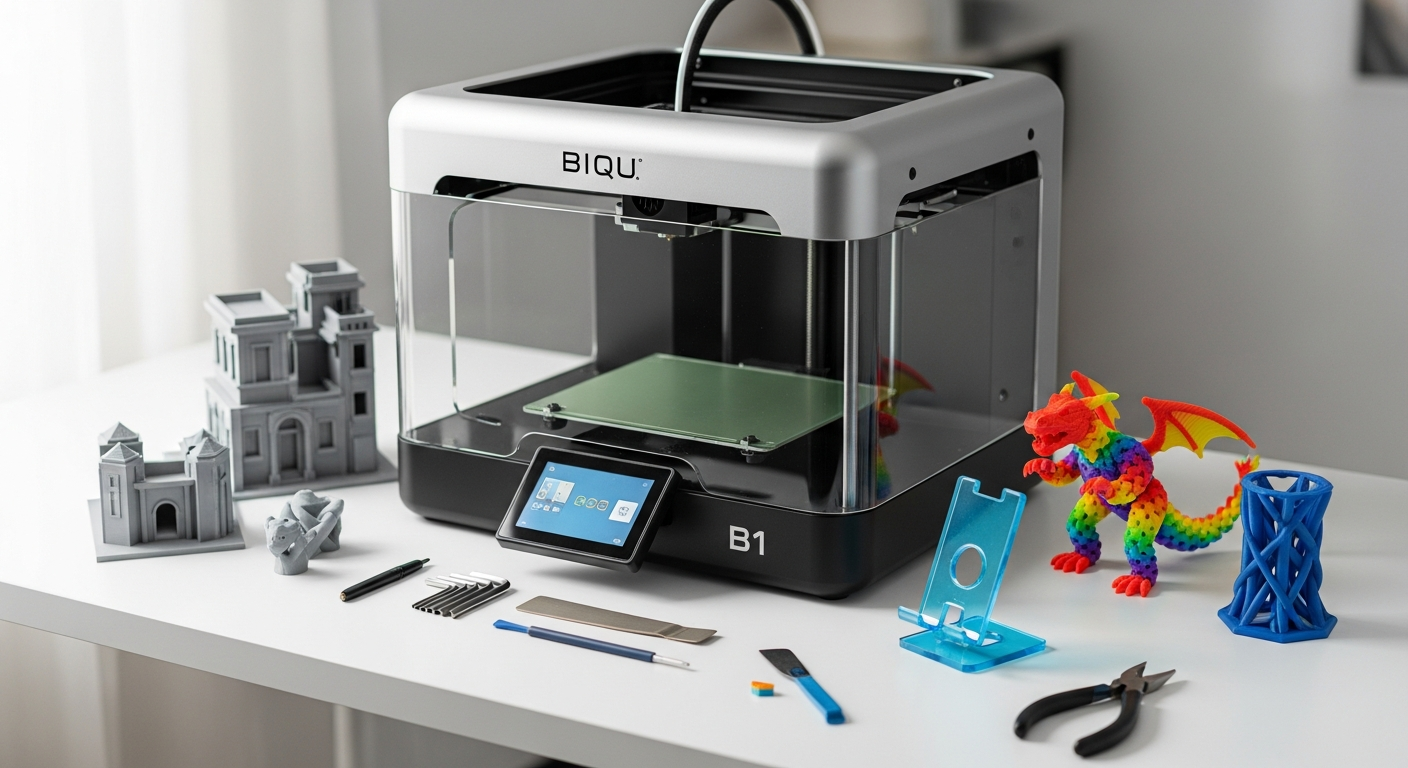
Over 50,000 makers have already ditched expensive printers for the BIQU B1—and they're printing everything from functional prototypes to intricate miniatures without breaking the bank. The entry-level 3D printer market has exploded, yet most machines force you to choose between affordability and quality. The BIQU B1 shatters that false choice entirely.
BIQU Technology has built a reputation for delivering performance where it matters most. The BIQU B1 represents their answer to a critical gap in the market: a printer that beginners can afford, experienced makers can upgrade, and everyone in between can actually enjoy using. It's become the quiet workhorse in maker spaces, educational institutions, and home workshops across the globe.
The Build That Matters—Core Specifications and Hardware Design
The BIQU B1's foundation rests on thoughtful engineering that prioritizes practical performance over flashy features. Its build volume of 235 x 235 x 270 mm provides genuine flexibility for your projects—whether you're printing a single large object or batching multiple smaller prints in one session. This dimension sweet spot accommodates most functional parts and creative projects without requiring the footprint of industrial equipment.
32-Bit Control Board and Processing Power
At the heart of this printer sits a 32-bit SKR 1.4 control board, a significant advantage over older 8-bit alternatives still found in cheaper competitors. The difference extends beyond raw processing speed. The 32-bit architecture handles complex geometry calculations more efficiently, translates to smoother motion profiles, and enables real-time adjustments during printing. This isn't marketing speak—the practical result is fewer stutters, more consistent extrusion, and layer-to-layer precision that justifies the investment.
Silent Operation Through TMC2208 Drivers
The removable TMC2208 stepper drivers deserve special attention if you plan to use this printer in shared spaces or offices. Unlike older stepper drivers that produce audible whining, these drivers operate nearly silently. The trade-off? A separate observation: the power supply fan still generates noise, but the stepper motors themselves won't disturb colleagues or family members during longer print sessions.
Heating and Adhesion Reliability
The heated bed addresses one of the fundamental challenges in FDM printing—material adhesion and thermal stability. Consistent bed heating prevents warping on larger prints and enables reliable first-layer adhesion across different filament types. The removable double-sided spring steel plate simplifies the entire print removal workflow. After printing completes and the bed cools, prints pop off with minimal force, and you can flip the plate to use the opposite side for your next job.
Precision and Speed Performance
Layer thickness precision down to 50 microns delivers respectable quality for the price point. This measurement determines how fine your surface details can be—finer layers mean smoother prints but longer print times. The maximum printing speed of 100 mm/s provides reasonable throughput without sacrificing the reliability that defines this machine's reputation. Most users run prints at 40-60 mm/s to optimize for quality, reserving maximum speed for non-critical prints or infill patterns.
Aesthetic Touches That Serve Purpose
RGB lighting in the print head and dial might seem purely decorative, but practical benefits emerge when monitoring prints in dimly lit maker spaces. You can actually see what's happening at the nozzle without squinting or adjusting your workshop lighting. It's a small detail that demonstrates BIQU's attention to real-world user experience.
The Dual-Interface Advantage—Touchscreen Meets Traditional Control
The 3.5-inch color touchscreen on the BIQU B1 balances accessibility with flexibility in a way that appeals to both newcomers and experienced tinkerers. The interface responds quickly, menus navigate intuitively, and monitoring your print requires just a glance rather than hunting through nested screen options.
Touchscreen Workflow Benefits
The touchscreen handles everything from filament loading to real-time temperature adjustments. Beginners gravitate toward this interface because it mirrors smartphone interaction patterns—familiar and forgiving. You can adjust printing parameters mid-job, pause for inspection, and resume without computer intervention. This independence means your printer isn't tethered to a host computer running slicing software.
Marlin Mode for Command-Line Users
For users comfortable with traditional printer control, Marlin mode provides direct command-line access. This appeals to people already familiar with 3D printer firmware, those performing advanced customization, or users developing custom printing workflows. The flexibility to choose your interface based on the specific task represents thoughtful design.
Live Z Adjustment During First Layer
The live Z adjustment feature allows real-time bed leveling during initial layer printing. Instead of perfectly leveling before starting, you can fine-tune the nozzle height while watching the first layer emerge. This practical feature compresses the learning curve for absolute beginners and prevents wasted filament on failed test prints.
Material Versatility—What You Can Actually Print
The BIQU B1's material compatibility extends across a respectable range of filaments, though realistic expectations matter when evaluating what each material type will deliver.
PLA—The Sweet Spot
PLA printing is where the BIQU B1 truly excels. The Bowden-type extruder particularly suits PLA's characteristics, delivering consistent extrusion and reliable results across countless community prints. Most users report minimal failed prints when working with quality PLA filament. Colors print vibrant, details remain crisp, and the material's forgiving nature means even calibration mistakes rarely ruin an entire print.
Flexible Filaments and TPU
TPU and other flexible materials present challenges with Bowden extrusion because the distance between the extruder motor and nozzle allows material to compress inconsistently. Users do print flexible materials successfully, but require patience and calibration adjustments. A direct drive upgrade resolves this limitation entirely, though it increases initial investment.
Wood-Filled and Composite Materials
Wood-filled filaments work adequately on the BIQU B1, producing attractive prints with wood-grain aesthetics. The material behaves similarly to PLA in most respects, though slightly abrasive particles demand more frequent nozzle replacement compared to standard PLA.
Nylon and High-Temperature Materials
Nylon printing demands elevated temperatures and bed heat that the BIQU B1 can technically reach, but the lack of an enclosure creates cooling challenges. Parts warp as they cool unevenly in ambient air. Users report success with nylon by printing in enclosed spaces, but this isn't the printer's primary strength.
ABS Challenges and Workarounds
ABS requires even higher temperatures and more aggressive cooling management. Without an enclosure, ABS prints frequently warp and separate from the bed mid-print. A DIY enclosure using transparent plastic sheeting resolves most issues, but represents an additional project before you achieve reliable ABS printing.
The Affordability Factor—Value Proposition in the $250-$350 Range
The BIQU B1's price positioning demands scrutiny. At $250-$350, you're not buying the cheapest printer on the market—budget competitors exist at $150-$200. You're buying a printer that happens to be affordable while delivering features typically reserved for machines costing twice as much.
Price Comparison Against Competitors
Direct comparisons reveal the value. Competitor printers at similar price points cut corners on the control board (8-bit instead of 32-bit), omit silent stepper drivers, or force choices between touchscreen and command-line interfaces. The BIQU B1 includes most features competitors charge more for, making the per-feature cost remarkably efficient.
What's Actually Included
Your investment covers more than just plastic extrusion hardware. You receive a 32-bit control board, removable modular components, dual interface capability, quality spring steel plate, heated bed, and community support from thousands of active users. Stripped-down competitors cut several of these features to hit lower price points.
Cost Per Print Economics
When amortized across typical usage patterns, the BIQU B1's per-print cost remains low. Filament represents the dominant ongoing expense regardless of which printer you use, and the BIQU B1's reliability means fewer failed prints wasting material. Over 500 prints, a failed print costs you more than the machine's higher initial investment.
Resale Value and Long-Term ROI
The BIQU B1 holds resale value remarkably well in the second-hand market. Users who eventually upgrade to professional equipment recover 40-50% of their initial investment. Small businesses using the BIQU B1 for custom product creation frequently report ROI within 2-3 months of regular use.
Reliability in Real-World Conditions—Consistent Results You Can Count On
The BIQU B1's reputation rests fundamentally on reliability data from thousands of users across diverse applications. Failed print rates reported by the community average around 5-8%, significantly lower than entry-level competitors hovering near 15-20%. This difference compounds dramatically across high-volume usage.
Thermal Stability and Extended Sessions
The printer maintains consistent temperature control during marathon printing sessions, essential for batch production scenarios. Users report minimal print quality degradation even after 24+ hour continuous operation. The heated bed temperature stability prevents mid-print warping that plagues cheaper machines without proper thermal regulation.
Mechanical Durability Over Time
Key components show impressive longevity under regular use. The extruder assembly handles thousands of hours without requiring replacement. The print bed surface remains effective for hundreds of prints before showing wear. Power supply failures, common in budget equipment, remain rare in BIQU B1 ownership reports, despite that noisy cooling fan.
Build Plate Adhesion Consistency
The removable spring steel plate produces remarkably consistent first-layer adhesion across different filament types. Users switching between PLA, PETG, and TPU report minimal adhesion adjustment needed between material changes. This consistency prevents the frustration that derails beginner printing enthusiasm.
Nozzle Performance and Lifespan
Stock brass nozzles operate reliably for 50-100 hours of printing before showing noticeable wear. Replacement nozzles cost $5-10, and users typically maintain one spare on hand. Hardened steel nozzles extend lifespan for abrasive materials but cost more upfront.
The Upgrade Ecosystem—Modular Design for Future Growth
One of the BIQU B1's most underappreciated strengths is its upgrade pathway. The modular component design means your initial investment transforms into increasingly capable hardware without replacing the entire machine.
Removable Driver Architecture
The TMC2208 drivers simply slide out of the SKR board, allowing future upgrades to better drivers without replacing the entire control system. Users frequently upgrade to TMC5160 drivers for enhanced performance, costing roughly $20-30 per axis. This modularity demonstrates forward-thinking design rarely seen at this price point.
Open-Source Firmware Ecosystem
Marlin firmware compatibility connects your printer to thousands of community developers improving and customizing printer behavior. You're not locked into BIQU's firmware choices—you can load custom configurations, access experimental features, or compile your own modifications. This community support represents genuine long-term value that closed-source alternatives cannot match.
Direct Drive Conversion Path
Converting to a direct drive extruder removes the Bowden limitation with flexible materials. Kits exist specifically for the BIQU B1, priced around $40-60, and installation requires roughly 30 minutes. This upgrade dramatically improves TPU and flexible filament reliability without replacing the entire printer.
Specialized Nozzle Compatibility
The standard nozzle format supports specialty alternatives for different applications. Textured nozzles produce matte finishes. Larger diameter nozzles enable faster printing of robust parts. Micro nozzles ($30-50) unlock fine detail work previously impossible.
Bed Surface Alternatives
Beyond the included spring steel plate, users apply PEI sheets, magnetic build plates, or textured surfaces to suit specific materials. This flexibility transforms the printer's capability without machine modifications.
DIY Enclosure Solutions
Community members have designed simple acrylic or plastic enclosures for ABS printing. Plans circulate freely through maker forums, and material costs remain under $50. This upgrade path enables high-temperature material printing once you've mastered basic PLA operation.
Cooling Fan Upgrades
The power supply fan noise bothers many users, but replacement options exist. Quieter replacement fans ($15-25) significantly reduce ambient noise without affecting cooling effectiveness. This single modification substantially improves the experience in shared spaces.
Prioritizing Upgrade Investments
Most users follow a natural progression: master PLA printing first, then add an enclosure for ABS experimentation, then consider direct drive conversion if flexible materials become important. Spreading upgrades across several months prevents overwhelming yourself while building printing competence gradually.
Honest Limitations—Where the BIQU B1 Shows Its Constraints
Praising this printer's strengths means acknowledging where it falls short. These limitations rarely disqualify the machine for its intended audience, but they deserve honest assessment.
Power Supply Fan Noise
The cooling fan produces a persistent whirring sound at 60-65 decibels, comparable to a refrigerator but noticeable in quiet environments. For office workers or light sleepers, this represents a genuine drawback. The upgrade path exists (replacement fans), but should factor into your decision if you're sensitive to ambient noise.
Manual Bed Leveling Learning Curve
Unlike printers with automatic bed leveling sensors, the BIQU B1 requires manual adjustment. The process involves paper thickness gauging at multiple points. Beginners frequently get this wrong initially, wasting filament on failed first layers. Live Z adjustment mitigates this somewhat, but the learning curve remains steeper than fully automatic systems.
Bowden Extruder Limitations
The distance between extruder motor and nozzle inherently limits flexible material performance. TPU prints require patience, slower speeds, and often still produce inconsistent results. This limitation doesn't prevent flexible filament printing—it just makes it less reliable than materials like PLA.
Lack of Enclosure
The open design prioritizes access and aesthetics but sacrifices thermal control for high-temperature materials. ABS and nylon printing becomes challenging without DIY enclosure additions. This represents perhaps the most significant technical limitation of the stock machine.
Print Speed Trade-offs
The maximum 100 mm/s speed trades off reliability for raw throughput. Users who prioritize quality typically operate at 40-60 mm/s, accepting longer print times for better results. This isn't a critical limitation but requires adjusted expectations compared to marketing claims about maximum speed.
Bed Temperature Ceiling
The heated bed reaches approximately 110°C, sufficient for most materials but approaching the limit for some high-temperature applications. Professional nylon printing frequently requires 120-130°C bed temperatures.
Who Should Buy This Printer—Matching Machine to User Profile
The BIQU B1 serves specific user types exceptionally well while representing a compromise for others. Understanding where you fit in this landscape prevents buyer's remorse.
Hobbyists and Makers Exploring 3D Printing
If you're dipping your toes into 3D printing without major financial commitment, the BIQU B1 becomes almost impossible to beat. You gain legitimate printing capability at an entry-level price, without sacrificing features that make the experience enjoyable. The community support means you'll find answers to every beginner question.
Educational Institutions
Schools and maker spaces need reliable, affordable equipment that students can't easily break through experimentation. The BIQU B1's durability and modular design suit classroom environments perfectly. Teachers appreciate the dual interface—students can learn command-line thinking or stick with touchscreen convenience.
Small Business Prototypers
Entrepreneurs creating custom products or prototypes profit from the BIQU B1's reliability and quick payback period. The printer's low acquisition cost reduces financial risk when scaling production from one machine to multiple units.
Tech Enthusiasts and Tinkerers
If you enjoy upgrading hardware and customizing firmware, the BIQU B1 becomes a platform rather than a finished product. The open-source ecosystem and modular components satisfy desires to modify and improve without requiring professional engineering knowledge.
Budget-Conscious Professionals
Established professionals wanting a secondary printer for experimentation benefit from the BIQU B1's reliability without premium pricing. You know exactly what you're getting, and the lack of surprises matters when equipment reliability directly impacts your workflow.
Community Maker Spaces
Shared workshops benefit from equipment that handles high-volume usage while remaining accessible to users with varying skill levels. The BIQU B1's reputation for reliability and ease of use makes it ideal for community environments.
Home Office Professionals
If you work from home and value quiet equipment, consider the noise factor carefully. The upgraded cooling fan makes this more practical for home offices than the stock configuration.
Setup, Assembly, and Getting Your First Print—Practical Getting Started
Moving from purchase to first successful print involves several steps, but the process remains accessible for newcomers despite the technical nature of 3D printing.
Unboxing and Inventory
The BIQU B1 arrives well-packaged with all necessary components. Your inventory includes the printer frame assembly, control board, nozzle, print plate, power supply, USB cable, filament sample, and documentation. Verify nothing arrived damaged before proceeding—manufacturers replace damaged parts without hassle, but identifying issues immediately matters.
Assembly Timeline and Complexity
Total assembly typically requires 1-2 hours for someone moderately handy with tools. The frame bolts together straightforwardly, the control board mounts via screws, and the heated bed connects through standardized connectors. Detailed documentation and community videos guide every step. Most people successfully complete assembly on their first attempt without external help.
Bed Leveling Procedure
Bed leveling represents the most critical setup task. The procedure involves adjusting four corner screws while sliding paper between nozzle and plate. You're seeking light resistance as you move the paper—not free movement, not grinding pressure. Check leveling at multiple points across the plate's surface. Many users perform this step 2-3 times before achieving confidence, and that's completely normal.
Firmware and Interface Selection
The printer arrives with firmware pre-loaded and ready to use immediately. You can begin printing using the touchscreen right out of the box. If you want Marlin mode or custom configurations, that's an optional additional step after you've confirmed everything works.
First Print Recommendations
Print calibration objects first—simple geometric shapes designed to test various printer functions. Benchy (a tiny sailboat model) serves as the traditional first print, revealing how well your printer handles overhangs, fine details, and dimensional accuracy. These test prints cost minimal filament and provide invaluable feedback about necessary adjustments.
Filament Loading and Nozzle Priming
Loading filament involves inserting it into the extruder, using the touchscreen menu to heat the nozzle, then pushing filament through until clean plastic extrudes. Priming ensures the nozzle is full of filament before actual printing begins. The process takes roughly 5 minutes and becomes automatic once you've done it a few times.
Software Setup and Slicing
You'll need slicing software—Cura, PrusaSlicer, or Simplify3D—to convert 3D models into printer instructions. These programs are typically free (except Simplify3D), downloadable quickly, and pre-configured profiles for the BIQU B1 exist in community forums. Configuration takes 15-20 minutes following online guides.
Troubleshooting Common First-Print Issues
Problems typically fall into a few categories: first layer adhesion (usually bed leveling), extrusion gaps (filament not fully loaded), or warping (temperature or bed adhesion issues). The community has exhaustively documented solutions to all standard problems. Searching for specific symptoms usually yields multiple approaches within 5 minutes.
The Bottom Line—Making Your Decision
The BIQU B1 FDM 3D printer occupies a rare position in the market: it's genuinely affordable without feeling cheap, reliable without being boring, and accessible without sacrificing upgrade potential. This machine proves itself across maker spaces, home workshops, and small production environments—consistently delivering results that punch above its price point.
Your decision ultimately hinges on what matters most to your workflow. If you're printing primarily PLA, value community support and customization, and can tolerate manual bed leveling and a noisy power supply fan, the BIQU B1 becomes almost a no-brainer investment. For those planning to extensively print flexible materials or high-temperature plastics without upgrades, you might want to explore alternatives with direct drive extruders or built-in enclosures.
The printer's true strength emerges over time. That modular design, open-source firmware, and thriving community of users mean your $250-$350 investment today can evolve into something far more capable tomorrow. You're not locked into the machine's current limitations—you're buying into a platform with genuine growth potential.
Ready to join thousands of makers who've already made the leap? Start by researching specific filament types you plan to use, then check community forums to see real-world prints from users with similar goals. The BIQU B1 community is remarkably helpful, and you'll find answers to nearly every question before you even power on your machine.
Leave a Reply