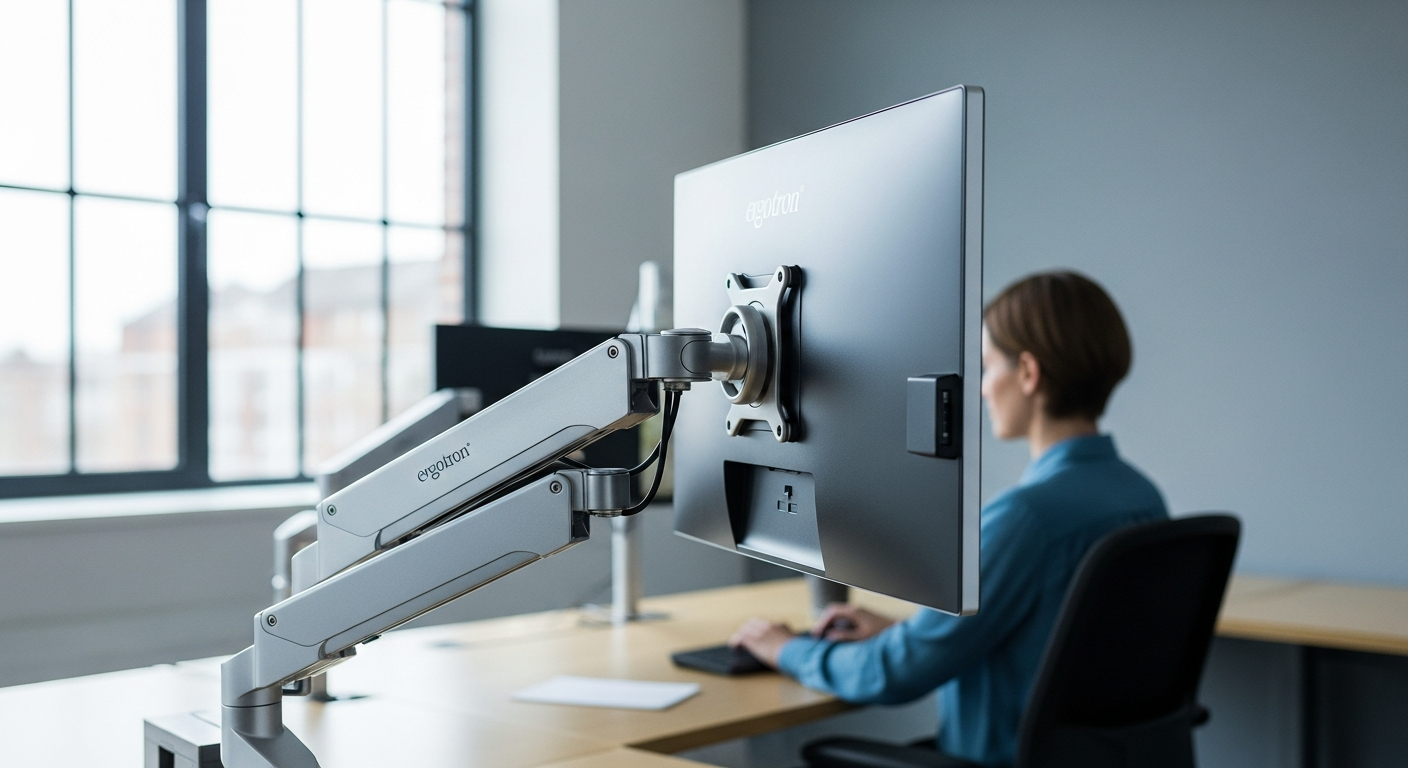
Over 80% of desk workers experience neck and back pain—and most don’t realize their monitor height is the culprit. A poorly positioned screen forces your eyes downward, your shoulders forward, and your spine into an unnatural curve. This silent ergonomic disaster compounds day after day, gradually wearing down your body while you focus on work.
The Ergotron LX Desk Monitor Arm has become the gold standard in the monitor mount market for one simple reason: it actually works. With its premium aluminum construction and exceptional range of motion, this single-monitor arm gives you the flexibility to position your display exactly where your body needs it. The engineering behind this product reflects years of research into how proper screen positioning transforms both comfort and performance.
Discover how the Ergotron LX can revolutionize your workspace ergonomics.
This guide covers everything you need to know about the Ergotron LX—from its impressive technical specifications and real-world performance to whether the investment truly pays off. By the end, you’ll understand exactly how this monitor arm can eliminate strain, reclaim desk space, and elevate your entire work-from-home or office setup.
Why Monitor Positioning Matters More Than You Think
The biomechanics of proper screen height and eye-level alignment
Your body’s alignment at the desk follows fundamental biomechanical principles. When your monitor sits at the correct height—roughly at eye level when you’re seated naturally—your neck maintains a neutral position. Your eyes naturally focus on the center of the screen without requiring you to tilt your head up or down. This seemingly small adjustment prevents the constant micro-adjustments your neck makes throughout the day, each one adding stress to cervical vertebrae and surrounding muscles.
How poor monitor placement contributes to repetitive strain injuries (RSI)
Screens positioned too low force sustained downward head tilt, a posture that puts disproportionate load on posterior neck muscles and the upper trapezius. Over weeks and months, this repeated strain can develop into cervical strain syndrome or contribute to thoracic outlet syndrome. The forward head posture that emerges from low screen positioning also increases load on your lower back as your body compensates for the upper body imbalance. These repetitive strain injuries don’t appear suddenly—they accumulate silently until pain becomes impossible to ignore.
The connection between ergonomic setup and long-term productivity gains
Productivity isn’t just about hours worked; it’s about quality of focus and mental clarity. Physical discomfort creates a constant background distraction that taxes cognitive resources. When your body is properly positioned, your brain can allocate full attention to the task at hand rather than managing pain signals. Studies consistently show that ergonomically optimized workstations correlate with fewer sick days, higher output quality, and improved employee retention.
Real-world impact on focus, energy levels, and end-of-day fatigue
The afternoon energy crash many professionals experience isn’t inevitable—it’s often a symptom of accumulated physical strain. Proper monitor positioning reduces the energy your body expends maintaining unnatural postures throughout the day. Workers using correctly positioned monitors report clearer thinking by mid-afternoon, sustained energy through the end of the workday, and dramatically reduced muscle soreness when leaving the office.
Unpacking the Ergotron LX’s Engineering and Build Quality
Premium polished aluminum construction and durability factors
The Ergotron LX uses polished aluminum as its primary structural material—a choice that reflects engineering priorities toward longevity and aesthetic refinement. Aluminum resists corrosion better than steel while remaining significantly lighter, making adjustments smooth without sacrificing stability. The polished finish isn’t purely cosmetic; it reduces friction in moving joints and maintains its appearance through years of daily use without requiring special maintenance.
The engineering behind smooth, fluid adjustment mechanisms
Movement quality defines the user experience with monitor arms. The Ergotron LX achieves its reputation for smooth adjustments through precision-engineered pivot points and counterbalance mechanisms. Rather than relying on friction to hold position, the arm uses a sophisticated spring-tension system that maintains position while requiring minimal force to adjust. This design means you can reposition your monitor throughout the day without the frustration of stiff joints or sudden drops.
Weight capacity specifications (up to 25 pounds / 11.3 kg)
The 25-pound weight capacity accommodates the vast majority of modern monitors. This supports standard 27-inch displays, larger 32-inch monitors, and even ultrawide curved screens, provided they fall within the weight specification. The capacity is engineered with safety margins built in, meaning the arm will reliably hold your monitor without risk of mechanical failure across its entire adjustable range.
Screen size compatibility (up to 34 inches)
Support for monitors up to 34 inches opens possibilities for professionals requiring expansive screen real estate. Content creators, data analysts, and programmers benefit from larger displays without sacrificing the ergonomic positioning that smaller screens provide. The arm maintains its performance across this entire size range without modification.
VESA mounting pattern support (75x75mm and 100x100mm)
Nearly all modern displays use one of these two VESA patterns for monitor mounting. The Ergotron LX’s compatibility with both standards means the arm works with virtually any contemporary display on the market. This compatibility future-proofs your investment—when you upgrade your monitor years down the road, your existing arm will almost certainly work with the new display.
10-year warranty coverage and what it guarantees
The decade-long warranty reflects manufacturer confidence in engineering and manufacturing quality. This coverage protects against mechanical failure, defects in materials, and workmanship issues. The generous warranty period also signals that Ergotron expects this product to remain functional and relevant for a full decade—a rare commitment in the office equipment market.
Movement Range and Ergonomic Flexibility Explained
13-inch vertical height adjustment capabilities
Vertical adjustment is the most critical ergonomic feature of any monitor arm. The 13-inch range accommodates users of different heights and seated positions. Taller individuals can raise the screen higher, while those with lower desks or specific postural needs can lower it accordingly. This range ensures that nearly any user can position their monitor at true eye level regardless of their physical dimensions or desk configuration.
75-degree tilt range for optimal viewing angles
Tilt adjustments allow you to angle the screen to match your natural downward gaze angle—typically 15 to 20 degrees below horizontal eye level. This range also accommodates glare reduction and different viewing preferences. Some users prefer a more dramatic downward tilt for extended reading-focused work, while others prefer a flatter angle for video calls where eye contact through the camera matters.
360-degree pan and rotation functionality
Pan rotation allows you to swivel the monitor left and right without moving your entire body—essential for multitasking between desktop computers or sharing screens during collaborative work. The 360-degree range means you can rotate the monitor to portrait orientation for specific tasks, position multiple monitors at optimal angles, or quickly turn the display toward a colleague without standing up.
How these adjustments reduce eye strain and neck tension
Combined, these movement ranges let you fine-tune positioning to your exact anatomy and task requirements. Proper height eliminates downward head tilt. Optimal tilt reduces glare and matches your natural viewing angle. Rotation capability means you’re never craning your neck at awkward angles to see content. The cumulative effect is dramatically reduced strain across eyes, neck, and shoulders.
Positioning options for different work scenarios (typing, document review, video calls, content creation)
Different tasks benefit from different screen positions. Typing-intensive work typically calls for the monitor positioned at true eye level. Document review and detail work might benefit from a slightly lower angle. Video calls often work better with slight upward positioning so the camera captures your face at a flattering angle. Creative work like photo editing or video production might require portrait orientation or specific angles to see colors and details accurately. The Ergotron LX’s range accommodates all these scenarios through quick, effortless adjustments.
Installation, Mounting Options, and Desk Compatibility
Desk clamp versus grommet mount: which works best for your setup
The Ergotron LX offers both mounting options, each suited to different desk situations. Desk clamps work on any desk edge and require no drilling or permanent modifications—ideal for rental spaces or situations where you might relocate. Grommet mounts thread through existing cable holes in your desk, offering a cleaner appearance and taking up no desk edge space. Choose based on your desk’s construction, your desire for permanence, and whether you have suitable cable holes available.
Step-by-step installation considerations
Installation is straightforward but warrants careful attention. First, decide on your mounting method and gather necessary tools. Attach the base mount securely to your desk, ensuring the clamp or grommet mount is tight enough to prevent wobbling. Run the monitor’s power and data cables through the arm’s cable management channels before attaching the monitor to the VESA plate. Finally, adjust the arm’s tension and position your monitor to your preferred height and angle. Most users complete installation in 15-20 minutes.
Desk thickness and material compatibility
Desk clamps work on surfaces ranging from roughly one-half inch to nearly three inches thick, accommodating most standard desk materials including solid wood, particle board, and laminated surfaces. Grommet mounts require appropriately sized holes—typically 1.5 to 2 inches in diameter. Both methods work equally well on metal desks, though magnetic interference is negligible with this aluminum-based design.
Stability and wobble-free performance during adjustments
A critical test of any monitor arm is whether it wobbles when you adjust it or type nearby. The Ergotron LX maintains rock-solid stability throughout its entire range. The engineering prevents movement drift—once positioned, the monitor stays exactly where you placed it even as you type on a keyboard directly below. This stability is essential for productivity and user confidence.
Space-saving benefits compared to traditional monitor stands
Traditional monitor stands occupy substantial desk footprint, typically consuming 12 to 18 inches of valuable work surface. The Ergotron LX clamps to your desk edge, freeing this space entirely. For professionals working with limited desk area, this space reclamation represents a significant productivity gain—room for input devices, documents, or simply a less cluttered work surface that promotes focus.
Cable Management and Workspace Organization
Integrated cable routing system overview
The underside of the arm features integrated channels specifically designed to route your monitor’s power and data cables along the structure rather than dangling freely. This system keeps cables organized, protected from damage, and out of your immediate work area.
How the underside cable channels keep wires hidden and organized
Cables run through the channels from the monitor mount down to the base, then connect to your power strip or computer. The routing is intuitive and accommodates the typical cable bundle from modern displays. Built-in clips and management points prevent cables from shifting or creating unsightly loops as you adjust the monitor.
Reducing cable clutter for a professional appearance
A workspace with hidden cables feels more professional and organized—a psychological benefit that shouldn’t be underestimated. Visible cable tangles create visual noise that distracts from your work environment. The Ergotron LX’s cable management transforms this aspect of your desk setup, contributing to a clean, minimalist appearance.
Accessibility for quick cable adjustments or equipment swaps
Despite keeping cables organized, the system remains accessible. You can still disconnect and reconnect your monitor without disassembling the entire cable routing. If you need to swap monitors or troubleshoot connectivity, the cables are easily reached and adjusted.
Explore the complete cable management features of the Ergotron LX monitor arm.
Real-World Performance: Who Benefits Most From the Ergotron LX
Remote workers and home office professionals
Remote workers often set up desks in suboptimal environments—kitchen tables, makeshift home offices, or bedrooms not originally designed for full-time work. The Ergotron LX’s adjustability lets them optimize whatever desk space they have. Home office professionals report that the ability to precisely position their monitor throughout the day dramatically reduces fatigue compared to fixed-position monitor stands, making sustained productivity more achievable.
Content creators and video editors requiring precise screen positioning
Photographers, video editors, and graphic designers need specific monitor angles to accurately see color, detail, and composition. The Ergotron LX’s extensive positioning range lets them dial in exact angles for their specific workflows. The ability to quickly switch between orientations and angles supports the iterative work these professionals do throughout their day.
Gamers seeking optimal viewing angles for extended sessions
Gamers spend hours focused on their displays, making ergonomic positioning critical for both performance and comfort. The Ergotron LX’s smooth adjustment means gamers can position their monitor for optimal visibility of game details while maintaining proper neck and shoulder posture throughout extended gaming sessions.
Individuals with existing neck, shoulder, or back conditions
Users managing chronic pain or recovering from injury benefit substantially from the ability to fine-tune their monitor position to their specific physical needs. Many report that proper monitor positioning, enabled by the Ergotron LX, reduces their pain levels enough to work comfortably without additional medical intervention.
Corporate environments prioritizing employee ergonomic health
Forward-thinking companies recognize that ergonomic investment yields returns through reduced sick time, higher productivity, and improved retention. The Ergotron LX’s combination of effectiveness and professional appearance makes it a popular choice for corporate deployments seeking to demonstrate commitment to employee wellness.
Investment Analysis: Is the Price Tag Justified?
Cost range breakdown (€150–€250 depending on retailer)
The Ergotron LX typically costs between €150 and €250, positioning it in the premium monitor arm segment. This price reflects the engineering quality, material selection, and manufacturing precision that define the product.
Price-to-performance ratio versus budget alternatives
Budget monitor arms start around €30-€50 but typically feature plastic components, limited adjustment ranges, and reliability concerns. Mid-range alternatives at €80-€120 offer better build quality but still compromise on movement fluidity and longevity. The Ergotron LX’s higher cost buys you engineering that these alternatives simply don’t match—smoother adjustments, superior build quality, and a product designed to last a decade rather than a few years.
Long-term value calculation over the 10-year warranty period
Consider the cost-per-year over the warranty period. A €200 investment spread across ten years equals €20 annually—less than many people spend on coffee in a month. Compared to the cost of replacing a cheaper arm every 2-3 years, the Ergotron LX’s longevity represents actual financial savings.
Potential health care cost savings from reduced strain injuries
The financial calculus extends beyond the product purchase. Physical therapy for neck and back issues costs €500-€2,000. Workers’ compensation claims and lost productivity from strain injuries represent massive costs to both individuals and employers. An investment that substantially reduces these risks pays for itself in health care cost avoidance alone.
Resale value and durability justification
The Ergotron LX maintains reasonable resale value because its quality and reputation mean used units remain attractive to buyers. You can typically recover 40-60% of your investment if you later sell the arm. Budget arms have minimal resale value because their quality doesn’t inspire confidence in second-hand buyers.
Practical Setup Tips for Maximum Ergonomic Benefit
Ideal monitor height relative to eye level when seated
Position the top of your monitor at or slightly below eye level when seated naturally. Your gaze should fall toward the center of the screen without requiring you to tilt your head up or down. This positioning maintains neutral cervical spine alignment and reduces strain on neck muscles.
Optimal viewing distance and screen angle recommendations
Position your monitor approximately 20-26 inches from your eyes—roughly an arm’s length away. This distance reduces eye strain and allows you to take in the entire screen without moving your head. Angle the screen to match your natural downward gaze angle, typically 15-20 degrees below horizontal.
Adjusting the arm for different tasks throughout your workday
Don’t lock your monitor into a single position. Different tasks benefit from slight adjustments. Writing-intensive work benefits from eye-level positioning. Video conferencing works better with the screen slightly higher. Detail-focused tasks might benefit from a slightly lower angle. The Ergotron LX’s smooth adjustment means making these micro-changes takes seconds and significantly improves comfort for each task type.
Combining the monitor arm with keyboard and mouse positioning
Monitor positioning is only one component of ergonomic setup. Your keyboard should sit at a height where your elbows rest at 90 degrees with your forearms roughly parallel to the ground. Your mouse should sit at the same height as your keyboard, preventing shoulder elevation. Combine proper monitor positioning with proper input device placement for comprehensive ergonomic optimization.
Creating a complete ergonomic workstation ecosystem
The best results come from optimizing every element of your setup. Good monitor positioning combined with an ergonomic chair, proper desk height, and well-positioned peripherals creates a complete system where no single component causes strain. The Ergotron LX plays a central role in this ecosystem but works best alongside other ergonomic considerations.
Potential Limitations and Who Might Consider Alternatives
Higher price point as a barrier for budget-conscious buyers
If your budget is under €100, the Ergotron LX likely exceeds what you’re willing to spend. Budget-focused users might find adequate solutions in the €50-€80 range, though they’ll sacrifice some adjustment fluidity and longevity. The question becomes whether the additional features justify the cost premium for your specific situation.
Initial setup complexity compared to fixed monitor stands
While installation is straightforward, it requires more thoughtful consideration than simply placing a monitor stand on your desk. Some users prefer the simplicity of fixed solutions and don’t want to think about positioning decisions. For these users, a basic stand might actually be preferable despite the ergonomic disadvantages.
Weight capacity limitations for ultra-large or heavy displays
If your monitor exceeds 25 pounds or you’re considering mounting multiple displays on a single arm, the Ergotron LX’s specifications won’t support your needs. Very large high-end gaming monitors or professional displays sometimes exceed these limitations. Verify your monitor’s exact weight and VESA pattern before purchasing.
Space constraints in very compact desk environments
The Ergotron LX requires adequate desk edge for clamping or an existing grommet hole for mounting. Extremely compact desks or non-standard surfaces might not accommodate either mounting method. Measure your available space carefully before committing to purchase.
The Ergotron LX in Action: User Experiences and Testimonials
Professional testimonials from remote workers and office environments
Remote workers consistently report that the Ergotron LX transformed their daily work experience. A software engineer notes that end-of-day neck pain disappeared within days of installation. A project manager describes the ability to quickly adjust her monitor during different work phases as genuinely transformative for her workflow. Office professionals similarly report that shared Ergotron LX installations in their workplace correlate with noticeably reduced ergonomic complaints.
Measurable improvements in comfort and productivity
Users report quantifiable benefits. Remote workers reduce afternoon fatigue by shifting attention and physical positioning throughout the day. The smooth adjustments mean people actually reposition their monitors multiple times daily rather than locking into a fixed position. This dynamic positioning combats the fatigue that comes from extended static postures.
Common praise points from verified users
Across reviews and user testimonials, several consistent themes emerge: the smooth, effortless adjustment mechanism; the rock-solid stability that prevents wobbling or drift; the premium feel of the aluminum construction; and the dramatic improvement in comfort even after just a few days of use. Users consistently mention being surprised by how much difference proper positioning makes.
Stability feedback during active use and adjustments
A critical concern with any monitor arm is whether it wobbles when you adjust it or type nearby. User feedback consistently highlights the Ergotron LX’s exceptional stability. Even users with significant desk vibration from typing report zero monitor movement or drift—the arm holds position exactly where you set it.
Long-term satisfaction trends from established users
Users who’ve owned the Ergotron LX for multiple years consistently report continued satisfaction. The mechanical components don’t develop play or looseness over time. The finish doesn’t degrade. Users describe their arms as feeling as smooth and solid after years of daily use as they were when new. This longevity feedback directly validates the 10-year warranty.
Your Path to a Pain-Free, Productive Workspace Starts Here
The Ergotron LX Desk Monitor Arm isn’t just another piece of office equipment—it’s an investment in your physical health and work performance. From its rock-solid aluminum construction to its remarkable range of motion, every detail has been engineered to support your body and adapt to your workflow. Whether you’re battling end-of-day neck pain, managing a remote office, or simply wanting to optimize your setup, this monitor arm delivers measurable results that justify its premium price.
The real question isn’t whether you can afford the Ergotron LX—it’s whether you can afford to ignore the impact of poor ergonomics on your health and productivity. With a decade-long warranty backing your purchase and countless professionals vouching for its reliability, you’re making a decision that will pay dividends for years to come.
Leave a Reply