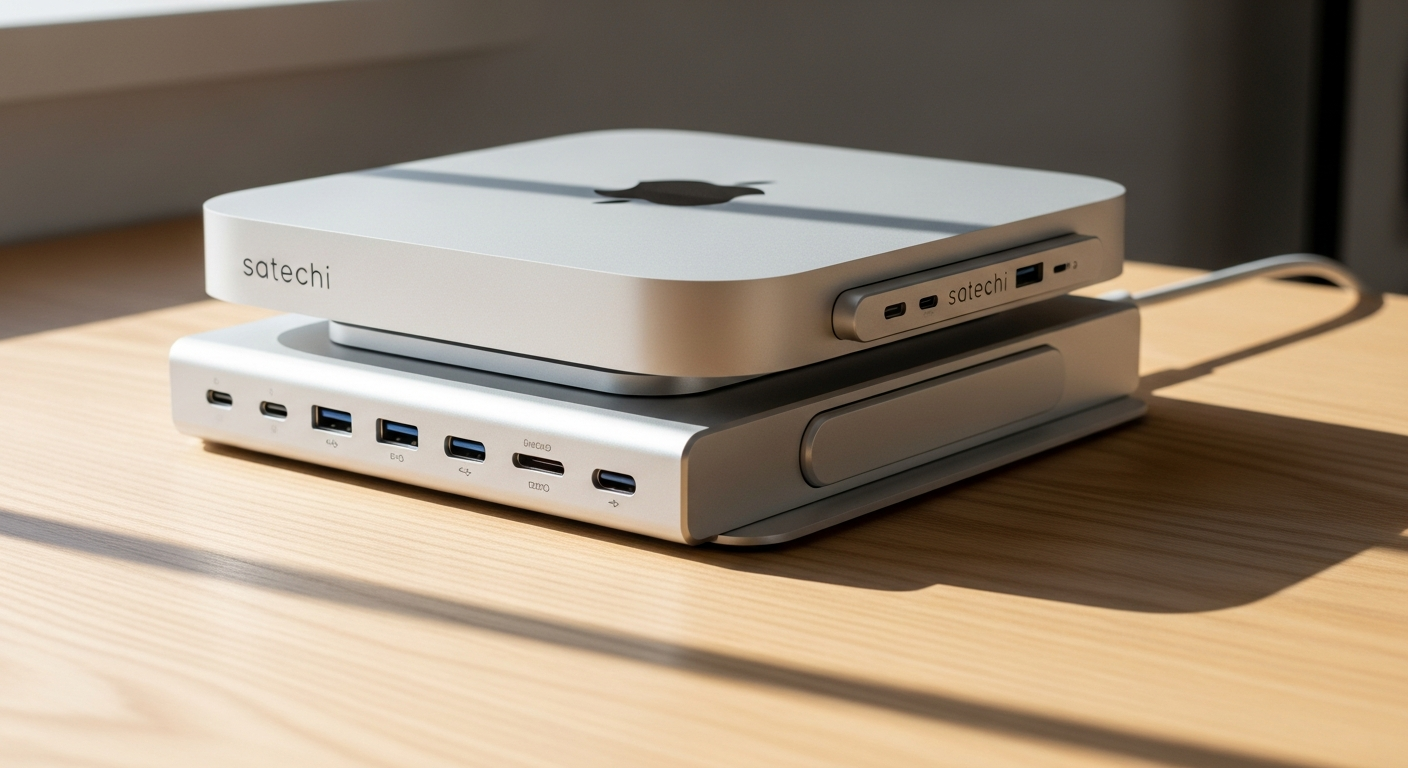
Mac mini users face a persistent frustration: Apple's compact powerhouse arrives with frustratingly limited ports, forcing professionals and creators to juggle adapters and external hubs across their desks. That single design choice creates a ripple effect of clutter, cable chaos, and connectivity compromises that undermine the machine's otherwise elegant simplicity.
The Satechi Mac Mini M4 Stand & Hub with SSD Enclosure enters this scenario as a thoughtfully engineered solution that addresses multiple pain points simultaneously. Rather than settling for a basic hub, Satechi bundled three essential functions—a multi-port USB hub, an ergonomic stand, and an integrated NVMe SSD enclosure—into one aluminum-crafted accessory that mirrors Apple's design language. At $99.99, it's become a top-selling choice among Mac mini and Mac Studio owners seeking a more complete workstation experience.
Throughout this guide, you'll understand the Satechi stand hub's standout features, port specifications, and real-world performance capabilities. You'll see exactly what storage expansion looks like, how the ergonomic elevation improves your workspace, and whether this accessory genuinely justifies its position in your setup budget.
Why Mac Mini Users Need Enhanced Port Connectivity
Limited built-in ports on Mac mini create immediate bottlenecks. With only 2 Thunderbolt 4 ports available, users quickly exhaust their connectivity options when connecting external drives, peripherals, and input devices simultaneously.
Common connectivity challenges plague photographers, videographers, and developers who juggle external drives, card readers, and input devices daily. Each additional peripheral requires either daisy-chaining adapters or constant plugging and unplugging—a workflow that defeats the purpose of owning a compact desktop machine designed for efficiency.
The clutter problem compounds quickly. Cables snake across desks, adapters dangle from ports, and the elegant Mac mini becomes the center of a tangled mess. Professional workflow impact follows naturally—limited ports slow down file transfers, backup processes, and peripheral switching. A photographer importing photos from multiple cards, a developer testing across various devices, or a content creator managing backup drives all hit the same wall: insufficient ports for simultaneous operation.
Satechi's multi-port solution consolidates connectivity into a single, organized hub without requiring additional desk real estate. This approach transforms how users interact with their Mac mini by eliminating the constant adapter rotation.
Port Specifications and Data Transfer Speeds
The hub features a USB-C data port delivering 10 Gbps transfer speeds for high-speed external drives and peripherals. Three USB-A data ports support up to 10 Gbps on compatible versions while maintaining backward compatibility with older USB devices that operate at slower speeds without causing any slowdown to other connected ports.
SD and microSD card readers built into the hub address a critical gap for photographers, videographers, and content creators who need quick access to camera memory cards and drone storage media. These readers aren't afterthoughts—they're core components that solve real workflow friction.
Simultaneous multi-port operation means all ports function concurrently without speed degradation. You can transfer files via USB-C while reading SD card data and charging peripherals through USB-A ports without experiencing bottlenecks or reduced performance.
Real-world transfer scenarios reveal the practical impact. Transferring a 4GB video file across USB-C takes roughly 3-4 seconds at 10 Gbps speeds. Importing a 2GB folder of RAW photos through the SD card reader while simultaneously backing up project files to an external drive happens without compromise. These aren't theoretical speeds—they're tangible improvements that compress hours into minutes across a typical workday.
Comparison to Mac mini's native ports demonstrates the connectivity expansion achieved. Where the Mac mini offers only 2 Thunderbolt ports, the Satechi hub adds 4 additional data ports plus dedicated card readers. That's a meaningful expansion of practical connectivity without external adapters or hub sprawl.
The Integrated NVMe SSD Enclosure—Storage Without the Clutter
NVMe and M.2 SATA support provides flexibility to use various SSD types and brands. Whether you already own compatible drives or prefer specific manufacturers for performance or reliability reasons, the enclosure accommodates your choice without proprietary lock-in.
Capacity up to 4TB accommodates growing storage needs for backups, large projects, or application libraries. Video editors can dedicate drives to specific projects. Photographers can maintain separate libraries by subject or client. Developers can expand available space for virtual machines or large development environments.
The 10 Gbps transfer speeds match the hub's data ports for consistent, fast performance. Adding an SSD through the hub doesn't create a speed bottleneck—data moves as quickly as it would through native Thunderbolt ports on the Mac mini itself.
Tool-free installation requires no screwdrivers. Simply slide the NVMe drive into the designated slot, and the enclosure secures it mechanically. The entire process takes under five minutes, even for users unfamiliar with hardware installation. This simplicity removes a common barrier to storage expansion.
Use cases vary dramatically depending on your workflow. Backup solutions benefit from high-speed SSD storage that completes nightly backups faster than external mechanical drives. Video editing project storage demands fast read/write speeds when working with 4K or higher resolution footage. Software library expansion lets developers maintain larger collections of development tools and dependencies without consuming Mac mini's internal storage.
Thermal management receives attention through the stand's elevation design. By raising the Mac mini off the desk surface, airflow improves around all components, including the SSD enclosure. During active use, this elevation mitigates heat accumulation that could affect drive performance or longevity.
Ergonomic Design and Workspace Organization
Elevation benefits extend beyond aesthetics. Raising the Mac mini off the desk surface improves airflow and thermal performance. Components don't rest against potentially warm surfaces, and air circulates more freely around the device during intensive operations.
Cable management transforms dramatically. Rather than coiling multiple cables around the base of the Mac mini, you route them through and around the hub's integrated structure. The result is fewer tangled cords and a cleaner visual workspace that makes adjustments and repairs easier.
Aluminum construction matches Mac mini's aesthetic and feels like an official Apple accessory. The material choice isn't arbitrary—aluminum provides durability while maintaining the premium look and feel that aligns with the overall Mac ecosystem. This cohesion matters to users who've invested in Apple hardware specifically because of its design consistency.
Desk real estate efficiency gains from consolidating hub, stand, and storage into one footprint. Rather than occupying separate spaces for a standalone hub, a separate stand, and an external SSD enclosure, all three components occupy the space traditionally taken by the Mac mini alone.
Improved viewing angles emerge from slight elevation. When your Mac mini sits elevated, monitor positioning becomes more ergonomic, and cable management becomes less obtrusive. The overall desk environment feels more intentional and organized.
Aesthetic appeal resonates with design-conscious users who appreciate the cohesive look with existing Apple hardware. The accessory doesn't feel like an aftermarket addition—it feels like a natural extension of the Mac mini itself.
Installation, Compatibility, and Setup Process
Plug-and-play functionality means no drivers or software installation is required for basic operation. You unbox the hub, position it on your desk, insert your Mac mini, connect your peripherals, and begin working immediately.
Mac mini M-series compatibility spans M1, M2, M3, and M4 models. The hub is optimized for these generations while maintaining compatibility with older Mac mini versions. Mac Studio compatibility adds another layer of utility—the hub works seamlessly with Mac Studio units for users who've upgraded to that hardware.
SSD installation steps involve opening a small latch, sliding the NVMe drive into the enclosure at a slight angle, and then pressing down gently until it clicks into place. The simple process takes under five minutes and requires no technical expertise.
Port recognition happens automatically. macOS detects all hub ports without configuration, and devices connected to those ports appear in System Information and Finder instantly. The experience mirrors connecting peripherals directly to the Mac mini.
Firmware considerations are minimal. Satechi typically provides updates through a companion app, but basic operation functions perfectly without any updates. The hub is designed as a transparent extension of your Mac mini—it works immediately and continues working across macOS updates.
Real-World Performance and Thermal Considerations
Heat generation during active use represents a realistic trade-off. When multiple ports and the SSD operate simultaneously, the hub generates noticeable warmth, particularly on the top surface near the SSD enclosure. Extended sessions with all ports active can create thermal stress on the device.
Thermal testing scenarios reveal how performance holds up during sustained file transfers or backup operations. The hub maintains full 10 Gbps speeds throughout extended operations without throttling, even as temperatures climb. However, the device itself becomes warm to the touch during these scenarios.
Airflow improvements from the stand's elevation mitigate heat buildup compared to direct-surface placement. The difference is measurable—a raised Mac mini experiences better thermal conditions than one resting directly on a desk or shelf. This elevation advantage extends to the SSD enclosure, reducing drive temperatures during intensive read/write operations.
SSD temperature monitoring during intensive operations shows manageable results. The drive itself remains well within operational specifications, typically ranging from 40-50°C during heavy use depending on ambient room temperature. The hub's aluminum construction actually helps dissipate heat from the drive efficiently.
Fan noise impact varies based on intensity. During light use, the Mac mini's fans remain virtually silent even with the hub installed. During sustained heavy transfer operations or backup cycles, fan activity increases noticeably as the Mac mini works harder, but this is normal behavior unrelated to any limitation of the hub itself.
Long-term reliability expectations remain positive for consistent daily use. The hub contains no moving parts and uses standard components. Users report multiyear reliability without degradation in performance or port functionality.
Pricing, Value Proposition, and Alternatives
The $99.99 price point reflects thoughtful value engineering. Purchasing separate components individually—a quality USB hub, a standalone aluminum stand, and a dedicated NVMe enclosure—would cost roughly equivalent or more money while consuming significantly more desk space.
Cost-benefit analysis becomes clear when comparing to alternatives. A quality USB hub alone typically costs $30-50. A dedicated stand adds another $20-30. A standalone NVMe enclosure runs $40-60. The Satechi hub delivers all three integrated into a single device at the $99.99 price point, making the economic argument straightforward.
Alternative solutions exist but carry trade-offs. Standalone hubs offer more port options but provide no stand or storage. External SSD enclosures work with any computer but don't integrate with a hub. Third-party stands elevate the Mac mini but add no connectivity. None of these alternatives solve all three problems simultaneously.
Value for different user types varies based on actual workflow needs. Photographers benefit immediately from fast SD card reading and high-speed SSD storage. Developers gain practical port expansion. Casual users might find the same functionality excessive. The assessment depends entirely on whether your actual daily tasks require all three integrated functions.
Warranty and support from Satechi typically includes a one-year limited warranty covering manufacturing defects. Customer service receives generally positive reviews, with support responding to issues within reasonable timeframes. Documentation and setup guides are clear and accessible.
Long-term investment considerations matter as Mac mini hardware evolves. The hub works with current M-series models and will likely support future generations given Satechi's consistent product updates. However, radical Mac mini redesigns could eventually diminish compatibility.
Limitations and Honest Trade-Offs
Mac mini-specific design means limited use if you upgrade to different Apple hardware. The stand portion fits only Mac mini dimensions, so transition to Mac Studio or other computers would require replacing the accessory or using it differently.
USB-C charging limitations apply to some hub versions. Certain USB-C ports function as data-only connections, which means you cannot charge peripherals through those specific ports. This limitation doesn't affect the primary USB-C port, but it's worth verifying specifications for your intended use case.
Video output constraints mean not all ports support external display connections. The hub expands connectivity but doesn't add Thunderbolt 4 or USB-C display output capabilities. Your monitor connection still requires one of the Mac mini's native Thunderbolt ports.
Heat accumulation during extended use of all ports simultaneously generates noticeable warmth. This isn't dangerous or indicative of a problem, but it's a reality worth acknowledging if you plan to use all ports concurrently during sustained operations.
Storage capacity ceiling of 4TB may feel limiting for heavy video production workflows. Users managing 8TB or larger project files need to consider this limitation, though most professional workflows incorporate tiered storage with active projects on faster drives and archived projects on mechanical backup.
Future compatibility questions naturally arise as Mac mini hardware evolves. While the hub should work with upcoming revisions, radical design changes could impact compatibility. Satechi's track record suggests they update products to maintain compatibility, but this isn't guaranteed.
Who Should Buy This Accessory
Content creators and photographers benefit immediately. The combination of SD/microSD card readers, fast USB-C and USB-A ports, and high-speed SSD storage directly addresses the most common workflow bottlenecks in image and video creation. Fast file transfers and convenient card reading eliminate the most painful parts of their daily process.
Software developers require multiple USB ports for devices, external drives, and testing peripherals. The hub provides enough concurrent connectivity that developers can maintain multiple peripheral connections without constant unplugging and replugging.
Mac mini as server users benefit from elevated positioning and expanded connectivity for 24/7 operation. Whether running a home media server, development server, or backup destination, the elevated position improves thermal management during continuous operation.
Remote workers appreciate cable management and the professional workspace appearance. The consolidated hub creates a cleaner desk environment that translates to fewer distractions and a more organized home office aesthetic.
Students and educators value the all-in-one solution for budget-conscious setups. The ability to add storage and connectivity in a single purchase makes the Mac mini more capable without requiring multiple separate purchases.
Not ideal for users with minimal peripheral needs or those planning to upgrade systems soon. If your current Mac mini usage involves only keyboard, mouse, and monitor, the hub adds complexity without tangible benefit. Similarly, if you anticipate upgrading hardware within the next year, the investment might not be justified.
Making the Decision—Is It Right for Your Setup?
Assessment questions guide the decision. How many external devices do you currently connect to your Mac mini? Do you frequently transfer files or media between external drives and your computer? Would additional fast storage genuinely improve your workflow? Does your desk environment feel cluttered with cables? Would elevated positioning improve your ergonomic setup?
Workload analysis determines whether the hub genuinely solves your specific challenges. Keep a usage log for a week. Track how many times you connect or disconnect peripherals, how long file transfers take, and whether limited ports create workflow friction. This concrete data reveals whether the hub addresses real problems or theoretical convenience.
Budget considerations matter—$99.99 is a meaningful purchase even if it's relatively modest in the context of Mac mini ownership. Evaluate whether the investment delivers measurable productivity gains that justify the cost. If the hub saves you 30 minutes weekly through faster file transfers and fewer adapter swaps, the annual time savings become substantial.
Space and desk setup assessment reveals whether consolidation genuinely improves your physical environment. Do you have room for an elevated stand? Would reducing external hub clutter noticeably improve your workspace? If your desk is already optimized, the consolidation benefit diminishes.
Future-proofing requires honest assessment of your Mac mini usage trajectory. Are you likely to keep this machine for 3-5 years, or might you upgrade sooner? If you plan significant hardware changes within a year, the investment faces a shorter return window.
Trial period approach works well if available. Some retailers offer return windows allowing you to test whether the benefits genuinely improve your workflow before committing to permanent ownership. This low-risk approach lets you make decisions based on actual experience rather than speculation.
The Bottom Line: Satechi's Thoughtful Solution for Mac Mini Limitations
The Satechi Mac Mini Stand Hub with SSD Enclosure succeeds because it refuses to choose between solving one problem or another. It tackles connectivity constraints, storage expansion needs, and workspace organization simultaneously—all while maintaining the aesthetic cohesion Apple users expect. That integrated approach is precisely why it's become a bestseller among Mac mini owners who've grown frustrated with port limitations.
The 10 Gbps transfer speeds, tool-free SSD installation, and aluminum design aren't revolutionary individually, but together they create a genuinely useful accessory that transforms how you interact with your Mac mini. Whether you're a photographer managing large RAW files, a developer juggling multiple peripherals, or someone simply tired of adapter sprawl, this hub delivers measurable practical value.
The trade-offs are real—thermal considerations during heavy use, Mac mini-specific design, and USB-C limitations on some ports—but they're manageable for most users. At $99.99, you're paying roughly what you'd spend buying these components separately, except you gain the integration benefit and space savings.
If your Mac mini setup currently involves cable chaos, external drive juggling, or compromised workflows due to limited ports, the Satechi stand hub warrants serious consideration. Test it against your actual workload, assess whether the elevation and consolidation genuinely improve your desk environment, and make the decision based on your specific needs rather than general enthusiasm. That's how you'll know whether this accessory becomes an essential part of your setup or an expensive experiment.
Leave a Reply