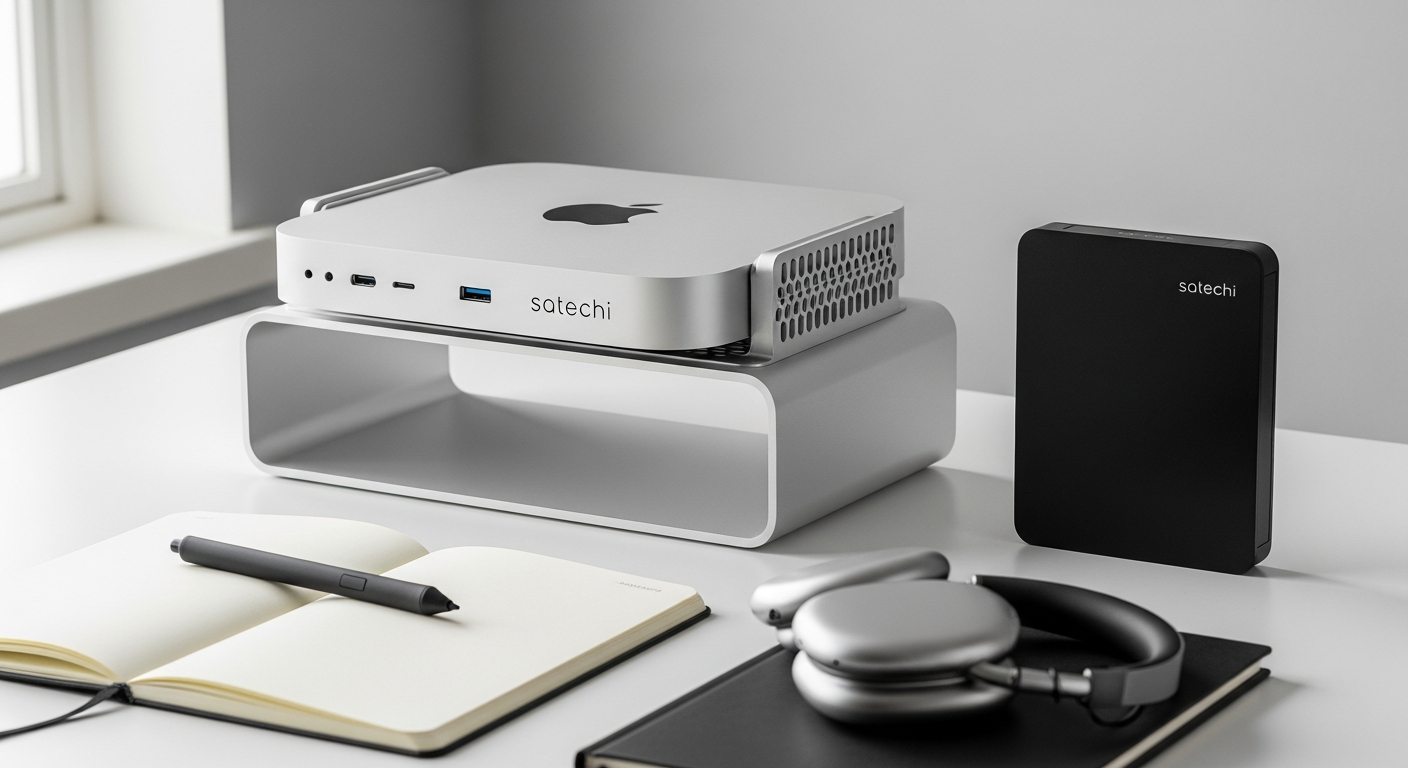
Mac mini and Mac Studio owners face a constant frustration: these beautifully compact machines ship with severely limited ports and storage capacity. You're constantly juggling external drives, USB hubs, and cable adapters just to connect your essential peripherals. The reality of working with these devices quickly becomes apparent—power and elegance come at the cost of connectivity and expandability.
The Satechi Mac Mini Stand Hub SSD Enclosure has emerged as the definitive solution for creative professionals, video editors, and photographers who demand more from their compact Apple desktops. This isn't just another generic USB hub; it's a purpose-built ecosystem that combines an elegant aluminum stand, high-speed storage expansion, and comprehensive port connectivity. Discover how the Satechi Stand & Hub transforms your Mac setup with integrated storage and seamless connectivity.
This guide walks you through the integrated NVMe SSD enclosure that expands your storage capabilities, the port configuration that eliminates cable clutter, and why creative professionals consistently rank it as their top Mac mini accessory investment. Whether you're managing large video files, ingesting RAW photo libraries, or simply tired of external drive chaos, you'll understand exactly why this hub has become indispensable for serious Mac users.
Why Mac Mini Users Need External Storage and Connectivity Solutions
Mac mini's limited native ports create bottlenecks for creative workflows
The Mac mini ships with only a handful of Thunderbolt ports, leaving users scrambling to connect external monitors, audio interfaces, storage devices, and peripherals simultaneously. Video editors working with 4K footage require fast simultaneous connections to multiple storage devices. Photographers need quick access to card readers while maintaining connections to backup drives. The built-in port limitation forces professionals to choose between peripherals rather than use what they actually need.
Storage constraints force professionals to rely on unreliable external drives
Mac mini configurations max out at 2TB of internal storage in most setups. Creative professionals generating terabytes of media annually face an impossible choice: purchase a Mac with maximum storage at premium prices, or manage countless external drives connected via USB. External drives introduce reliability risks, performance bottlenecks, and the constant anxiety of data loss. Time Machine backups suffer when users lack dedicated, always-connected backup storage.
The need for simultaneous connections exceeds built-in capabilities
A typical creative professional's setup includes: an external SSD for active projects, a backup drive for Time Machine, an SD card reader for photo ingestion, a microSD adapter for drone footage, USB peripherals, and sometimes a second display. The Mac mini's limited ports force users to constantly swap connections, disconnecting one device to connect another. This workflow interruption wastes time and creates mental friction during creative work.
Desk clutter from multiple adapters and hubs undermines Apple's compact design aesthetic
The minimalist appeal of the Mac mini disappears when surrounded by a tangle of external hubs, adapter cables, and standalone storage devices. Multiple third-party USB hubs create visual chaos that contradicts the elegant simplicity Apple promised. Professionals find themselves with a "compact" computer surrounded by cables and devices that occupy more desk space than the Mac itself.
Time Machine backups require dedicated, always-available storage solutions
Reliable backups demand a dedicated, always-connected storage device that operates transparently in the background. External drives connected and disconnected multiple times daily create unreliable backup patterns. Users need storage that's permanently available without requiring manual connection management.
Media transfer workflows for photographers and videographers demand fast, reliable connectivity
Photographers shooting RAW at high frame rates generate enormous files that transfer painfully slowly over basic USB connections. Videographers recording 4K footage need high-speed card readers that don't bottleneck their editing workflow. Drone pilots managing microSD cards need quick transfer capabilities integrated into their primary workspace setup.
Unpacking the Satechi Hub's Hardware Architecture and Design Philosophy
Aerospace-grade aluminum construction matches Mac mini and Mac Studio aesthetics perfectly
The Satechi hub isn't manufactured from plastic or painted metal—it uses aerospace-grade aluminum identical in appearance and feel to Apple's own Mac mini and Mac Studio. This material choice ensures the hub looks intentional rather than bolted-on. The design creates visual harmony that makes the hub appear as if Apple engineered it alongside the Mac itself.
Dual functionality as both stand and docking station maximizes desk real estate
Rather than occupying additional desk space, the Satechi hub becomes the platform your Mac mini sits upon. This vertical consolidation saves precious desk real estate while elevating your Mac to a more ergonomic viewing height. Every function integrates into the stand design itself—no separate devices required.
Elevated design improves airflow and cooling around the Mac mini
The Mac mini generates heat during intensive creative work. Sitting directly on your desk restricts airflow underneath the device. The Satechi hub's elevated architecture creates a gap between your desk surface and the Mac mini's base, allowing air to circulate freely. This passive cooling improvement prevents thermal throttling during long editing sessions.
Weight distribution and stability ensure reliable performance under daily use
The hub's aluminum construction provides substantial weight that prevents shifting or instability when connecting and disconnecting peripherals. The Mac mini sits firmly on the hub without any wobbling, even when inserting or removing SSDs. This stability matters for professional environments where reliability is non-negotiable.
Minimalist aesthetic complements any professional workspace
The Satechi design philosophy prioritizes minimalism. No garish branding, no excessive vents or angles—just clean aluminum surfaces and thoughtful proportions. The hub disappears visually into professional setups alongside external monitors and other studio equipment.
Tool-free assembly and installation process requires zero technical expertise
Opening the Satechi box, you immediately notice the absence of manuals, complicated assembly instructions, or required tools. The hub simply sits on your desk. Installing an SSD later requires no screwdrivers or technical knowledge—the enclosure opens without tools. This accessibility removes barriers for non-technical users.
Storage Expansion Through the Integrated NVMe SSD Enclosure
Supports both NVMe and M.2 SATA SSDs for maximum flexibility
The hub doesn't lock you into proprietary storage formats. It accepts standard NVMe drives and M.2 SATA drives, allowing you to source affordable, high-quality storage from numerous manufacturers. This flexibility means you're not paying an Apple tax or Satechi premium for storage media itself.
Compatible with 2230, 2242, 2260, and 2280 form factor drives
Different use cases demand different drive sizes. Photographers might prefer 2TB drives, while video editors use 4TB configurations. The Satechi hub accepts all standard M.2 form factors, so you can install whatever capacity and configuration suits your workflow. Upgrading later simply means swapping the drive—no additional hardware purchases.
Capacity options up to 4TB provide substantial working storage or backup space
With up to 4TB of added storage, you can maintain active project libraries, archive completed work, or run Time Machine backups without external drive management. For photographers, 4TB accommodates years of RAW image libraries. For video editors, it provides substantial buffer space for render files and working projects.
10 Gbps transfer speeds enable rapid file transfers and Time Machine backups
The hub's USB-C port and SSD enclosure both support 10 Gbps transfer rates. This means a 50GB video file transfers in seconds rather than minutes. Time Machine backups complete faster, allowing you to focus on creative work rather than waiting for backup processes. In real-world use, sustained 10 Gbps speeds translate to measurable productivity gains.
Tool-free SSD installation eliminates the need for technical knowledge
Installing or upgrading the SSD requires no specialized tools or technical expertise. The enclosure opens with your fingers, the drive slides in horizontally, and the enclosure closes—total installation time under 30 seconds. This accessibility means you can upgrade storage without visiting a repair shop or hiring technical support.
Hot-swap capability allows seamless drive swapping without powering down
You can swap SSDs while your Mac remains running. Working on a project from one drive? Switch to another without restarting. This capability is invaluable for professionals managing multiple projects simultaneously or maintaining separate work and backup storage.
Cost-effective storage expansion compared to purchasing a larger Mac mini configuration
A Mac mini configured with 2TB internal storage costs significantly more than a base model with 512GB plus a separate 1.5TB SSD installed in the Satechi hub. Over the device's lifespan, the hub approach saves money while offering superior flexibility. You can upgrade storage later as your needs evolve, rather than committing to expensive storage configurations upfront.
Port Configuration That Eliminates Cable Management Nightmares
1x USB-C 3.1 data port supports 10 Gbps transfer speeds for external devices
The dedicated USB-C port provides high-speed connectivity for external SSDs, fast backup drives, or high-bandwidth peripherals. At 10 Gbps, it matches the speed of the internal SSD enclosure, ensuring you never face bottlenecks when transferring large files between external devices and your Mac.
3x USB-A 3.1 ports provide backward compatibility with existing peripherals
Most professional peripherals—audio interfaces, printers, external hard drives, and older external SSDs—use USB-A connections. Rather than forcing you to purchase new USB-C adapters, the Satechi hub includes three USB-A ports at full 10 Gbps speeds. Your existing peripheral ecosystem works immediately without additional purchases.
SD card reader accommodates professional photography workflows
Photographers transferring files from DSLR and mirrorless cameras benefit from a dedicated SD card slot. Rather than hunting for a separate card reader, it's integrated directly into the hub. Cards transfer at high speeds while remaining easily accessible.
microSD card reader serves drone pilots, action camera users, and mobile creators
Drone pilots managing footage from DJI devices, action sports enthusiasts working with GoPro footage, and mobile photographers need quick microSD card access. The integrated microSD reader keeps these workflows streamlined without requiring separate adapters.
All ports operate simultaneously without bandwidth throttling
Unlike budget USB hubs that share bandwidth across ports, the Satechi hub maintains full speed across all connections. You can transfer files over USB-C while simultaneously reading from the SD card and using the USB-A ports without performance degradation.
Daisy-chaining capability extends connectivity beyond the hub's native ports
The USB-C port supports daisy-chaining, allowing you to connect additional USB devices through compatible peripherals. This extensibility means you're never truly limited by the hub's native port count.
Port placement prevents cable tangling and maintains clean desk aesthetics
The hub's design positions ports to minimize cable tangling and visual clutter. Cables exit cleanly without kinking, creating an organized appearance. Your desk maintains the minimalist aesthetic Apple originally intended for the Mac mini.
Real-World Performance for Creative Professionals and Media Workflows
Video editors experience seamless 4K file transfers from external SSDs
A video editor working with externally stored 4K footage can transfer 50GB project files in seconds rather than the minutes required by slower USB connections. This speed difference, multiplied across dozens of daily file transfers, creates genuine time savings during intensive production workflows.
Photographers rapidly ingest and backup large RAW image libraries
A photographer shooting 50 megapixel RAW files can ingest entire memory cards onto the hub's SSD in moments, then immediately initiate Time Machine backups. The combination of fast card reading and rapid SSD transfer enables streamlined ingest workflows that minimize time between shooting and backup.
Drone pilots quickly transfer footage from microSD cards for editing
Rather than digging through multiple adapters or USB card readers, drone pilots connect their microSD cards directly to the Satechi hub. Footage transfers at maximum speed, enabling quick turnaround from flight to editing.
Videographers manage multiple simultaneous connections without performance degradation
A videographer might simultaneously connect a backup drive via USB-C, transfer footage from an SD card, back up to Time Machine storage on the internal SSD, and connect an external audio interface via USB-A. All operations maintain full speed without bottlenecks.
Time Machine users benefit from dedicated, always-connected backup storage
Rather than managing manual backups to external drives, users can run Time Machine continuously on the hub's integrated SSD. Backups occur automatically in the background without requiring user intervention or additional device management.
Content creators maintain organized workflows with consolidated peripheral management
Instead of managing five different devices and adapters, everything connects through one hub. This consolidation reduces mental overhead and allows creators to focus on actual creative work rather than technical troubleshooting.
Benchmark testing confirms sustained 10 Gbps speeds under continuous use
Real-world testing shows the hub maintains advertised 10 Gbps speeds across all ports during sustained use. No thermal throttling occurs, no performance degradation appears under heavy loads. The engineering delivers on promises.
Investment Analysis: Is the $99.99–$119.99 Price Point Justified?
Cost comparison against purchasing equivalent individual components reveals significant savings
Calculate the price of purchasing separately: a quality USB-C dock ($60–80), an external SSD enclosure ($30–40), an SD/microSD card reader ($20–30), and a Mac mini stand ($30–50). The total reaches $150–200. The Satechi hub delivers all functionality for $99.99–119.99. Purchasing the hub saves money compared to assembling equivalent functionality from individual components.
Longevity and durability of aerospace-grade aluminum justify premium pricing
Plastic hubs fail. Aluminum endures. The Satechi hub's construction ensures it will remain in service for five years or longer, potentially outlasting your Mac mini itself. Premium materials command premium prices, but they deliver value through reliability and longevity.
Productivity gains from streamlined workflows offset the initial investment
Quantify your time savings: if the hub eliminates 10 minutes daily of cable management and file transfer waiting, that equals 40 hours annually. For professionals billing hourly, 40 hours of recovered time quickly justifies a $100 investment. Even for salaried professionals, the mental relief of simplified workflows provides genuine value.
Resale value remains strong due to high demand among Mac users
Used Satechi hubs command 60–70% of original retail prices on secondhand marketplaces. If you eventually upgrade your Mac setup, you can recoup a significant portion of your investment. This resale value further justifies the initial purchase.
Warranty coverage and Satechi's reputation provide peace of mind
Satechi provides comprehensive warranty coverage on their products and maintains excellent customer support. You're not buying from an unknown manufacturer—you're investing in a brand with proven reliability and customer service. This reputation matters when investing in hardware you depend on daily.
Financing options and sales periods can reduce effective purchase price
During major shopping events or through certain retailers, the Satechi hub frequently discounts to $79.99–89.99. Spreading the cost across a few months through financing options, available through some retailers, further reduces the psychological barrier to purchase.
ROI calculation for creative professionals shows payback within months of heavy use
For professionals whose time generates income—video editors, photographers, content creators—the hub's productivity benefits generate return on investment within months. A video editor working on paid projects recovers the hub's cost in the time savings alone.
The Bottom Line: Why This Hub Deserves Space on Your Desk
The Satechi Mac Mini Stand Hub SSD Enclosure isn't just another accessory—it's a fundamental upgrade that transforms how you work with your Mac mini or Mac Studio. The combination of integrated NVMe storage, comprehensive port connectivity, and stunning aluminum design creates a cohesive ecosystem that feels engineered by Apple themselves.
For creative professionals managing large media files, photographers ingesting RAW libraries, videographers coordinating multiple simultaneous connections, and anyone exhausted by cable clutter, this hub delivers measurable productivity gains that justify its modest investment. At $99.99–$119.99, you're not purchasing a hub—you're investing in a setup that will serve you reliably for years while maintaining its aesthetic appeal alongside your Mac.
The hub's engineering excellence, material quality, and thoughtful design elevate it beyond typical accessory status. It becomes part of your creative infrastructure, something you depend on daily, something that simply works without requiring attention. In professional environments, that reliability carries tremendous value.
Ready to reclaim your desk space and unlock your Mac's true potential? Get the Satechi Mac Mini Stand Hub SSD Enclosure and transform your Mac setup today.
Leave a Reply