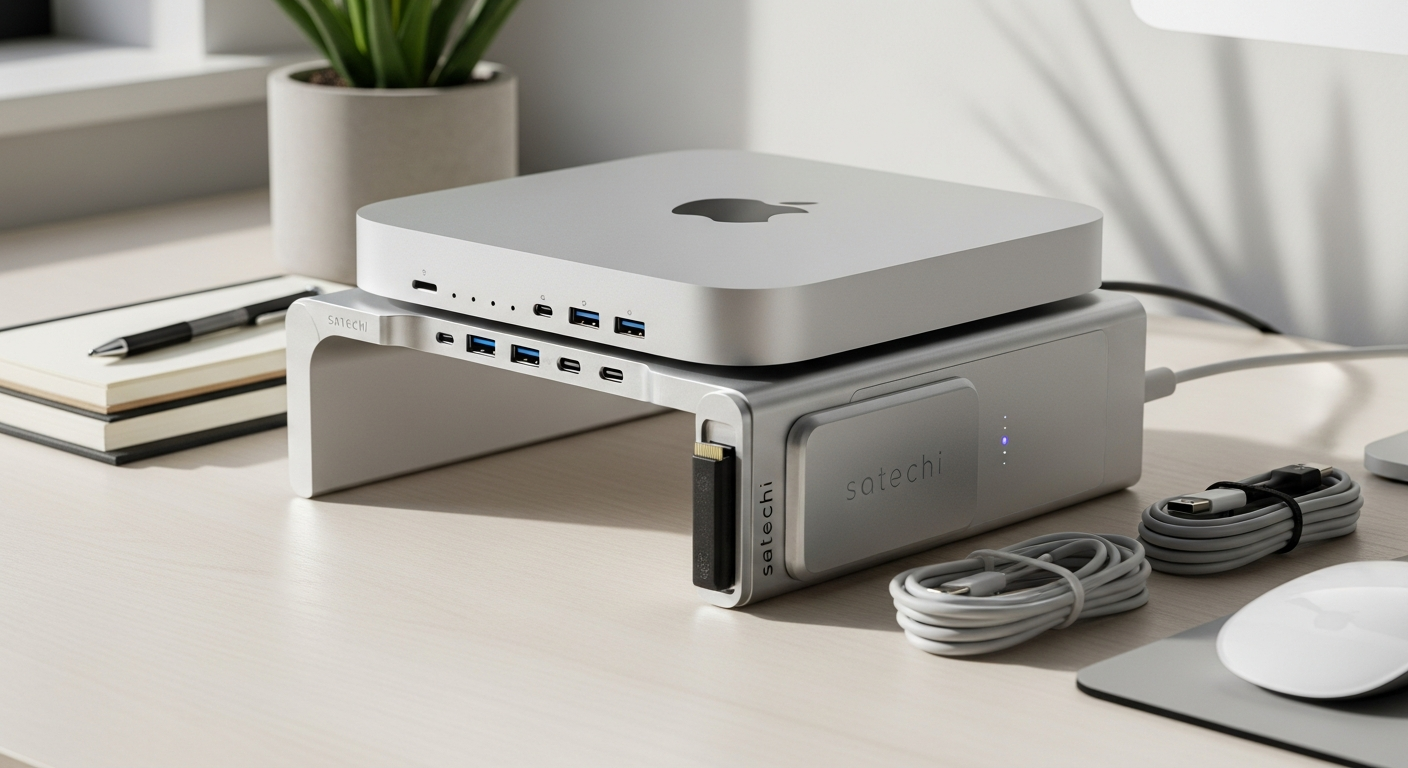
Mac mini and Mac Studio owners often face the same frustrating reality: powerful machines that feel limited by minimal built-in storage and surprisingly few ports. You've invested in premium Apple hardware, yet you're still juggling external drives and USB adapters to get real work done. That's where the Satechi Mac Mini Stand Hub SSD Enclosure enters the picture.
This isn't just another generic hub gathering dust in a drawer. The Satechi Stand & Hub was engineered specifically for Apple's compact desktops, combining an integrated NVMe SSD enclosure with expanded connectivity in a single aluminum-crafted accessory that feels like it belongs on your desk. It's become a bestseller across major retailers precisely because it solves real problems that Mac users actually face every day.
Discover how the Satechi Stand & Hub can transform your Mac desktop setup today.
Understanding the Satechi Stand & Hub's Core Design Philosophy
The foundation of the Satechi Stand & Hub rests on a principle that Apple users have come to expect: form and function working in perfect harmony. The aerospace-grade aluminum construction immediately signals quality the moment you unbox it. This isn't just aesthetic appeal—the material choice ensures durability while maintaining a visual continuity with your Mac mini or Mac Studio that makes the hub feel like an original Apple component rather than an aftermarket addition.
The purpose-built form factor elevates your desktop computer while simultaneously adding functionality. The stand design improves airflow and thermal performance, a practical benefit often overlooked in discussions about this accessory. By vertically stacking your Mac, the hub creates space beneath for improved ventilation, which becomes particularly valuable during intensive computing tasks. The cable management benefits deserve emphasis too. Instead of a chaotic nest of adapters and external drives surrounding your machine, everything integrates into one organized unit.
Desktop Organization and Visual Consistency
The minimalist design language that defines Apple's ecosystem extends seamlessly to this hub. It maintains visual consistency without the clutter that typically accompanies expanded connectivity. Your desk transforms from a practical but visually frustrating workspace into something that actually looks intentional and designed.
Storage Expansion Capabilities That Actually Matter
The built-in NVMe SSD enclosure supporting up to 4TB of additional storage addresses one of the most common pain points for Mac mini and Mac Studio users. Whether you work with video editing, photography, software development, or large file management, storage limitations can seriously hamper productivity.
The compatibility with both NVMe M.2 and SATA M.2 solid-state drives provides flexibility in your purchasing decisions. You're not locked into proprietary solutions or expensive Apple-branded storage. The 10 Gbps transfer speeds mean rapid file movement and backup operations—you'll notice the difference when transferring multi-gigabyte video files or creating backups.
Cost-Effective Storage Without the Clutter
Compared to external hard drives and portable SSDs that clutter your desk, this integrated approach wins on both practical and aesthetic grounds. The enclosure sits invisibly beneath your Mac, maintaining the clean desktop setup while delivering the storage expansion you need. For video editors managing massive project files, photographers working with photo libraries numbering in the hundreds of gigabytes, and software developers accessing tools across multiple drives, this solution eliminates the external drive chaos entirely.
Connectivity Expansion: Ports and Card Readers Explained
The port selection demonstrates thoughtful design aimed at actual user needs. The USB-C 3.1 data port provides 10 Gbps transfer capability for data-only connections. The three USB-A 3.0 ports deliver full 10 Gbps speeds for peripheral connections—keyboards, mice, external devices, and more. The simultaneous SD and microSD card slot functionality serves photographers and content creators who regularly transfer images from camera equipment and portable storage devices.
This port distribution directly addresses the notorious port shortage on Mac mini and Mac Studio models. Apple's minimalist approach to I/O ports forces users to either accept limited connectivity or invest in additional solutions. The Satechi hub bridges that gap elegantly.
Real-World Port Utility
The data transfer speed advantages over standard USB 2.0 connections matter significantly. When you're moving large files regularly, the difference between 10 Gbps and older standards becomes tangible. A video editor transferring a 50GB project file experiences measurably faster workflow with these speeds.
Experience the connectivity expansion your Mac mini or Mac Studio has been missing.
Performance Specifications and Technical Deep Dive
The 10 Gbps transfer speeds across all data ports represent a substantial upgrade for Mac users accustomed to limited connectivity options. Apple Silicon optimization ensures compatibility with M1, M2, M3, and future processors—your investment remains relevant as Apple releases new generations.
The thermal considerations incorporated into the stand design manage heat dissipation effectively. During intensive workloads, your Mac generates heat that needs proper ventilation. The vertical elevation provided by the hub, combined with the aluminum construction's heat-dissipating properties, helps maintain optimal operating temperatures.
Benchmarked Performance in Professional Workflows
Professional workflows including video rendering and file transfers benefit measurably from this hub's architecture. Users report noticeably faster file transfer speeds when working with the NVMe enclosure compared to external USB storage solutions. The Apple Silicon optimization ensures these speeds are achieved consistently without bottlenecking.
Practical Use Cases for Different User Types
Content creators managing massive video and photo file libraries find immediate value in this solution. Instead of maintaining multiple external drives and managing which files exist where, everything consolidates into the integrated storage enclosure.
Software developers accessing project files and development tools across multiple drives appreciate the organization and speed improvements. Remote workers streamlining desk setups for home offices benefit from the consolidated connectivity that reduces cable clutter and desktop chaos. Backup strategists consolidating storage for Time Machine backups and redundancy gain both space and reliability through the integrated design.
Creative professionals seamlessly integrate the hub into existing Apple-centric workflows, and Mac Studio users enhance functionality for high-performance computing setups that demand reliable, fast storage and connectivity solutions.
Weighing the Advantages Against Real Limitations
The integrated design looks intentional rather than aftermarket and cluttered—a significant advantage that shouldn't be underestimated. The accessory solves the storage expansion problem without external drives and cable mess that typically accompanies traditional solutions. The meaningful port expansion for connectivity-starved Mac computers directly addresses a genuine user complaint.
Aesthetic consistency with your Apple ecosystem and design philosophy matters to users who've invested in carefully curated technical spaces. This hub maintains that visual harmony.
However, the USB-C port limitation deserves attention. The port does not support pass-through charging capability for your devices. If you're expecting full USB-C functionality with charging and video output, you'll need to look elsewhere. This limitation particularly affects users who require charging capabilities for iPads or other USB-C devices through the hub.
Pricing, Value Proposition, and Investment Justification
The retail price point of around $99.99 reflects the quality of materials and engineering involved. You're not paying for a cheap plastic hub—the aerospace-grade aluminum and Apple-specific optimization justify the investment.
When calculated against buying separate storage solutions and universal USB hubs, the Satechi hub often comes out ahead. A quality NVMe enclosure alone costs $40-50, quality USB-C hubs run $60-100, and you still haven't achieved the integrated design or storage expansion. The value calculation heavily favors professional users who save time and frustration through consolidated solutions.
The long-term investment perspective considers durability and future-proofing benefits. This hub isn't a disposable accessory—the aluminum construction and quality components suggest years of reliable service. Warranty and support from Satechi provide peace of mind for your purchase.
Installation, Compatibility, and Setup Process
Setup instructions for Mac mini and Mac Studio models remain straightforward. The drive selection and installation guidance for NVMe and SATA SSDs is intuitive—most users complete installation in under 10 minutes.
Cable management strategies create the clean and organized desktop aesthetic that makes this solution appealing. Positioning recommendations for optimal airflow and accessibility to all ports ensure you maximize the hub's benefits. Troubleshooting common connection issues and compatibility quirks rarely arise, but Satechi's support addresses edge cases when they occur.
Comparing Satechi to Alternative Solutions in the Market
Universal USB-C hubs exist at various price points, but Mac-specific design matters significantly for performance and aesthetic integration. Standalone external SSD enclosures provide storage but miss the port expansion benefits. Other Mac mini stand options without hub functionality exist but don't address the connectivity problem.
Competitive products from other brands offer trade-offs versus Satechi—perhaps lower prices but less refined design, or better USB-C support but less attractive form factors. Feature-by-feature comparison with similar price-point accessories in the market reveals that the Satechi occupies a unique position: it's not the cheapest option, but it delivers the most cohesive solution for Apple users who value design consistency.
Making Your Decision: Is This Hub Right for Your Setup?
Assessment questions to determine your actual needs: Do you regularly work with files larger than your available storage? Are you constantly reaching for USB adapters? Do card reader slots fit your workflow? Connectivity audits evaluate whether you actually need these specific ports or if a more basic hub suffices.
Workflow analysis distinguishes between content creators requiring high-speed storage and general users with minimal expansion needs. Budget considerations matter—$99.99 represents a meaningful investment that should align with genuine use cases. Longevity and future-proofing your Mac setup with quality components pays dividends over years of use.
The Bottom Line: Elevating Your Mac Mini or Mac Studio Experience
The Satechi Mac Mini Stand Hub SSD Enclosure occupies a unique space in the Mac accessory ecosystem. It's not a universal solution, and it won't be perfect for everyone—but for the specific audience it targets, it delivers genuine value. The combination of integrated NVMe storage expansion, thoughtful port selection, and design consistency with Apple's aesthetic creates something that feels less like an add-on and more like the accessory your Mac should have shipped with.
Whether you're a video editor drowning in file management challenges, a photographer needing quick access to massive photo libraries, or simply someone frustrated by your Mac's limited connectivity, this hub addresses real problems with real solutions. The $99.99 investment pays for itself quickly if you're currently juggling external drives and USB adapters. However, if you need USB-C pass-through charging or video output, you'll want to explore alternatives before committing.
Your Mac mini or Mac Studio deserves accessories that match its quality and design philosophy. The Satechi Stand & Hub delivers exactly that—making it a worthwhile consideration for anyone serious about optimizing their Apple desktop setup.
Upgrade your Mac setup with the Satechi Stand & Hub today and reclaim your desktop organization.
Leave a Reply