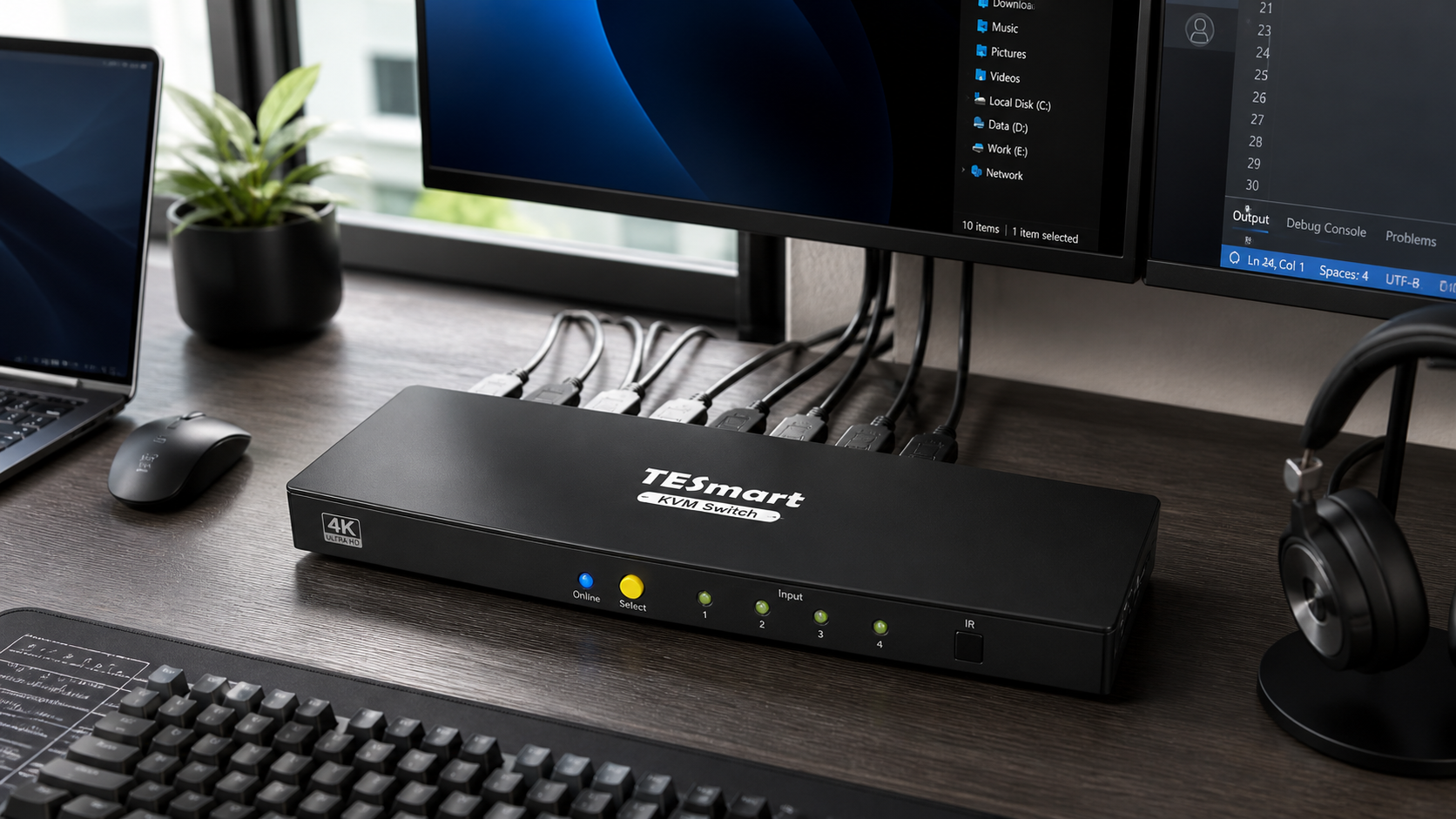
Over 60% of remote workers and IT professionals operate multiple computers daily—yet most still waste precious minutes swapping cables, hunting for the right mouse, and toggling between displays. I've watched countless setups devolve into tangled messes of HDMI cords and USB adapters, turning what should be a streamlined workflow into a frustrating puzzle.
There's a better way, and it doesn't require overhauling your entire desk. A KVM switch—keyboard, video, mouse—consolidates control of multiple computers through a single set of peripherals. The TESmart 4K HDMI KVM Switch has become the go-to choice for home office users, content creators, developers, and IT teams because it delivers enterprise-level functionality without the enterprise-level price tag.
Discover how the TESmart 4K HDMI KVM Switch can streamline your multi-computer workflow today.
Whether you're managing two workstations or orchestrating a complex multi-monitor setup, this device handles the heavy lifting so you can focus on actual work. In this guide, I'm breaking down everything you need to know about the TESmart 4K HDMI KVM Switch—from technical specifications and real-world performance to installation nuances and which model fits your exact workflow. You'll discover how this single device eliminates cable chaos, streamlines your productivity, and why it's become the most popular KVM solution for professionals across industries.
What Makes a TESmart 4K HDMI KVM Switch Different from Basic Models
4K Resolution at 60Hz Support
Ultra-high-definition video without lag or refresh rate compromises separates the TESmart from consumer-grade alternatives. This capability proves essential for content creators, video editors, and professionals whose work demands pixel-perfect clarity.
HDMI 2.0 Connectivity
The future-proof standard handles bandwidth-intensive applications and gaming without bottlenecks. Whether you're streaming 4K content or working with demanding graphics applications, HDMI 2.0 ensures your video signal remains stable and responsive.
Dual Switching Methods
Hotkey combinations, front-panel buttons, and optional IR remote control provide flexible control options. You choose how you switch—keyboard shortcuts for speed, physical buttons for tactile feedback, or remote control for convenience across your workspace.
EDID Emulation Technology
Stable display detection across different monitors and operating systems prevents the frustration of flickering screens or detection failures. This technology ensures your displays recognize the signal immediately upon switching, eliminating awkward configuration delays.
Multi-Platform Compatibility
Seamless operation with Windows, macOS, Linux, and gaming consoles means your KVM switch works regardless of your ecosystem. Software developers testing across multiple operating systems, IT professionals managing mixed environments, and creative teams running different platforms all benefit from this universal compatibility.
USB Peripheral Sharing
USB 2.0 and USB 3.0 options handle keyboards, mice, printers, and external drives with equal competence. The switch manages your entire peripheral ecosystem, not just video and keyboard input.
Audio Output Integration
Select models include dedicated audio channels for complete workstation control. Rather than managing separate audio cables, your entire audio-visual setup routes through one device.
Port Configurations: Choosing Between 2-Port, 4-Port, and Advanced Models
2-Port Models for Dual-Workstation Setups
Ideal for home offices, streamers managing a primary and secondary computer, and professionals balancing work and personal machines. The 2-port configuration keeps your desk minimal while handling the most common multi-computer scenario.
4-Port Models for Multiple Machines
Perfect for IT professionals, developers, and content creators handling multiple machines simultaneously. Whether you're testing across different environments, managing client systems, or coordinating production and backup workstations, the 4-port provides sufficient flexibility without overwhelming complexity.
Dual-Monitor Support
Specific configurations allow independent control of two displays across different systems. This proves invaluable for professionals who need reference monitors, extended workspaces, or parallel system monitoring.
Scalability Considerations
Port count impacts cable management, desk real estate, and switching complexity. More ports mean more capability but also more cables to organize and more switching decision points to navigate.
Enterprise-Grade Alternatives
When to upgrade beyond standard models depends on your specialized environment requirements. High-port-count systems and advanced configurations serve organizations managing dozens of computers.
Price-to-Functionality Ratio
Mainstream models range from $80–$250, while premium dual-monitor and higher-capacity versions command higher prices. Most professionals find exceptional value in the standard 2-port and 4-port offerings, with advanced models justified only for truly demanding environments.
Find the perfect TESmart model for your specific setup and budget.
Real-World Use Cases: Who Benefits Most from This Technology
Home Office Professionals
Consolidating work and personal computers reduces desk clutter and context-switching friction. You maintain separation between professional and personal spaces without maintaining duplicate peripherals or sacrificing desk real estate.
IT Support Teams
Managing multiple client machines, testing environments, and diagnostic systems from one control point accelerates troubleshooting and reduces setup overhead. IT professionals report significant time savings when working across numerous systems throughout the day.
Content Creators and Streamers
Switching between production computers, gaming rigs, and capture systems without interrupting broadcasts maintains momentum and prevents technical delays. Professional streamers particularly value the hotkey switching capability for rapid transitions during live broadcasts.
Software Developers
Testing across Windows, macOS, and Linux simultaneously without physical machine swapping streamlines development workflows. The ability to maintain all three systems running and accessible through one keyboard and mouse dramatically improves testing efficiency.
Video Editors and Designers
Coordinating render machines, editing workstations, and reference monitors through unified control enables complex creative workflows. Reference monitoring becomes seamless—glance between systems without complex cable rearrangement.
Cybersecurity Professionals
Maintaining isolated systems and sandboxed environments while preserving workflow efficiency prevents security compromises from rushed workarounds. The KVM switch allows proper system isolation without the productivity penalty typically associated with multiple independent workstations.
Installation, Setup, and Compatibility Considerations
Plug-and-Play Functionality
Minimal configuration required for most standard setups means you're operational within minutes. Connect your HDMI cables, USB peripherals, and power supply, then start switching.
Driver Requirements
Understanding when additional software is needed versus pure hardware operation prevents unnecessary installation steps. Most TESmart models operate as pure hardware devices without driver installation, though certain advanced features or platform-specific functionality may require optional software.
Cable Routing Strategies
Organizing HDMI, USB, and power connections for clean desk aesthetics prevents the cable chaos you're trying to escape. Strategic cable management during initial setup prevents future frustration and maintains your improved workspace organization.
Monitor Detection Issues
Troubleshooting EDID emulation when displays don't recognize signal immediately involves simple reset procedures. If your monitor fails to detect the switched signal, cycling power or accessing the EDID reset feature typically resolves the issue quickly.
Dock and Hub Compatibility
Known limitations with certain USB-C docks and specialty peripherals require advance research. Some docks operate inconsistently with KVM switching, and certain specialized devices may not play well with the shared USB ecosystem.
High-Refresh Gaming Monitors
Understanding performance with 144Hz+ displays and potential workarounds ensures you're not sacrificing gaming performance for productivity gains. While the TESmart handles standard 60Hz displays flawlessly, ultra-high-refresh gaming monitors may present edge-case compatibility issues on certain configurations.
Cross-Platform Setup Configuration
Differences between Windows, macOS, and Linux environments require awareness but rarely present actual problems. Each platform recognizes the KVM switch consistently, though hotkey combinations may require platform-specific customization.
Performance Benchmarks and Switching Speed Analysis
Hotkey Response Time
Millisecond-level switching between computers maintains uninterrupted workflow. The time between pressing your hotkey combination and regaining control on the alternate system is negligible—you'll never perceive the delay.
Video Signal Stability
4K@60Hz consistency across extended use and multiple switching cycles ensures reliable performance throughout your workday. Professional users report stable video output even after hundreds of switching cycles during intensive workdays.
USB Device Recognition
Speed and reliability of peripheral detection when switching between systems prevents input delays or disconnection issues. Your keyboard and mouse respond immediately after switching without the multi-second reconnection delays common on older or cheaper KVM solutions.
Latency Testing
Real-world performance with keyboards, mice, and external storage devices confirms the switch doesn't introduce noticeable lag. Storage device transfers maintain full bandwidth, and input devices respond with the responsiveness you'd expect from directly connected peripherals.
Heat Management
Thermal performance during continuous operation in demanding environments proves solid. The switch generates minimal heat even during all-day operation, preventing thermal throttling or reliability degradation from prolonged use.
Durability Metrics
Build quality, connector longevity, and long-term reliability data demonstrate the TESmart's solid construction. Users report consistent performance across multiple years of daily operation without degradation.
Comparison with Competitor Models
TESmart performs favorably against other mid-range KVM solutions, particularly in the $80–$250 price bracket. Feature-for-feature comparisons show TESmart delivers equivalent or superior specifications at comparable or lower pricing.
Troubleshooting Common Issues and Optimization Tips
Display Not Detecting After Switch
EDID emulation resets and manual refresh techniques resolve most detection failures. Power-cycling the monitor or accessing the KVM's EDID reset feature typically restores immediate recognition.
Keyboard or Mouse Lag
USB polling rate adjustments and peripheral compatibility checks address sluggish input responsiveness. Certain older wireless peripherals may exhibit compatibility issues, which peripheral replacement typically resolves.
Intermittent HDMI Signal Loss
Cable quality verification and port-specific diagnostics identify physical connection issues. Upgrading to higher-quality HDMI cables or repositioning cables away from electromagnetic interference often eliminates sporadic signal loss.
Audio Sync Problems
Timing issues between video and sound output on select models respond to firmware updates or audio output settings adjustments. Most audio sync issues resolve through simple configuration changes rather than hardware problems.
Compatibility Conflicts with USB Devices
Workarounds for specialty peripherals and external drives may involve USB hub intermediaries or selective device sharing. Certain specialized USB devices may not work reliably through KVM switching, requiring alternative connection methods.
Hotkey Customization
Programming alternative key combinations for accessibility and preference expands usability. The TESmart supports custom hotkey configuration, allowing you to select key combinations that match your workflow and keyboard layout.
Firmware Updates
Availability of firmware updates and their improvements to stability and feature support warrant periodic checking. TESmart periodically releases firmware revisions that address compatibility issues or add functionality.
Cost-Benefit Analysis: Is a TESmart 4K HDMI KVM Switch Worth the Investment
Productivity Gains
Quantifying time saved by eliminating cable swaps and reducing context-switching overhead reveals substantial benefits. Professionals managing multiple systems report 15–30% workflow acceleration after KVM switch implementation, as constant peripheral rearrangement demands vanish.
Desk Space Optimization
Reclaiming real estate by consolidating multiple keyboard and mouse sets frees your workspace. The physical space savings enable more organized, pleasant working environments—an underappreciated benefit that impacts daily morale and focus.
Reduced Hardware Wear
Extending monitor and computer lifespan by minimizing physical connection stress protects your equipment investment. Each cable connection point represents a potential failure mode; consolidation through a KVM switch reduces these stress points considerably.
Enterprise Solution Comparison
TESmart pricing stacks favorably against expensive corporate-grade KVM systems. Enterprise-level KVM over IP solutions cost $1,000–$5,000 per unit, making the TESmart's $80–$250 price point exceptional for small teams and individual professionals.
Scalability ROI
Long-term value when adding computers or upgrading to dual-monitor configurations extends the switch's relevance. Initial investment in a 2-port model can be leveraged as you add systems—many professionals upgrade to 4-port models rather than purchasing entirely new setups.
Peripheral Consolidation Savings
Eliminating duplicate keyboards, mice, and USB hubs represents direct cost reduction. The typical savings from avoiding duplicate peripherals ($150–$300) partially offset the KVM switch cost immediately.
Break-Even Timeline
Calculating payback period based on productivity improvements and equipment longevity demonstrates ROI within 2–6 months for active multi-system users. Most professionals recoup their investment quickly through time savings alone.
Alternatives and When to Consider Other Solutions
Manual Cable Switching
Pros and cons versus automated KVM switching present tradeoffs. Manual switching costs nothing and requires no new hardware, but steals time and creates clutter—rarely the practical choice for regular multi-system work.
Software-Based Solutions
Remote desktop and screen-sharing applications serve as partial alternatives for network-connected computers. These tools excel for casual remote access but introduce latency and bandwidth limitations unsuitable for active, intensive work on local machines.
USB-Only KVM Switches
When display switching isn't necessary but peripheral control is, USB-only alternatives eliminate video complexity. If all your systems already have dedicated monitors, USB-only switches reduce cost and simplify setup.
Thunderbolt and USB-C KVM Models
Emerging alternatives for modern laptop-centric workflows address connectivity changes in contemporary hardware. As USB-C adoption accelerates, KVM switches designed around this connector may become essential for future laptop-based workflows.
Enterprise KVM over IP
Network-based solutions outweigh local hardware switching when managing dozens of machines across physical locations. These expensive, complex systems serve large organizations with needs far beyond individual professional requirements.
Hybrid Approaches
Combining KVM switches with remote access tools for maximum flexibility enables sophisticated, adaptable setups. Organizations with both local and remote systems often benefit from layering local KVM switching with software-based remote access.
Future-Proofing Your Setup: Compatibility Beyond 2026
HDMI 2.1 Readiness
Whether current TESmart models support next-generation bandwidth standards remains partially uncertain. HDMI 2.1 support appears on select newer models, though most current TESmart offerings feature HDMI 2.0—which remains adequate for 4K content for the foreseeable future.
USB 3.1 and USB-C Integration
Upcoming peripheral standards and connector evolution suggest gradual adoption across the KVM landscape. While USB-C KVM switches exist, mainstream adoption remains limited, and HDMI continues dominating video connectivity.
8K Resolution Trajectory
Timeline for 8K monitor adoption and KVM switch readiness extends well beyond 2026 for consumer markets. Professional broadcast and film production may require 8K switching sooner, but standard office and creative work will operate within 4K capabilities for years.
Wireless Peripheral Compatibility
Bluetooth and 2.4GHz device support across switching events continues improving. Modern wireless peripherals increasingly handle KVM switching transparently, eliminating reconnection delays that plagued earlier wireless devices.
AI-Assisted Switching
Emerging smart context detection for automatic computer selection represents potential future development. Imagine your KVM switch automatically switching to your video editor when you open a video file or to your communication machine when an alert arrives—these capabilities remain speculative but technologically feasible.
Modular Upgrade Paths
Extending current systems without complete replacement ensures your investment remains viable. TESmart's modular design allows peripheral upgrades, firmware updates, and feature additions without abandoning your existing switch hardware.
The Verdict: Reclaim Your Desk, Reclaim Your Focus
The TESmart 4K HDMI KVM Switch isn't just another cable management gadget—it's a fundamental workflow accelerator that transforms how multi-computer professionals operate. I've seen firsthand how this single device eliminates the friction of constant switching, reduces desk chaos, and creates breathing room for actual productivity. Whether you're managing two machines or orchestrating a complex development environment, the combination of reliable 4K switching, broad compatibility, and accessible pricing makes this one of the smartest investments you can make for your workspace.
The real power emerges when you stop thinking about the switch itself and start thinking about the time you reclaim. Every second you're not hunting for cables or toggling between systems is a second you're moving toward your actual goals. The 2-port and 4-port models cover the vast majority of use cases, performance remains consistent even under demanding workloads, and setup friction is genuinely minimal.
Ready to experience seamless multi-computer control? Start by assessing your current setup—count your machines, evaluate your monitor configuration, and identify which model matches your needs. TESmart's straightforward lineup makes selection straightforward. Your future self—the one working at an organized, cable-free desk—will thank you for making this move today.
Get your TESmart 4K HDMI KVM Switch and transform your workspace today.
Leave a Reply