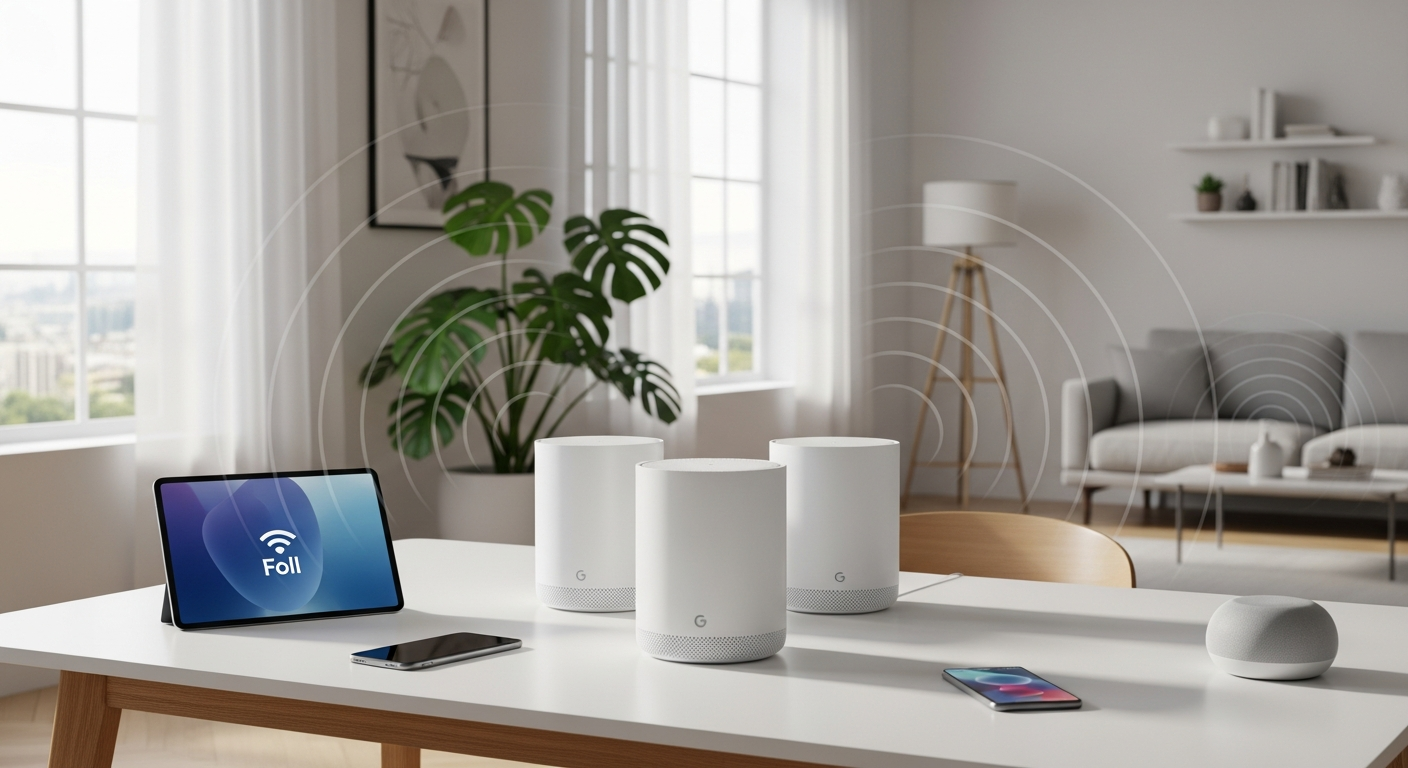
Nearly 40% of homes still struggle with WiFi dead zones, leaving entire rooms disconnected and streaming experiences ruined. The frustration of buffering videos, dropped video calls, and slow internet in bedrooms or basements has become an all-too-familiar problem for households relying on traditional single-router setups. These conventional systems simply can't deliver consistent coverage across larger properties or multi-floor homes, leaving you constantly searching for the strongest signal.
Traditional single-router setups have dominated home networking for years, but they come with a fundamental limitation: coverage gaps that grow worse the farther you move from the main unit. The Google WiFi Mesh System 3-Pack changes that equation entirely by distributing coverage across multiple units that work together as a unified network. Each unit acts as both a router and access point, creating overlapping signals that ensure seamless connectivity throughout your entire property.
Discover how the Google WiFi Mesh System 3-Pack can eliminate dead zones in your home today.
By the end of this guide, you'll understand how the three-unit configuration transforms larger homes and multi-floor properties, explore the straightforward setup process, and recognize why this system has become The Outlet Shop's best-selling networking solution. You'll have a clear picture of whether this mesh system fits your home's connectivity needs and how it compares to traditional alternatives.
Why Multi-Unit Mesh Networks Beat Single Router Solutions
Single Router Limitations
A single router sitting in one corner of your home faces an insurmountable challenge: physics. Signal strength degrades as distance increases, and walls absorb WiFi radiation. Bedrooms on the opposite side of the house experience significantly weaker signals, basements become dead zones, and back patios offer barely usable coverage. Meanwhile, devices connected to a struggling signal perform poorly—video calls freeze, streaming stutters, and downloads crawl.
How Mesh Systems Distribute Coverage
Mesh networks solve this problem through intelligent distribution. Rather than relying on one unit to cover an entire home, multiple units work in concert. Each Google WiFi point acts as both a router and an access point, creating overlapping signals that blanket your property. As you move from room to room, your devices automatically connect to the strongest available signal, maintaining consistent speeds without manual intervention.
The Three-Unit Advantage
The 3-Pack configuration specifically targets homes exceeding 3,000 square feet or properties with multiple stories. One router simply cannot reach into distant corners or penetrate multiple floor levels effectively. Three strategically placed units create comprehensive coverage where single-router systems fail. You can position one unit on each floor of a multi-story home or distribute them across different zones of a sprawling single-story property.
Unified Network Experience
Your devices connect to a single WiFi network name rather than juggling multiple network identities. Band steering technology automatically assigns devices to the optimal frequency band—the 2.4 GHz band for longer range, the 5 GHz band for speed—without requiring manual configuration. This seamless handoff means you can stream a video while walking from your kitchen to your bedroom without experiencing interruption or reconnection delays.
Real-World Performance Gains
The practical result is consistent speeds throughout your entire property. Your living room, home office, guest bedroom, and basement all receive strong signals. Gaming consoles get the low-latency connection they need, smart home devices maintain reliable communication with your hub, and video calls stay crystal clear regardless of which room you're in.
Setting Up Your Google WiFi 3-Pack in Minutes, Not Hours
Unboxing and Physical Placement
Your package arrives with three identical Google WiFi units and power cables. These compact devices measure just a few inches in any direction, making placement decisions based on coverage rather than accommodating bulky equipment. Strategic positioning matters: place units in central locations on different floors or zones, avoiding enclosed spaces like closets or cabinets that would obstruct signal propagation.
The Google WiFi App Walkthrough
Download the Google WiFi app on your smartphone, and the setup process becomes self-explanatory. The app guides you through each step with clear instructions, asking only for essential information. You'll connect your primary unit to your internet source (modem or router), then position the additional units throughout your home. The app recognizes when units are in range and walks you through connecting them to your primary unit.
Network Naming and Password Creation
Customize your network name and password through the mobile interface. Choose memorable credentials that reflect your household while maintaining security. The app prevents weak passwords, ensuring your network stays protected from unauthorized access.
Connecting Your First Devices
Once setup completes, your phones, tablets, laptops, and smart home devices can connect to your new unified network. Forget old network names and reconnect using your new credentials. Devices remember the network, so future connections happen automatically when these units are in range.
Troubleshooting Common Setup Issues
Occasionally units don't connect on the first attempt. The app provides specific guidance for each issue. Ensure units have power, verify they're within communication range, and check that your smartphone maintains adequate signal strength. Restarting units by unplugging them for 30 seconds solves most connectivity problems during initial configuration.
Ethernet Port Utilization
Each Google WiFi unit includes two Gigabit Ethernet ports. These wired connections bypass WiFi entirely, offering maximum stability for gaming consoles, smart TVs, or network-attached storage devices. Wired connections eliminate wireless interference and latency concerns for devices requiring absolute reliability.
Network Assist Technology: Smart Performance Optimization
Bandwidth Prioritization Explained
Your household doesn't demand equal bandwidth across all devices simultaneously. Someone video calling needs different treatment than a smart light bulb establishing a connection. Network Assist intelligently allocates resources, ensuring activities and devices requiring substantial bandwidth receive priority while background tasks adapt to available capacity. Video calls remain clear during simultaneous Netflix streaming, and gaming maintains low latency even when multiple family members browse the web.
Automatic Channel Optimization
WiFi channels resemble highways—too much traffic causes congestion. Your Google WiFi system continuously analyzes channel usage and automatically switches between clearer channels, optimizing both the 2.4 GHz and 5 GHz bands. This happens invisibly in the background, requiring no user intervention. The system avoids interference from neighboring networks, cordless phones, and microwave ovens by selecting the most available channels.
QoS (Quality of Service) Management
Quality of Service policies ensure that demanding applications maintain performance priority. When your teenage daughter streams 4K video while you're in a video conference and your spouse downloads files, QoS prevents any single activity from monopolizing bandwidth. The system allocates resources dynamically based on real-time network demands.
Device-to-Unit Assignment
The mesh network intelligently routes your devices to the optimal mesh unit. Rather than your device connecting to whatever unit it finds first, the system considers signal strength, current load, and device type. A smart home sensor might connect to the nearest unit, while your laptop streams video from the unit with the strongest 5 GHz signal. This intelligent assignment happens automatically.
Real-Time Performance Monitoring
The Google WiFi app dashboard displays network health metrics. You can see which devices are connected, approximate bandwidth usage, and network stability over time. This transparency helps identify problematic devices or unusual activity patterns. Monthly monitoring ensures your network maintains optimal performance.
Parental Controls and Guest Network Features
Built-In Parental Control Capabilities
Household members of different ages have different connectivity needs. The parental control features allow you to set screen time limits, restrict access during specific hours, and filter inappropriate content. You apply these rules by individual device rather than individual person, accommodating devices your children use versus devices they don't.
Guest Network Creation
Visitors frequently ask for WiFi access, but sharing your primary network password risks security and combines guest traffic with personal data. The guest network feature creates a separate WiFi network on your primary unit exclusively for visitor access. Guest traffic routes separately from your main network, keeping your smart home devices, work files, and personal data completely isolated.
App-Based Network Management
Control your network from anywhere using the Google WiFi app. You can pause internet access to specific devices during family dinner, enforce bedtime internet cutoffs, or grant temporary access to a guest who stayed longer than expected. These adjustments happen instantly—no rebooting required.
Device-Specific Restrictions
Different rules apply to different family members' devices. Your elementary-school child's tablet might have content filtering and strict time limits, while your teenager's phone has more permissive settings. Your work laptop bypasses restrictions entirely. Device-level granularity accommodates each family member's circumstances.
Privacy Benefits
Keeping guest traffic separate from your personal network provides substantial privacy protection. Your smart home devices, security cameras, and personal computer never interact with guest devices. This isolation prevents malicious guests from accessing sensitive data and protects your smart home infrastructure from compromise.
Dual-Band WiFi Specifications and Speed Performance
2.4 GHz Band Advantages
The 2.4 GHz band penetrates walls and obstacles effectively, traveling farther than the 5 GHz band. Devices in distant rooms or separated from your mesh unit by multiple walls benefit from the 2.4 GHz band's superior range. This band works well for smart home devices that don't demand high bandwidth—door locks, light bulbs, thermostats, and sensors typically connect via 2.4 GHz.
5 GHz Band Benefits
The 5 GHz band supports significantly faster speeds than 2.4 GHz, making it ideal for bandwidth-intensive activities. 4K video streaming, online gaming, large file transfers, and video conferencing all benefit from 5 GHz's higher data rates. The tradeoff is reduced range—5 GHz travels shorter distances and penetrates walls less effectively than 2.4 GHz.
AC1200 Speed Rating
The AC1200 designation indicates combined throughput capacity of approximately 1200 megabits per second across both bands. In practice, real-world speeds depend on distance from units, obstacles between your device and the mesh unit, and network congestion. Typical household usage experiences 300-600 Mbps when close to units and 100-300 Mbps at greater distances.
2×2 Wave 2 Technology
The antenna configuration uses two spatial streams for both transmitting and receiving data. This 2×2 MIMO (Multiple-Input Multiple-Output) arrangement enhances signal strength and capacity compared to single-stream systems. Wave 2 refers to the WiFi standard generation, indicating modern features and performance characteristics.
Gigabit Ethernet Ports
Each unit includes two Gigabit Ethernet ports supporting wired connections at up to 1000 Mbps. Devices connected via Ethernet bypass wireless entirely, eliminating interference concerns and latency variation. This proves invaluable for gaming consoles, media servers, and networked printers requiring absolute reliability.
Typical Throughput Expectations
In real-world conditions, expect 500-800 Mbps near units, 200-400 Mbps in nearby rooms, and 100-200 Mbps at the edge of coverage areas. These measurements assume minimal interference and clear line of sight. Walls, floors, and distance reduce these speeds proportionally. Most household applications stream smoothly at these speeds, with 25 Mbps sufficient for 4K video and 10 Mbps adequate for video conferencing.
The Unboxing Value: New Condition at The Outlet Shop's Discount Price
Original Retail Price Versus Current Offer
The Google WiFi Mesh System 3-Pack carries an original retail price of £329.99. The Outlet Shop currently offers the same system in New condition for £99.99, representing a £230 discount. This 70% price reduction positions this professional-grade mesh system at an entry-level price point, making whole-home coverage accessible to households previously unable to justify the investment.
New Condition Assurance
The New designation confirms the product arrives unopened and unused, identical to items purchased directly from retail channels. You receive the complete package with all original components, documentation, and warranty coverage. New condition guarantees authenticity and full manufacturer support.
Three-Pack Value Proposition
Purchasing three individual Google WiFi units separately costs substantially more than the 3-Pack bundle. The bundled approach provides better value per unit while ensuring all three units match identically. Upgrading from single-router frustration to comprehensive mesh coverage costs less than you might expect.
Comparison to Other Mesh Systems
Competing mesh systems at similar price points often offer lesser specifications or fewer included units. Some alternatives provide only two units in their standard package, necessitating additional purchases for equivalent coverage. Others charge premium prices for comparable performance. The Google WiFi 3-Pack delivers competitive specifications with straightforward setup at a price that undercuts most alternatives.
Long-Term Investment Perspective
Google maintains regular firmware updates for Google WiFi, ensuring your system receives security patches and feature improvements for years. The durable construction means these units continue operating reliably through multiple hardware generations. Rather than viewing this as a disposable gadget, consider it infrastructure that serves your household for five or more years.
Sleek Design That Blends Into Any Home Aesthetic
Minimalist Appearance
Google WiFi units embrace minimalist design philosophy. Each unit features clean lines, neutral coloring, and unobtrusive proportions. They resemble tasteful home décor elements rather than obvious technology. This aesthetic restraint allows the units to complement virtually any interior design style, from modern minimalist to traditional classic.
Compact Footprint
Unlike traditional routers that demand dedicated space, Google WiFi units occupy minimal area. Their compact size—comparable to a hockey puck standing on its edge—means you can position them on bookshelves, entertainment centers, or side tables without visual domination. They don't require mounting hardware or special installation infrastructure.
Color Options and Finish
The uniform white finish with subtle design elements coordinates with modern home aesthetics. The neutral coloring works equally well in minimalist living rooms, contemporary home offices, or bedrooms. This finish choice reflects Google's design philosophy of creating technology that fades into the background of your home.
Non-Intrusive Presence
Unlike traditional routers with protruding antennas, indicator lights, and bulk, Google WiFi units quietly sit wherever you place them. Visitors won't notice your WiFi hardware because the units maintain such low visual profiles. Your network infrastructure stays invisible while delivering comprehensive coverage.
Stackable and Portable
The uniform cylindrical design allows units to stack neatly if spatial constraints require compact arrangement. The portability means repositioning units if your coverage needs change or you rearrange your home layout. No permanent installation or wiring means adapting your mesh configuration takes minutes rather than hours.
Limitations to Consider Before Purchasing
Advanced Customization Trade-Offs
The simplified interface that makes Google WiFi so accessible comes with a tradeoff: limited granular control options. Power users accustomed to configuring specific channels, transmission power levels, or security protocols might find the system overly streamlined. Google intentionally restricts these advanced options to maintain simplicity for typical households.
Not Ideal for Power Users
Network administrators or technically advanced users might prefer mesh systems offering extensive customization. Those running server applications, complex VPN configurations, or specialized networking setups might outgrow Google WiFi's capabilities. The system excels for general household use but lacks flexibility for advanced configurations.
Band Steering Automation
You cannot manually force specific devices to specific bands. The system makes these assignments automatically based on its optimization algorithms. While this automatic assignment works well for most situations, situations where you want to override automatic decisions remain unavailable.
Limited Third-Party Integration
Some smart home platforms and devices have better compatibility with competing mesh systems. If you've invested heavily in a specific smart home ecosystem different from Google's offerings, you might discover inconsistent integration. Google ecosystem devices work seamlessly, but others may show variable support.
Firmware Update Dependency
System improvements arrive exclusively through software updates rather than hardware upgrades. You cannot swap components or upgrade individual units. Long-term performance depends on Google's commitment to releasing firmware updates for this aging product line.
Making the Most of Your Mesh Network After Installation
Optimal Unit Placement Strategies
Position your primary unit—the one connected directly to your modem—in a central location with minimal obstructions. Place secondary units where coverage seems weakest, typically on different floors or at opposite ends of your home. Avoid enclosed spaces, corners, or shelves surrounded by metal objects that impede signal propagation. Elevation matters too; units positioned on shelves rather than floor level generally perform better.
Avoiding Interference Sources
Microwave ovens, cordless phones, and certain medical equipment broadcast on the same frequencies as WiFi. Position mesh units away from these devices. Metal filing cabinets, aquariums, and mirror walls also affect signal propagation. Your Network Assist technology adapts to interference, but avoiding problematic locations yields better baseline performance.
Regular App Monitoring
Check your network health through the Google WiFi app monthly. Review connected devices, bandwidth patterns, and any error messages. Early detection of problems prevents frustration later. Monthly monitoring takes five minutes and provides peace of mind.
Firmware Update Management
Enable automatic updates so your system receives the latest security patches and feature improvements without requiring manual intervention. Check the app periodically to confirm updates completed successfully. These updates maintain your system's security and optimize performance over time.
Scaling Your Network
If your home expands, coverage requirements change, or performance degrades over time, additional Google WiFi units integrate seamlessly into your existing network. The mesh architecture supports adding units without reconfiguring your primary setup. Scaling works smoothly for growing households or expanding properties.
Integration With Smart Home Devices
Google Nest products integrate natively with Google WiFi, offering seamless smart home control. Other smart home devices typically work well with the robust network Google WiFi provides, though integration depth varies. Your Google ecosystem devices benefit from the tightest integration and most reliable performance.
Your Connected Home Starts Here
The Google WiFi Mesh System 3-Pack represents a genuine breakthrough for households tired of WiFi frustration. The three-unit configuration eliminates dead zones, the setup process takes mere minutes, and the network assist technology keeps everything running smoothly without requiring technical expertise. Parental controls, guest networking, and app-based management transform your WiFi from a utility into a tool you actually control. At £99.99 through The Outlet Shop, you're getting the exact same Google WiFi system that's become the best-selling mesh solution for larger homes. The dual-band specifications deliver consistent speeds throughout every room, while the sleek design means your network infrastructure stays invisible. For the vast majority of households seeking reliable, whole-home coverage without complexity, this system delivers exactly what you need.
Start building your connected home with the Google WiFi Mesh System 3-Pack today.
Leave a Reply